

Data Widget: remaining data
大胜 纪 Utilities iPhoneiPadiPod touchApple Watch
Data Widget: remaining data is a paid Utilities app for iPhone and iPad by 大胜 纪. Rated 4.3/5 from 146 ratings. Requires iOS 17.0. Updated October 6, 2026.
- Rating
- 4.3
- 146 ratings
- Price
- 1.99 USD
- on the App Store
- Size
- 5 MB
- Age 4+
- Updated
- Oct 6
- 2026 · v4.4.2
Screenshots



About Data Widget: remaining data
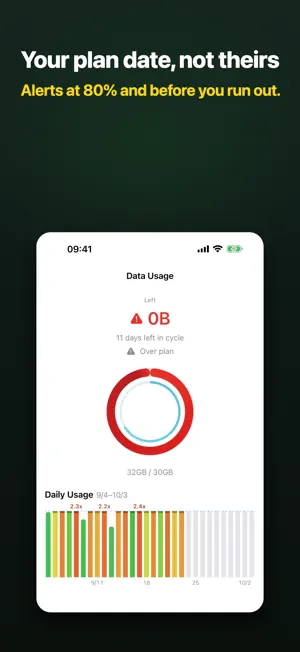
See how much data you have left this cycle — and whether you’re heading for overage. Track against your own plan date: remaining on the Home Screen, Lock Screen, and Apple Watch, with optional alerts at 80% or when you run out. No carrier login, and no extra data used just to check. It is a one-time purchase: no subscription, no ads, widgets included. ONE-TIME PURCHASE. NO SUBSCRIPTION. Buy once and everything below is included: • No subscription, no trial that expires, no “Pro” tier added later • Home Screen, Lock Screen, StandBy and Apple Watch widgets are part of the app, not an upgrade • Nothing you already paid for gets moved behind a new plan later YOUR PLAN DATE, NOT THEIRS Usage in Settings doesn’t follow your billing date, and carrier apps want an account. Data Widget totals cellular bytes on-device against the cap you set: • Monthly, weekly, or a custom cycle • Calibrate to the number on your bill (confirms before saving) • If your plan rolls unused data, carry it into this cycle • Dual SIM / eSIM: both lines together, primary only, or split — useful with a travel eSIM • 5G and LTE cellular interfaces REMAINING VS. PACE The headline number is remaining. Time and usage share one bar; the arrow is calendar pace — green if you’re under, red if you’re burning faster. Home says “12% ahead of pace” or “about N days left at this rate,” with a daily chart for spikes. History is one row per cycle, grouped by year. GLANCE WITHOUT OPENING THE APP Widgets on the Home Screen, Lock Screen, or StandBy show remaining in large type, plus when it last updated. Apple Watch complications show remaining on the face. In the app, tap to switch % and used | remaining. BEFORE YOU OVERAGE Optional alerts at 80%, 90%, or when you run out — once per tier each cycle. You can also alert when usage runs ahead of time. PRIVATE AND HONEST No ads. No location. No SMS scraping, no carrier-bill login. On-device totals can differ from Settings > Cellular because of VPN, Personal Hotspot, or carrier rounding. That’s explained in Settings; calibration lines the ledger up with your plan. Requires iOS 17 or later. Apple Watch requires watchOS 10 or later. Designed for iPhone. On iPad it only counts on cellular models.
Ratings & reviews
4.3
146 ratings
What’s new
Version 4.4.2 · Updated October 6, 2026
Small improvements.
App privacy
The developer, 大胜 纪, reported these privacy practices to Apple.
Data Not Collected
The developer does not collect any data from this app.
Alternatives to Data Widget: remaining data
Looking for apps like Data Widget: remaining data? Here are 6 similar apps on the App Store. The highest rated is Puzzle Alarm Clock, Wake Me Up (5.0/5), and all 6 are free to download.
-
 Puzzle Alarm Clock, Wake Me Up
5.0
Puzzle Alarm Clock, Wake Me Up
5.0
-
 Post Saver: Save Social Posts
4.2
Post Saver: Save Social Posts
4.2
-
 Pinlet
5.0
Pinlet
5.0
-
 QuickScan:扫描识别文件证件卡包 手机扫描仪全能王
5.0
QuickScan:扫描识别文件证件卡包 手机扫描仪全能王
5.0
-
 Whois Master
-
 TV Remote Control - Clicker
5.0
TV Remote Control - Clicker
5.0
| App | Rating | Price | Last updated | Compare |
|---|---|---|---|---|
| Data Widget: remaining data | 4.3 / 5 (146 ratings) | 1.99 USD | October 6, 2026 | |
| Puzzle Alarm Clock, Wake Me Up | 5.0 / 5 (1) | Free | Oct 10, 2026 | Compare |
| Post Saver: Save Social Posts | 4.2 / 5 (5) | Free | Oct 14, 2026 | Compare |
| Pinlet | 5.0 / 5 (1) | Free | Oct 12, 2026 | Compare |
| QuickScan:扫描识别文件证件卡包 手机扫描仪全能王 | 5.0 / 5 (3) | Free | Oct 10, 2026 | Compare |
| Whois Master | – | Free | Oct 4, 2026 | Compare |
| TV Remote Control - Clicker | 5.0 / 5 (8) | Free | Oct 12, 2026 | Compare |