

DevLocation
Weigan Technology (Shenzhen) Co., Ltd. Utilities iPhoneiPadiPod touchMac
DevLocation is a free Utilities app for iPhone and iPad by Weigan Technology (Shenzhen) Co., Ltd. Requires iOS 18.0. Updated October 19, 2026.
- Price
- Free
- on the App Store
- Size
- 13 MB
- Age 4+
- Updated
- Oct 19
- 2026 · v1.0.6
Screenshots
About DevLocation
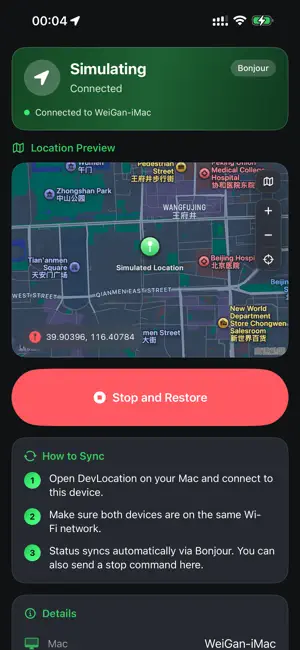
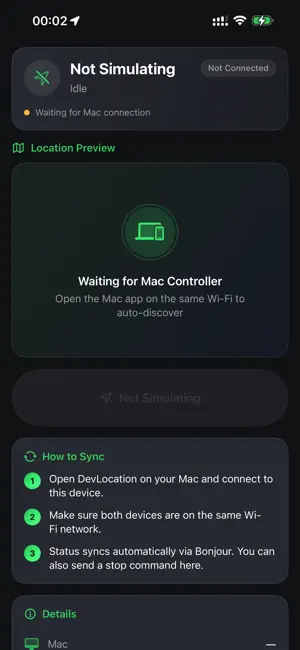
Terms of Use (EULA): https://www.apple.com/legal/internet-services/itunes/dev/stdeula/ DevLocation is a location simulation and GPS debugging tool for iOS developers. From Mac, simulate a single coordinate or a continuous route on an iPhone with Developer Mode enabled, so you can test maps, navigation, and location-based features on a real device. For development and functional testing only. Enable Developer Mode, connect with USB, and tap Trust. Follow local laws and the Apple Developer Agreement. FEATURES • Single-point mode: pick a map location, search an address, or enter coordinates • Route mode: set start, via, and end points, then simulate walk, run, cycle, or drive • Speed and GPS jitter: adjust speed and add slight jitter to test accuracy logic • GPX import and export: reuse tracks or save the current route • Follow roads: optionally generate road-aligned paths • Favorites and history: save places and routes, replay previous sessions • Mac and iPhone companion: sync on the same network; stop and restore from iPhone • Shortcuts: set or stop location simulation on Mac HOW TO USE ON IPHONE The iPhone app is a companion. It shows status and lets you stop and restore. Simulation is started from Mac. 1. Install and open • Install DevLocation on an iPhone with Developer Mode enabled • Allow local network access to find the Mac on the same Wi-Fi 2. Pair with Mac • Open DevLocation on Mac, connect this iPhone with USB, tap Trust, and connect • Keep both devices on the same Wi-Fi • Status syncs automatically; the home screen shows the Mac name 3. Monitor a session • The header shows Simulating or Idle, plus connection health • Location Preview marks the coordinate; change map style, zoom, or recenter • Details lists device, mode, speed, coordinates, and last update 4. Stop and restore • While simulating, tap Stop and Restore • iPhone tells Mac to end the session and restore real location • The button is disabled when idle 5. Tips • Use Mac to pick points, build routes, and start • Use iPhone to confirm on device or to stop quickly • If status does not update, check the same network and keep the Mac app open NOTES • Developer Mode is required • Use only on your own development devices to test apps you are developing • Stop and restore when finished • This tool does not bypass system restrictions or misrepresent location for non-development use
What’s new
Version 1.0.6 · Updated October 19, 2026
Fix user-reported Bugs.
App privacy
The developer, Weigan Technology (Shenzhen) Co., Ltd., reported these privacy practices to Apple.
Data Used to Track You
The following data may be used to track you across apps and websites owned by other companies:
- Identifiers: Device ID
Data Not Linked to You
The following data, which may be collected but is not linked to your identity, may be used for the following purposes:
- Identifiers: Device ID
Used for: Third-Party Advertising
Alternatives to DevLocation
Looking for apps like DevLocation? Here are 6 similar apps on the App Store. The highest rated is 模拟定位器lite (4.0/5), and all 6 are free to download.
-
 定位修改-模拟定位虚拟&地理闹钟线路查询
1.0
定位修改-模拟定位虚拟&地理闹钟线路查询
1.0
-
 模拟定位器lite
4.0
模拟定位器lite
4.0
-
 每日打卡-虚拟定位&定位助手
3.5
每日打卡-虚拟定位&定位助手
3.5
-
 Magnifier · Baro
2.0
Magnifier · Baro
2.0
-
 Annidiem
-
 RecallRoll: Photo Cleaner
| App | Rating | Price | Last updated | Compare |
|---|---|---|---|---|
| DevLocation | – | Free | October 19, 2026 | |
| 定位修改-模拟定位虚拟&地理闹钟线路查询 | 1.0 / 5 (1) | Free | Jun 17, 2026 | Compare |
| 模拟定位器lite | 4.0 / 5 (1) | Free | Feb 26, 2025 | Compare |
| 每日打卡-虚拟定位&定位助手 | 3.5 / 5 (8) | Free | Jan 15, 2026 | Compare |
| Magnifier · Baro | 2.0 / 5 (1) | Free | Oct 18, 2026 | Compare |
| Annidiem | – | Free | Oct 22, 2026 | Compare |
| RecallRoll: Photo Cleaner | – | Free | Sep 26, 2026 | Compare |
Compare DevLocation with the top alternatives: ratings, updates, ASO score and keyword gaps →