

One Line: Notes That Sort
XTI Co.,Ltd. Productivity iPhoneiPadiPod touch
One Line: Notes That Sort is a free Productivity app for iPhone and iPad by XTI Co.,Ltd. Requires iOS 18.0. Updated October 17, 2026.
- Price
- Free
- on the App Store
- Size
- 37 MB
- Age 4+
- Updated
- Oct 17
- 2026 · v1.8.3
Screenshots


About One Line: Notes That Sort
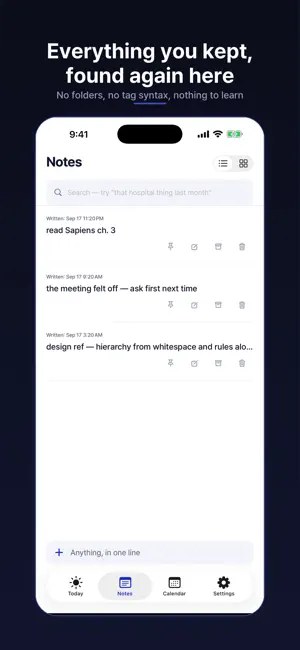
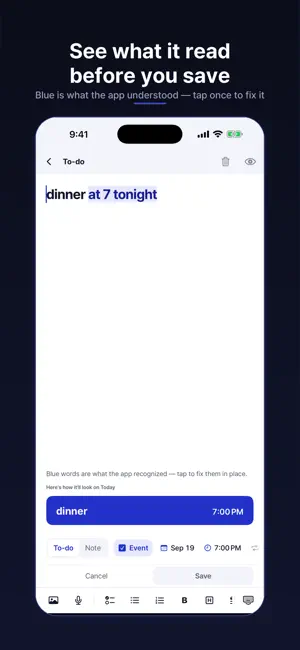
Type one line. That's the whole system. Most notes apps die the same way: organizing them becomes the work. Folders, projects, boards, tag syntax — a filing system you have to maintain before you're allowed to write anything down. One Line has none of that. You type a line and it files itself — "buy milk" becomes a to-do, "dentist tomorrow at 3pm" becomes an event with a reminder, and everything else stays a note. If it reads a line wrong, one tap changes it, and it remembers the correction. ■ Notes, tasks, and events in one stream Not three apps. Not three tabs you keep forgetting to open. One place you actually write to, with a Today view for what's in front of you and a calendar for what's coming. ■ Nothing leaves your device unless you ask No account is needed to use the app. Your writing is stored on your iPhone, and the app reads and sorts it on the device itself — nothing is sent anywhere to be processed. No ads, no tracking, no advertising identifier. Airplane mode changes nothing. Turn on Cloud sync and you sign in with Apple or Google; only then is anything you write stored on our servers. The separate, opt-in usage stats send counts of which features you used, once a week, plus a crash report if the app quits on you — never your notes. Turn on link previews and the request goes straight to that site — never through us, and we never learn what you looked at. It is off until you turn it on. ■ You don't have to open the app · A Home Screen widget shows today at a glance · Tap the widget once to capture straight into the app · Share from Safari and the page title and article are saved with it — add "todo read tomorrow" while sharing and it becomes a task for tomorrow · Share text or a screenshot from any other app and it's saved · Due dates and events arrive as notifications ■ Gets in without typing (Pro) · Share a screenshot and the text on it becomes a note — menus and status bars stripped, dates, phone numbers and amounts pinned to the top · Snap a photo or a document and the text inside is read · Record a voice memo and it is transcribed · Long articles shared from Safari can be summarized in a few lines (Apple Intelligence devices) · The reading happens on this device. Photos and voice are never sent anywhere to be read ■ Free, and actually complete · Unlimited notes, tasks, and events · Natural-language dates in English and Korean — "dentist tomorrow 3pm", "report by friday", "every monday gym" · Sync across your devices — sign in and pick up where you left off. Photos, recordings and attachments come along too, up to 5 GB · Today view, calendar, notifications, widgets · Export a backup file and restore from it · Export everything as Markdown files No item caps. No ads. No trial that runs out. ■ One Line Pro · Yearly, with a discounted first year · Monthly · Lifetime — a launch price. Pay once and keep every Pro feature, including the ones that come later · Gets in without typing — Text from photos · Transcription · Article summary (Apple Intelligence devices) · Search what piled up — Semantic search: find "that hospital thing last month" without remembering the exact words · Keep it on your Home Screen — Pinned note widget Prices are shown in your local currency on the App Store. Cancel any time. Everything stays on your device. ■ Terms & Privacy · Subscriptions renew automatically unless cancelled at least 24 hours before the end of the current period. Manage or cancel any time in your App Store account settings. Lifetime is a one-time, non-consuming purchase and does not renew. · Terms of Use (EULA): https://www.apple.com/legal/internet-services/itunes/dev/stdeula/ · Privacy Policy: https://oneline.date/en/privacy
What’s new
Version 1.8.3 · Updated October 17, 2026
A small polish update. To-dos you save without a date no longer get "today" as a silent deadline. A due date is set only when you pick one or write it in the line; everything else stays on Today with no deadline. Long-press the date chip to clear a date and time you set. Fixed: scanning the "Log in with the One Line app" QR on the web with the iPhone camera opened the app but never showed the number to confirm.
App privacy
The developer, XTI Co.,Ltd., reported these privacy practices to Apple.
Data Linked to You
The following data, which may be collected and linked to your identity, may be used for the following purposes:
- Purchases: Purchase History
- Contact Info: Email Address, Name
- User Content: Photos or Videos, Audio Data, Other User Content
- Identifiers: User ID
Used for: App Functionality
Data Not Linked to You
The following data, which may be collected but is not linked to your identity, may be used for the following purposes:
- Identifiers: Device ID
- Usage Data: Product Interaction
Used for: Analytics
Alternatives to One Line: Notes That Sort
Looking for apps like One Line: Notes That Sort? Here are 6 similar apps on the App Store. The highest rated is Habit Tracker - CalHabit (5.0/5), and all 6 are free to download.
-
 Labeled: Daily To-Do List
-
 Habit Tracker - CalHabit
5.0
Habit Tracker - CalHabit
5.0
-
 Haru - Calendar & Task Manager
5.0
Haru - Calendar & Task Manager
5.0
-
 Weeklist: Weekly Planner
-
 Routine Flow Focus Timer: Flow
4.7
Routine Flow Focus Timer: Flow
4.7
-
 Mono Task - Focus Day Planner
4.7
Mono Task - Focus Day Planner
4.7
| App | Rating | Price | Last updated | Compare |
|---|---|---|---|---|
| One Line: Notes That Sort | – | Free | October 17, 2026 | |
| Labeled: Daily To-Do List | – | Free | Oct 23, 2026 | Compare |
| Habit Tracker - CalHabit | 5.0 / 5 (4) | Free | Oct 20, 2026 | Compare |
| Haru - Calendar & Task Manager | 5.0 / 5 (1) | Free | Oct 24, 2026 | Compare |
| Weeklist: Weekly Planner | – | Free | Sep 25, 2026 | Compare |
| Routine Flow Focus Timer: Flow | 4.7 / 5 (40) | Free | Aug 30, 2026 | Compare |
| Mono Task - Focus Day Planner | 4.7 / 5 (20) | Free | Oct 22, 2026 | Compare |