

Haru - Calendar & Task Manager
HYOSEOK KIM Productivity iPhoneiPadiPod touch
Haru - Calendar & Task Manager is a free Productivity app for iPhone and iPad by HYOSEOK KIM. Rated 5.0/5 from 1 ratings. Requires iOS 17.0.
- Rating
- 5.0
- 1 ratings
- Price
- Free
- on the App Store
- Size
- 45 MB
- Age 4+
- Updated
- Oct 7
- 2026 · v1.24.0
Screenshots



About Haru - Calendar & Task Manager
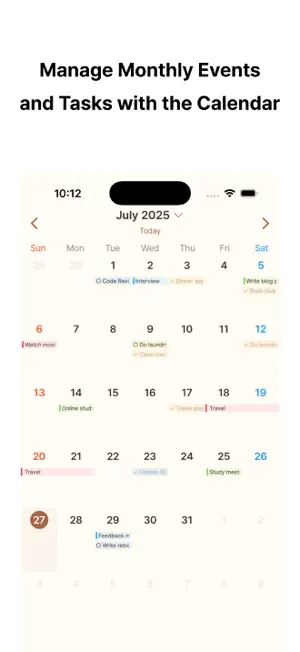
See your events, reminders, and weather in one place. Haru is a clean calendar app that helps you understand your day at a glance and focus on what matters. Instead of checking your calendar, reminders, and weather in separate apps, Haru brings the flow of your day together in one clear view. Get the big picture with the monthly calendar, then look closer with the 3-day view and the day timeline. Events and reminders appear together by time, making it easier to plan your day. Press and hold an item, then drag it to move it to another day or time. Home Screen widgets let you check events and reminders and complete reminders right from the widget. Customize the start screen, calendar display, theme, and other everyday settings to fit the way you plan. Key features • Today's events, reminders, and weather in one place • Monthly view, 3-day view, and day timeline • Calendar events and Reminders shown together • Press and hold, then drag to move events and reminders to another day or time • Home Screen widgets to check and complete reminders • Settings for the start screen, calendar display, and theme • Dark Mode support • Simple to use, with no complicated setup • Available in 11 languages See your day more clearly and keep the flow of your week and month organized. For questions, issues, or feedback, contact us at: [email protected]
What’s new
Version 1.24.0 · Updated October 7, 2026
• Haru now has Lock Screen widgets. Touch and hold the Lock Screen, tap Customize, and add a Haru widget. • The Today widget shows your next event and today's reminders together. The Events widget shows upcoming events, and the Reminders widget shows today's reminders. • Check off reminders right from the Lock Screen. A small circular widget shows how many of today's reminders you've finished. • If calendar or reminder access is off, or no calendars are selected, the Today and Calendar tabs now explain why and help you fix it. • Dragging an event or reminder from the day details in the calendar now gives haptic feedback. • If checking off a reminder fails to save, it now returns to its previous state so you can try again.
App privacy
The developer, HYOSEOK KIM, reported these privacy practices to Apple.
Data Used to Track You
The following data may be used to track you across apps and websites owned by other companies:
- Identifiers: Device ID
- Usage Data: Advertising Data
Data Linked to You
The following data, which may be collected and linked to your identity, may be used for the following purposes:
- Identifiers: Device ID
- Usage Data: Advertising Data
Used for: Third-Party Advertising, Analytics, Product Personalization
Data Not Linked to You
The following data, which may be collected but is not linked to your identity, may be used for the following purposes:
- Location: Precise Location, Coarse Location
- User Content: Customer Support, Other User Content
- Diagnostics: Crash Data
Used for: App Functionality
Alternatives to Haru - Calendar & Task Manager
Looking for apps like Haru - Calendar & Task Manager? Here are 6 similar apps on the App Store. The highest rated is WeeklyTodo | Events and Tasks (5.0/5), and all 6 are free to download.
-
 Time Calendar, Event, Task
4.6
-
 WeeklyTodo | Events and Tasks
5.0
-
 Plandy: Calendar & Tasks
-
 Dayble - Habits & Routines
4.5
-
 Task Batch
3.0
-
 Minimo: Notes & Widgets
5.0
| App | Rating | Price | Last updated | Compare |
|---|---|---|---|---|
| Haru - Calendar & Task Manager | 5.0 / 5 (1 rating) | Free | October 7, 2026 | |
| Time Calendar, Event, Task | 4.6 / 5 (15) | Free | Oct 3, 2026 | Compare |
| WeeklyTodo | Events and Tasks | 5.0 / 5 (2) | Free | Oct 7, 2026 | Compare |
| Plandy: Calendar & Tasks | – | Free | Oct 13, 2026 | Compare |
| Dayble - Habits & Routines | 4.5 / 5 (6) | Free | Aug 15, 2026 | Compare |
| Task Batch | 3.0 / 5 (2) | Free | Oct 2, 2025 | Compare |
| Minimo: Notes & Widgets | 5.0 / 5 (1) | Free | Sep 17, 2026 | Compare |