

OffPDF: Edit PDF Text & Scan
Mehmetcan Kul Productivity iPhoneiPadiPod touch
OffPDF: Edit PDF Text & Scan is a free Productivity app for iPhone and iPad by Mehmetcan Kul. Requires iOS 17.0. Updated October 26, 2026.
- Price
- Free
- on the App Store
- Size
- 94 MB
- Age 4+
- Updated
- Oct 26
- 2026 · v1.0.2
Screenshots


About OffPDF: Edit PDF Text & Scan
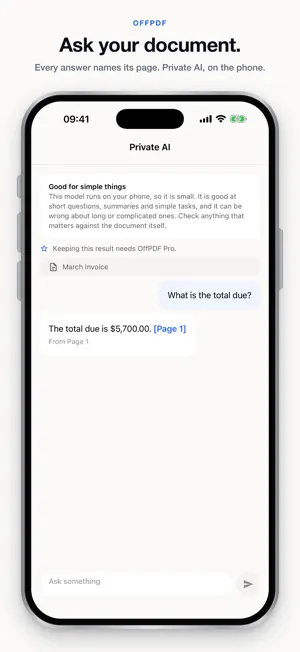
Your phone can scan. Every PDF app scans. Three things it normally cannot do without sending your file to a server: change a sentence inside a PDF, get a real Word file back out of one, and answer a question about a forty-page document. OffPDF does all three on the device. EDIT THE TEXT ALREADY IN A PDF Open a document and every line you can retype is outlined. Tap one and it becomes a field where the words are, at the size they are drawn. Change the words, the size, bold, italic, the colour, the letter spacing. Bold and italic use the document's own typeface, not a substitute. Nothing outside the line you changed moves. Not "roughly" — the page is read back after every edit, and every other letter has to land within a hundredth of a point of where it was. Checked against poppler over twenty real documents: nothing failed, no word lost, worst movement zero. An edit that fails is thrown away and you are told. CONVERT OFFICE FILES, BOTH WAYS, ON THE PHONE • Word, Excel and PowerPoint into PDF • PDF back to Word, with paragraphs, columns and pictures rebuilt • PDF back to Excel, with rows and columns detected • PDF back to PowerPoint, one slide per page Six converters, no server and no desktop — the part most apps put behind a subscription and most websites behind an upload. SCAN, AND MAKE A SCAN SEARCHABLE The camera turns a page into a clean PDF, with edge detection and a review step. The words are read on the device and written into the page invisibly, so the scan is searchable and its text selectable — in the language the page is actually in, so a Turkish or Arabic scan gets Turkish or Arabic letters, not empty boxes. A scan somebody else sent you can be made searchable the same way. ASK A DOCUMENT, AND SEE WHICH PAGE ANSWERED Ask a question, get a summary, or pull out the dates and amounts. Every answer names the page it came from, and that page is checked — a citation that does not match the document is removed rather than shown. The question and the document never leave the phone. Optional: nothing is downloaded until you ask. AND FOURTEEN MORE — 24 TOOLS IN TOTAL • Merge, split, extract pages, reorder, rotate • Crop — reversible; nothing is cut away • Compress, by quality or down to a size you pick • Fill and sign: type into a form, add a date, place a saved signature • Watermark, page numbers, and a metadata cleaner • Images to PDF • Add a password (AES-256), with separate switches for printing and copying • Remove a password from a document you can already open • Read: continuous scroll, in-document search, and a screen reader that reads the document itself • Open a password-protected file — it asks for the password once WHY NOTHING IS UPLOADED No account, nothing to sign in to, no setting to switch off. No analytics, no crash reporting, no ads. Airplane mode changes nothing above. The app makes one kind of network request, and only if you ask: downloading the optional AI model. No document, page, scan or question travels with it. ONE PAYMENT. NO SUBSCRIPTION. The core is free and stays free: scanning, merging, splitting, organising, rotating, cropping, compressing by quality, filling and signing, passwords, watermarks, page numbers, metadata and images to PDF. One payment — once, not monthly — unlocks the five that took the most building: editing the text inside a PDF, Office conversion both ways, asking a document, making a received scan searchable, and compressing to a size you choose. OffPDF for the web and the desktop is free and open source. On a phone there is no LibreOffice to call and no system recogniser to lean on, so those engines were written from scratch to run inside the app. That is what the one payment is for. 21 LANGUAGES, INCLUDING RIGHT-TO-LEFT Arabic, Hebrew and Persian mirror properly. Turkish, Greek, Cyrillic, Thai, Devanagari, Chinese, Japanese and Korean write into a PDF, not dropped. No account. No subscription. No analytics. No crash reporting. No ads.
What’s new
Version 1.0.2 · Updated October 26, 2026
Maintenance update.
App privacy
The developer, Mehmetcan Kul, reported these privacy practices to Apple.
Data Not Collected
The developer does not collect any data from this app.
Alternatives to OffPDF: Edit PDF Text & Scan
Looking for apps like OffPDF: Edit PDF Text & Scan? Here are 6 similar apps on the App Store. The highest rated is PDF Scanner: Scan to PDF ™ (5.0/5), and all 6 are free to download.
-
 PDFWorldEditor: PDF Editor
-
 PDF Scanner: Scan to PDF ™
5.0
PDF Scanner: Scan to PDF ™
5.0
-
 PDF Editor: Edit & Change Text
-
 PDF Compressor Offline
5.0
PDF Compressor Offline
5.0
-
 PDF Editor - Read, Fill & Edit
4.8
PDF Editor - Read, Fill & Edit
4.8
-
 PDF Editor ++
| App | Rating | Price | Last updated | Compare |
|---|---|---|---|---|
| OffPDF: Edit PDF Text & Scan | – | Free | October 26, 2026 | |
| PDFWorldEditor: PDF Editor | – | Free | Sep 20, 2026 | Compare |
| PDF Scanner: Scan to PDF ™ | 5.0 / 5 (1) | Free | Oct 16, 2026 | Compare |
| PDF Editor: Edit & Change Text | – | Free | Sep 30, 2026 | Compare |
| PDF Compressor Offline | 5.0 / 5 (1) | Free | May 20, 2026 | Compare |
| PDF Editor - Read, Fill & Edit | 4.8 / 5 (10) | Free | Aug 10, 2026 | Compare |
| PDF Editor ++ | – | Free | Sep 3, 2026 | Compare |