

Kage Loop
YANG LIU Education iPhoneiPadiPod touch
Kage Loop is a free Education app for iPhone and iPad by YANG LIU. Requires iOS 16.0. Updated October 3, 2026.
- Price
- Free
- on the App Store
- Size
- 1 MB
- Age 4+
- Updated
- Oct 3
- 2026 · v1.3
Screenshots



About Kage Loop
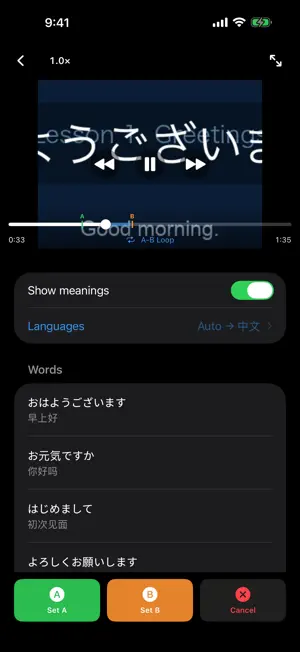
Kage Loop is a minimalist video player built for one thing: repeating a section of a video until you've got it. Perfect for shadowing practice, language learning, music transcription, or drilling any passage that needs repetition. A-B REPEAT Mark a start point and an end point. Playback loops between them indefinitely until you cancel. Both points are visible on the scrubber, so you always know exactly what's looping. SHAKE TO ADD Loop a line a few times, then shake your iPhone to add what was said to your word list. Speech is recognised entirely on your device. (iOS 26 on a supported iPhone.) WORD LISTS Jot down words as you practice. Each video keeps its own list, and you can review or edit it any time without leaving the player. Turn on meanings and each word gets a translation underneath, produced entirely on your device. Your notes outlive your videos. Word Lists on the home screen shows every list you have kept, grouped by playlist and then by episode — so you can delete a video to free up space and still have the words you learned from it. PLAYLISTS Group related videos together and name them. Videos take their filename automatically, and episodes sort the way you read them — 02 before 10. PLAYBACK BUILT FOR PRACTICE • Speed from 0.8x to 1.2x with voice pitch kept natural, remembered per video • Tap to jump 3 seconds, or press and hold to scan • Resumes where you left off • Audio keeps playing when the screen is locked • Plays sound even with the silent switch on COMPLETELY PRIVATE No account. No network requests. No analytics. No ads. Kage Loop plays videos straight from your photo library and never copies or uploads them. Everything you create stays on your device.
What’s new
Version 1.3 · Updated October 3, 2026
Shake to add a line Loop a line three times and Kage Loop offers to add it to your word list: shake your iPhone, or tap Add. What was said is recognised on your device, and the audio never leaves your iPhone. Requires iOS 26 on a supported iPhone. Choose the audio language once per playlist Under Languages, pick the language spoken in a playlist's videos. Adding looped lines needs it. Long words and meanings show in full Long phrases and their meanings now wrap onto as many lines as they need, instead of being cut off. Meanings follow your edits Change a word, tap Done, and its meaning is translated again.
App privacy
The developer, YANG LIU, reported these privacy practices to Apple.
Data Not Collected
The developer does not collect any data from this app.
Alternatives to Kage Loop
Looking for apps like Kage Loop? Here are 6 similar apps on the App Store. The highest rated is SubX Player: AI Dual Subtitles (5.0/5), and all 6 are free to download.
-
 ListeningDrill-AI: Subtitles
-
 SubX Player: AI Dual Subtitles
5.0
SubX Player: AI Dual Subtitles
5.0
-
 Monument BW
1.2
Monument BW
1.2
-
 AudioRepeater - Repeat&Seeking
4.7
AudioRepeater - Repeat&Seeking
4.7
-
 泰语学习-开口鹰零基础学泰语入门翻译
4.8
泰语学习-开口鹰零基础学泰语入门翻译
4.8
-
 Hearonymus
2.6
Hearonymus
2.6
| App | Rating | Price | Last updated | Compare |
|---|---|---|---|---|
| Kage Loop | – | Free | October 3, 2026 | |
| ListeningDrill-AI: Subtitles | – | Free | Aug 14, 2026 | Compare |
| SubX Player: AI Dual Subtitles | 5.0 / 5 (5) | Free | Oct 12, 2026 | Compare |
| Monument BW | 1.2 / 5 (6) | Free | Apr 9, 2026 | Compare |
| AudioRepeater - Repeat&Seeking | 4.7 / 5 (118) | Free | Oct 12, 2026 | Compare |
| 泰语学习-开口鹰零基础学泰语入门翻译 | 4.8 / 5 (8) | Free | Jul 7, 2026 | Compare |
| Hearonymus | 2.6 / 5 (7) | Free | Jun 24, 2026 | Compare |
Compare Kage Loop with the top alternatives: ratings, updates, ASO score and keyword gaps →