

AudioRepeater - Repeat&Seeking
Hashimoto Shogo Education iPhoneiPadiPod touch
AudioRepeater - Repeat&Seeking is a free Education app for iPhone and iPad by Hashimoto Shogo. Rated 4.7/5 from 115 ratings. Requires iOS 18.0.
- Rating
- 4.7
- 115 ratings
- Price
- Free
- on the App Store
- Size
- 50 MB
- Age 4+
- Updated
- Oct 12
- 2026 · v1.20.6
Screenshots



About AudioRepeater - Repeat&Seeking
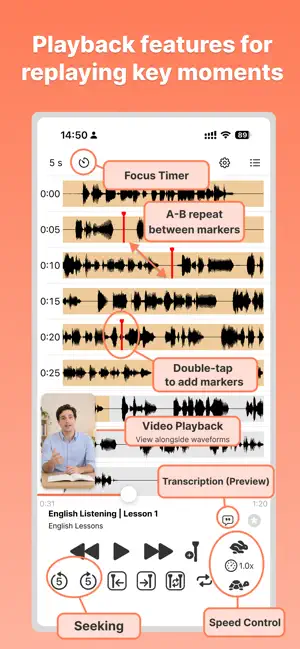
Jump to any moment. Repeat as many times as you need. AudioRepeater is an audio player with AB repeat and waveform display that dramatically boosts efficiency for language learning, instrument practice, and transcription. • Tap once to jump to exactly where you want to listen • Loop any section endlessly (AB repeat) • Navigate intuitively with visual waveforms • Transcribe with speech recognition An audio player built for practice and learning. Video file playback is also supported. 【Perfect for】 • Language learning and listening practice • Learning songs by ear and practicing phrases • Fine-tuning vocals and pronunciation • Transcribing interviews and meetings ■ Functions and usage 1. Create a playlist First, tap the Playlist button in the upper right to go to the Playlist screen and create a list of items you want to play. Use the "Add" button in your playlist to select songs from your music library or audio and video files from Files. You can add multiple items at once. In "Edit" mode, you can also change the order of the items. 2. Start playback Once you have created your playlist, go back to the previous screen. The audio in the selected item is analyzed, and its waveform is displayed on the screen. Tap the play button to start playback. For video files, the video also appears on the playback screen. 3. Playback position can be changed by tapping on it. If you tap the waveform during playback, the playback position will move from the tapped position. 4. Add Marker Tap (double-tap) the audio waveform twice in succession to display the menu and add a marker. You can also add a marker at the current playback position by tapping the "Add Marker" button to the right of the playback button. To delete a marker, tap the marker again, and select "Delete" from the menu that appears. You can also move a marker by dragging it. 5. Repeat/Skip playback between markers When the "Marker repeat" button is selected, playback will be repeated between the added markers. You can also move the playback position to the previous marker or the next marker. 6. Change the playback speed Use the tortoise and hare buttons at the bottom right to change the playback speed. You can reset the speed to 1x by clicking the middle button. 7. Change the length of audio displayed in one line Tap the "XX seconds" button in the upper left corner to change the length of audio displayed per line from 5 seconds to 60 seconds. ---------------- If you have any comments or requests regarding the development of the app, please contact us through this developer website (twitter).
Ratings & reviews
4.7
115 ratings
What’s new
Version 1.20.6 · Updated October 12, 2026
- Updated in-app wording and translations to make instructions clearer. - Improved VoiceOver labels for play, pause, and track navigation controls.
App privacy
The developer, Hashimoto Shogo, reported these privacy practices to Apple.
Data Used to Track You
The following data may be used to track you across apps and websites owned by other companies:
- Identifiers: User ID
Data Not Linked to You
The following data, which may be collected but is not linked to your identity, may be used for the following purposes:
- Identifiers: User ID, Device ID
- Usage Data: Product Interaction, Advertising Data
- Diagnostics: Crash Data, Performance Data
Used for: Third-Party Advertising, Analytics
Alternatives to AudioRepeater - Repeat&Seeking
Looking for apps like AudioRepeater - Repeat&Seeking? Here are 6 similar apps on the App Store. The highest rated is [Repete] (4.8/5), and all 6 are free to download.
-
 Repeat Player cut&loop
4.6
Repeat Player cut&loop
4.6
-
 Offle - MP3 & MP4 Repeat Play
4.5
Offle - MP3 & MP4 Repeat Play
4.5
-
![[Repete]](https://is1-ssl.mzstatic.com/image/thumb/Purple211/v4/8e/24/78/8e247838-d7e9-b2f2-77af-cd3cd8c028bf/AppIcon-0-0-1x_U007emarketing-0-8-0-85-220.png/200x200bb.webp) [Repete]
4.8
[Repete]
4.8
-
 ListeningDrill-Learn English
4.5
ListeningDrill-Learn English
4.5
-
 Repeater
4.5
Repeater
4.5
-
 Repeat Sound
4.8
Repeat Sound
4.8
| App | Rating | Price | Last updated | Compare |
|---|---|---|---|---|
| AudioRepeater - Repeat&Seeking | 4.7 / 5 (115 ratings) | Free | October 12, 2026 | |
| Repeat Player cut&loop | 4.6 / 5 (40) | Free | Oct 4, 2026 | Compare |
| Offle - MP3 & MP4 Repeat Play | 4.5 / 5 (40) | Free | Oct 5, 2026 | Compare |
| [Repete] | 4.8 / 5 (5) | Free | Jul 31, 2026 | Compare |
| ListeningDrill-Learn English | 4.5 / 5 (205) | Free | Feb 19, 2024 | Compare |
| Repeater | 4.5 / 5 (12) | Free | Feb 13, 2024 | Compare |
| Repeat Sound | 4.8 / 5 (10) | Free | Oct 3, 2026 | Compare |