

Staff Attendance: Time Clock
Tabish Hassan Business iPhoneiPadiPod touch
Staff Attendance: Time Clock is a free Business app for iPhone and iPad by Tabish Hassan. Requires iOS 17.0. Updated November 3, 2026.
- Price
- Free
- on the App Store
- Size
- 8 MB
- Age 4+
- Updated
- Nov 3
- 2026 · v1.1
Screenshots


About Staff Attendance: Time Clock
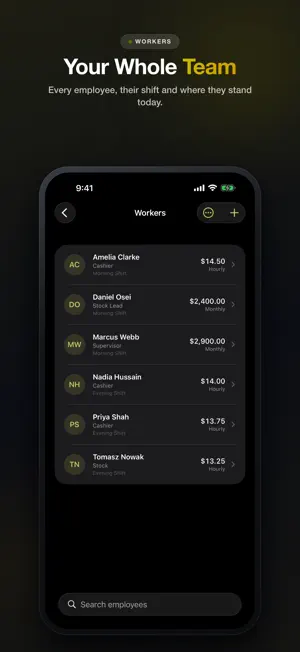
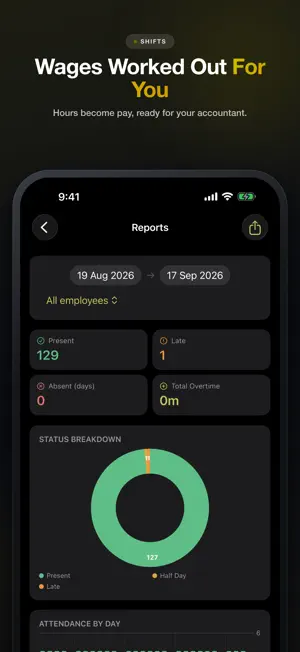
Staff Attendance turns one phone into a time clock for your whole team. Leave it on the counter. Each person taps their own name to clock in and out — nobody has to install anything, and nobody needs an account. Late arrivals are flagged automatically against the shift you set, overtime is counted past shift end, and short days become half days on their own. When payday comes, the register is already payroll. A SHARED DEVICE, NOT AN APP PER PERSON • Big, tappable name cards — readable across a counter • Clock in and out with one tap • Live clock and a running count of who is in, finished, and still to arrive • Owner side locked behind a 4-digit PIN SHIFTS THAT MATCH HOW YOU ACTUALLY WORK • Any start and end time, including night shifts that cross midnight • Unpaid break deducted from paid hours • Grace period before someone counts as late • Six-day weeks, five-day weeks, or a different shift for each weekday • More than one shift per person per day PAYROLL THAT ADDS UP • Hourly or monthly pay per employee • Overtime at your own multiplier • Optional deduction for late arrivals — off by default • Company holidays removed from the working-day count, and never counted as absences • Anyone who joined mid-month is prorated, not docked • Bonuses, advances, allowances and deductions as separate line items • Payslips you can print or share as PDF LEAVE AND ABSENCE • Sick, casual, annual and unpaid leave • Approve, reject, or set a decision back to pending • Yearly entitlements per person, with a warning when a request goes over • Only approved unpaid leave is deducted — paid leave costs your team nothing ON-SITE VERIFICATION, IF YOU WANT IT • Optional selfie on clock-in • Optional work-site check using GPS, with a radius you choose • A supervisor can allow an off-site clock-in with the owner PIN — and it is recorded as one • All of this is off by default REPORTS • Attendance by day, by person, or across any date range • Status breakdown and attendance-rate charts • Export to CSV for your accountant, or PDF to print YOUR DATA STAYS ON YOUR PHONE Everything is stored on the device. There is no account, no server, and no analytics. Back up to a file whenever you like, and restore it on a new phone — restoring adds to what is there and never deletes anything. FREE AND PREMIUM Free covers up to 5 employees with full attendance, shifts, leave and payroll. Premium adds: • Unlimited employees • Payslip PDF export • Payroll CSV export • Multiple work sites Available as a monthly or yearly subscription, or a single lifetime payment. Payment is charged to your Apple ID at confirmation of purchase. Subscriptions renew automatically unless auto-renew is turned off at least 24 hours before the end of the current period, and your account is charged for renewal within 24 hours of the period ending. You can manage and cancel subscriptions in your Apple ID account settings. The lifetime option is a one-time purchase and does not renew. Questions or problems: [email protected] Terms of Use (EULA): https://www.apple.com/legal/internet-services/itunes/dev/stdeula/ Privacy Policy: https://tabishapps.com/privacy-policy.html
What’s new
Version 1.1 · Updated November 3, 2026
NEW: Missed clock-out catcher — spot shifts that were never clocked out and fix them in one tap. Free version: ads from our ad partner Liftoff, plus occasional promotions for our other apps. Premium removes all ads. Bug fixes and performance improvements.
App privacy
The developer, Tabish Hassan, reported these privacy practices to Apple.
Data Used to Track You
The following data may be used to track you across apps and websites owned by other companies:
- Location: Coarse Location
- Identifiers: Device ID
- Usage Data: Product Interaction, Advertising Data
Data Not Linked to You
The following data, which may be collected but is not linked to your identity, may be used for the following purposes:
- Location: Coarse Location
- Identifiers: Device ID
- Usage Data: Product Interaction, Advertising Data
Used for: Third-Party Advertising, Developer’s Advertising or Marketing, Analytics
Alternatives to Staff Attendance: Time Clock
Looking for apps like Staff Attendance: Time Clock? Here are 6 similar apps on the App Store. The highest rated is Hours Tracker: Work Time Clock (5.0/5), and all 6 are free to download.
-
 Hourlo: Time Tracker
-
 ScanLedger: Physical Inventory
-
 Top Compta
-
 Hours Tracker: Work Time Clock
5.0
-
 Parchi: Udhaar Book Khata App
-
 Attendance and Time Sheets
5.0
| App | Rating | Price | Last updated | Compare |
|---|---|---|---|---|
| Staff Attendance: Time Clock | – | Free | November 3, 2026 | |
| Hourlo: Time Tracker | – | Free | Oct 31, 2026 | Compare |
| ScanLedger: Physical Inventory | – | Free | Oct 22, 2026 | Compare |
| Top Compta | – | Free | May 4, 2026 | Compare |
| Hours Tracker: Work Time Clock | 5.0 / 5 (1) | Free | Oct 2, 2026 | Compare |
| Parchi: Udhaar Book Khata App | – | Free | Oct 20, 2026 | Compare |
| Attendance and Time Sheets | 5.0 / 5 (1) | Free | Jul 16, 2026 | Compare |