

Trading Journal Analytics
DONALD GENE STRONG Finance iPhoneiPadiPod touch
Trading Journal Analytics is a paid Finance app for iPhone and iPad by DONALD GENE STRONG. Rated 5.0/5 from 2 ratings. Requires iOS 17.6.
- Rating
- 5.0
- 2 ratings
- Price
- 14.99 USD
- on the App Store
- Size
- 10 MB
- Age 4+
- Updated
- Oct 14
- 2026 · v1.5
Screenshots
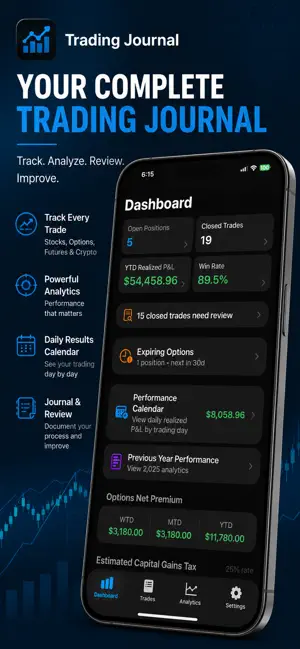


About Trading Journal Analytics
Track every trade. Analyze your performance. Improve your process. Trading Journal Analytics is a comprehensive trading journal built for traders who want to understand not only what they traded, but how they are actually performing. Record stocks, options, futures, and crypto trades, import existing trading history, document your reasoning, attach chart screenshots, review completed trades, and use detailed analytics to identify strengths, weaknesses, and patterns in your trading. Whether you’re an active trader, swing trader, options trader, or long-term market participant, Trading Journal Analytics gives you the tools to keep your trading history organized and turn it into useful performance insights. COMPLETE TRADE JOURNAL • Track stock, options, futures, and crypto trades • Record entries, exits, quantities, prices, fees, and dates • Track long and short positions • Monitor open positions and closed trades • Add notes and document the reasoning behind each trade • Attach multiple chart images and screenshots to trades • Take trade screenshots directly with your device's camera • Organize trades using strategy and custom tags GUIDED TRADE IMPORT Bring your existing trading history into your journal without entering every trade manually. • Import trade history from CSV files • Guided column mapping helps match your data to the journal • Import stocks, options, futures, and crypto • Support for single-leg and multi-leg options trades • Detect potential duplicate transactions before importing • Review and validate trades before they are added to your journal • Save reusable import templates for future imports ADVANCED OPTIONS TRACKING Go beyond simple stock journaling with dedicated options support. • Track single-leg options positions • Record multi-leg strategies • Track straddles and strangles • Track iron condors and iron butterflies • Support for calendar and diagonal spreads • Record position adjustments • Track rolls and changes throughout the life of a trade • Monitor options premiums PERFORMANCE ANALYTICS Turn your trade history into information you can actually use. • Track realized profit and loss • View your win rate • Monitor all-time and year-to-date performance • Explore your equity curve • Analyze results by strategy and security type • Review options strategy performance • View daily trading results with the Performance Calendar • Preserve and review previous-year performance • Track weekly, monthly, and yearly options premium results TRADE REVIEW Good trading isn't only about recording the result. Use the built-in trade review system to revisit completed trades, evaluate your decisions, document what worked or didn't work, and build a more disciplined trading process over time. CAPITAL GAINS ESTIMATES Enter your estimated tax rate and use your journal data to monitor estimated capital gains tax information, including week-to-date, month-to-date, and year-to-date figures. Tax calculations are estimates for informational purposes and are not tax advice. START WITH YOUR EXISTING PERFORMANCE Already trading before installing the app? Use Guided Import to bring supported trade history into your journal, or enter starting account and performance values so your analytics can reflect activity from before you began using the app. BACKUP, EXPORT & PRIVACY • Export journal data to CSV and Excel-compatible formats • Generate PDF performance reports • Back up and restore your journal • Protect the app with Face ID or Touch ID • Optional iCloud synchronization across your devices • Keep your journal local when cloud synchronization isn't enabled BUILT FOR THE TRADING PROCESS Trading Journal Analytics isn't a brokerage and doesn't place trades. It's a dedicated workspace for recording your activity, reviewing your decisions, measuring your results, and developing a clearer picture of your trading performance. Your trades tell a story. Trading Journal Analytics helps you understand it.
What’s new
Version 1.5 · Updated October 14, 2026
**What's New in Version 1.5** Introducing Advanced Risk Analytics, giving you deeper insight into your trading performance and risk. - **Profitability Statistics:** Analyze profit factor, expectancy, win/loss ratios, and more. - **Drawdown Analysis:** Track maximum and average drawdowns, recovery periods, and ongoing drawdowns. - **Losing Streaks:** Understand your largest cumulative losses during consecutive losing trades. - **Trading Consistency:** Explore win/loss distributions and trading outcome patterns. - **Drawdown History:** Review individual drawdown episodes with expandable details. - **Improved Charts:** More accurate drawdown visualization and clearer analytics. Understand not just how much you're making, but the risks behind your results.
App privacy
The developer, DONALD GENE STRONG, reported these privacy practices to Apple.
Data Not Collected
The developer does not collect any data from this app.
Alternatives to Trading Journal Analytics
Looking for apps like Trading Journal Analytics? Here are 6 similar apps on the App Store. The highest rated is Trading Journals (5.0/5), and all 6 are free to download.
-
 Trading Journals
5.0
Trading Journals
5.0
-
 Trading Journal: TradeJrnl
-
 Coin Tracker: Live Island
2.0
Coin Tracker: Live Island
2.0
-
 TradeZap - Trading Journal
5.0
TradeZap - Trading Journal
5.0
-
 Trading Journal - Galaxiem
-
 Tradology: Trading Journal
2.7
Tradology: Trading Journal
2.7
| App | Rating | Price | Last updated | Compare |
|---|---|---|---|---|
| Trading Journal Analytics | 5.0 / 5 (2 ratings) | 14.99 USD | October 14, 2026 | |
| Trading Journals | 5.0 / 5 (1) | Free | Jun 26, 2026 | Compare |
| Trading Journal: TradeJrnl | – | Free | Oct 12, 2026 | Compare |
| Coin Tracker: Live Island | 2.0 / 5 (1) | Free | Aug 30, 2026 | Compare |
| TradeZap - Trading Journal | 5.0 / 5 (11) | Free | Oct 26, 2026 | Compare |
| Trading Journal - Galaxiem | – | Free | Jan 9, 2026 | Compare |
| Tradology: Trading Journal | 2.7 / 5 (3) | Free | Sep 18, 2024 | Compare |