

Trading Journal: TradeJrnl
Stefan Pohl Finance iPhoneiPadiPod touchMac
Trading Journal: TradeJrnl is a free Finance app for iPhone and iPad by Stefan Pohl. Requires iOS 15.6. Updated October 12, 2026.
- Price
- Free
- on the App Store
- Size
- 33 MB
- Age 12+
- Updated
- Oct 12
- 2026 · v1.3.3
Screenshots



About Trading Journal: TradeJrnl
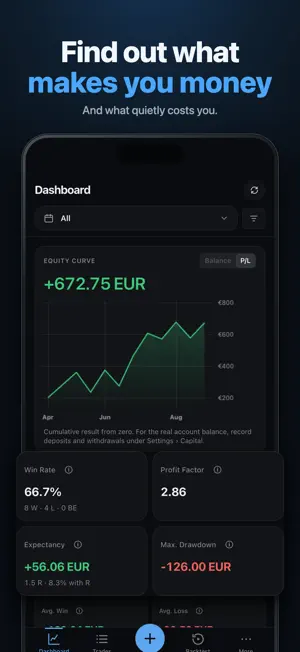
Every trade says something about how you trade. In a spreadsheet you mostly miss it. TradeJrnl puts each trade on the price chart, so you can see where you got in, where your stop was and what the market did next. If you trade on cTrader, you don't have to type anything in. Connect your account and your trades come into your journal with entry, exit, size and fees. The connection is read-only, so TradeJrnl can't place orders. Price data is retrieved through your cTrader account, depending on what your broker makes available. On MetaTrader 4 or 5, the TradeJrnl exporter picks up your trades automatically on desktop. You can also import your history from an MT4, MT5 or cTrader CSV file, or add trades by hand. On the chart you see entry and exit, and stop and target once you add them. You don't need screenshots for that anymore, though you can still attach them. Give each trade notes, a strategy, tags and a rating. You can log the setups you skipped too. The trades you didn't take often teach you just as much. Replay plays a closed trade back candle by candle, so you see the chart as it looked when you got in. New ideas go into the backtester first, bar by bar on historical prices, before real money is on the line. Save as many backtest sessions as you like and compare them. Your analytics show where your money comes from and where it goes: net P&L, win rate, profit factor, expectancy and maximum drawdown, plus calendars, heatmaps, your R distribution and breakdowns by strategy, session, symbol and direction. If you run several accounts, record deposits and withdrawals per account and edit several transactions at once. Your journal stays on your device. For backup and sync you pick the folder yourself; which cloud folders show up depends on your device and provider. Standard backups contain your journal and screenshots. Price data isn't included, and you can download or import it again at any time. Two things to know before you start. Charts, replay and backtests need price data, either through cTrader or from a file, for example from HistData, Dukascopy, TradingView or MetaTrader. And R values and percentage drawdown need your risk and capital details. TradeJrnl is a monthly or annual subscription. New subscribers get 14 days free, once per store account. You sign in with your email so your subscription works on all your devices. Signing in doesn't move your journal data; backup and sync with your own folder does that. You see the price and renewal terms before you buy. If your subscription ends, your journal stays on your device and you can still read and export it. TradeJrnl does not place orders or give investment advice. Replay and backtests use historical data and don't predict future results. Standard EULA: https://www.apple.com/legal/internet-services/itunes/dev/stdeula/
What’s new
Version 1.3.3 · Updated October 12, 2026
New: under Goals & Limits, set daily limits for loss, loss in R, number of trades and losing trades, plus a weekly goal. The Today card on the dashboard shows how much of each you have used, and the trade form reminds you when you have hit a limit. Tap a calendar day to open your day journal with your plan, review and mood. Each strategy gets a playbook with rules for entry, management and exit. Tick them off per trade and see how often you follow them and what it is worth. The dashboard now also analyses setup quality, plan adherence, rating, mistake and emotion tags, weekday, time of day and holding time, and shows your current streak. Set rating and plan adherence right in the trade view, and give screenshots a type and a caption. Plus smoother transitions, sheets you can swipe down to close, and haptic feedback on your phone. Also new: Sharpe ratio, Sortino ratio, green days and your best day's share of total profit, a breakdown by rule adherence, and the checklist right in the trade form. Notes now support Markdown, dates follow your chosen time zone, and the design is calmer and clearer.
App privacy
The developer, Stefan Pohl, reported these privacy practices to Apple.
Data Linked to You
The following data, which may be collected and linked to your identity, may be used for the following purposes:
- Purchases: Purchase History
- Contact Info: Email Address
- Identifiers: User ID
Used for: App Functionality
Alternatives to Trading Journal: TradeJrnl
Looking for apps like Trading Journal: TradeJrnl? Here are 6 similar apps on the App Store. The highest rated is Trading Journal Analytics (5.0/5), and 5 of the 6 are free to download.
-
 Trading Journal: Forex & Gold
-
 Trading Journal Analytics
5.0
Trading Journal Analytics
5.0
-
 Winsome, Losesome
-
 FX検証 - チャートで売買トレーニング
-
 RangeSight Studios
-
 Financial Robot Maker
| App | Rating | Price | Last updated | Compare |
|---|---|---|---|---|
| Trading Journal: TradeJrnl | – | Free | October 12, 2026 | |
| Trading Journal: Forex & Gold | – | Free | Oct 4, 2026 | Compare |
| Trading Journal Analytics | 5.0 / 5 (2) | 14.99 USD | Oct 14, 2026 | Compare |
| Winsome, Losesome | – | Free | Oct 22, 2026 | Compare |
| FX検証 - チャートで売買トレーニング | – | Free | Oct 5, 2026 | Compare |
| RangeSight Studios | – | Free | Jun 18, 2026 | Compare |
| Financial Robot Maker | – | Free | Sep 17, 2026 | Compare |