

SafeSpend Daily Budget Tracker
Manish Kumar Finance iPhoneiPadiPod touchApple Watch
SafeSpend Daily Budget Tracker is a free Finance app for iPhone and iPad by Manish Kumar. Requires iOS 26.2. Updated October 12, 2026.
- Price
- Free
- on the App Store
- Size
- 49 MB
- Age 4+
- Updated
- Oct 12
- 2026 · v1.1
Screenshots


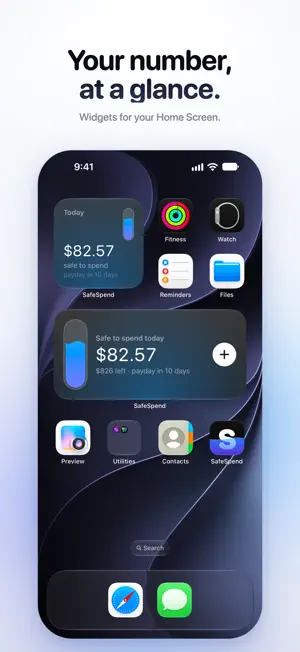
About SafeSpend Daily Budget Tracker
How much can I spend today? SafeSpend answers with one number. Tell it your balance, your payday and your bills. SafeSpend sets aside what's due, keeps some back for savings, and spreads the rest across the days until you're paid. Spend less today and tomorrow gets more. Spend more and it adjusts, so you never run dry before payday. No bank login. No account. No spreadsheets. Just the number, every day. YOUR NUMBER, EVERY DAY - See what's safe to spend today, and how much is left until payday - Your money shown as liquid in a glass reservoir that drains as you spend - Prefer it plain? Zen mode shows just the number, large and calm BILLS AND SAVINGS, SET ASIDE FIRST - Add rent, phone, subscriptions and other recurring bills once - Bills are taken out before your daily number, and logged when they come due - Set a savings target and an optional safety buffer that stay untouched SEE TROUBLE COMING - The colour changes to amber when today is running low - It turns red when you're on track to run out before payday - An honest shortfall instead of a surprise at the checkout LOG IT IN SECONDS - Amount, category, done. See what an expense leaves for each day before you add it - Type "coffee 4, lunch 12" and SafeSpend turns it into two expenses - Add expenses with Siri and Shortcuts SEE WHERE IT WENT - History by day and by category, with charts for the pay period - Tap a category to see just those expenses - An optional evening check-in to close out the day EVERY PAYDAY, A WRAP - When payday arrives, see how the period went and how much you kept - Share a card of your period, with no amounts shown ICONS YOU EARN - Unlock new app icons by how you spend: keep money in a pay period, stay within your number for a week, have no-spend days, and more - Each icon also changes the colour of your liquid AT A GLANCE - Home Screen and Lock Screen widgets - A payday countdown on your Lock Screen in the last days before payday - Apple Watch app: your number on your wrist, payday countdown, log from your wrist, and complications for your watch face PRIVATE BY DESIGN - No account, no sign-up, no bank login - Your balance, bills and expenses stay on your iPhone - No ads, no analytics, no tracking - Export your data as CSV at any time SAFESPEND PRO SafeSpend is free to download and includes your first 3 expenses. SafeSpend Pro removes the limit so your number stays true all month, and adds the Neon app icon. Pro is available as a monthly or yearly auto-renewing subscription. The yearly plan starts with a 7-day free trial for new subscribers. Payment is charged to your Apple Account when you confirm the purchase. Your subscription renews automatically unless cancelled at least 24 hours before the end of the current period, and your account is charged for renewal within 24 hours before the period ends. You can manage or cancel your subscription in your Apple Account settings. Any unused part of a free trial ends when you buy a subscription. SafeSpend is a budgeting aid, not financial advice. Terms of Use (EULA): https://safe-spend-web.vercel.app/terms Privacy Policy: https://safe-spend-web.vercel.app/privacy Support: https://safe-spend-web.vercel.app/support
What’s new
Version 1.1 · Updated October 12, 2026
Made for iPhone Duo. - Closed, your tabs and quick add sit in the side column, always in reach. - Open, Today shows the reservoir and your number side by side, and History puts your spending next to the period's charts. Tap a category to filter the list beside it. - Half folded, like a book, a laptop or a tent, your reservoir and number stay clear of the fold. Also new: each expense now drips out of the bottom of the reservoir. Plus small fixes and improvements.
App privacy
The developer, Manish Kumar, reported these privacy practices to Apple.
Data Not Linked to You
The following data, which may be collected but is not linked to your identity, may be used for the following purposes:
- Purchases: Purchase History
Used for: Analytics, App Functionality
Alternatives to SafeSpend Daily Budget Tracker
Looking for apps like SafeSpend Daily Budget Tracker? Here are 6 similar apps on the App Store. The highest rated is Reign: Budget & Expense Log (5.0/5), and all 6 are free to download.
-
 owllet: Budget & Expenses
-
 wym: where's your money
-
 Daily Budget - DaySpend
4.0
Daily Budget - DaySpend
4.0
-
 Fiscado: Finance Tracker
-
 Fynn – Expense Tracker
-
 Reign: Budget & Expense Log
5.0
Reign: Budget & Expense Log
5.0
| App | Rating | Price | Last updated | Compare |
|---|---|---|---|---|
| SafeSpend Daily Budget Tracker | – | Free | October 12, 2026 | |
| owllet: Budget & Expenses | – | Free | Oct 15, 2026 | Compare |
| wym: where's your money | – | Free | Oct 14, 2026 | Compare |
| Daily Budget - DaySpend | 4.0 / 5 (1) | Free | Oct 16, 2026 | Compare |
| Fiscado: Finance Tracker | – | Free | Oct 11, 2026 | Compare |
| Fynn – Expense Tracker | – | Free | Sep 21, 2026 | Compare |
| Reign: Budget & Expense Log | 5.0 / 5 (7) | Free | Jun 6, 2026 | Compare |