

MediaForge: Audio Video Studio
伟 孙 Photo & Video iPhoneiPadiPod touch
MediaForge: Audio Video Studio is a free Photo & Video app for iPhone and iPad by 伟 孙. Requires iOS 17.0. Updated October 12, 2026.
- Price
- Free
- on the App Store
- Size
- 33 MB
- Age 4+
- Updated
- Oct 12
- 2026 · v1.1.0
Screenshots
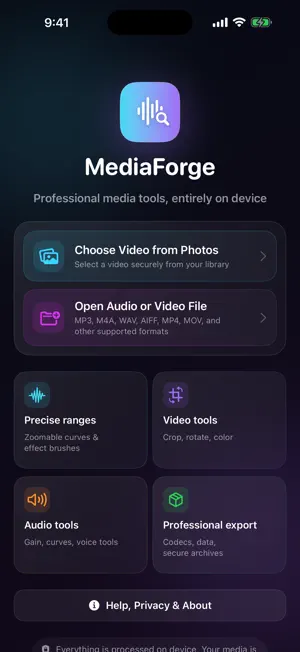
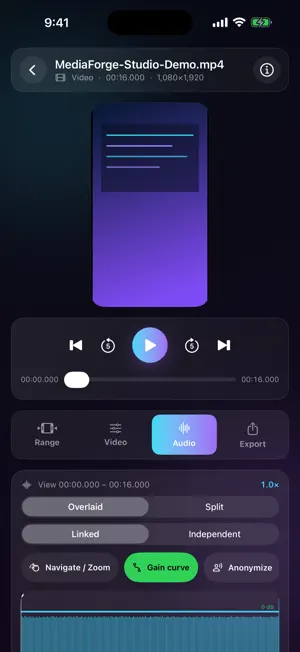
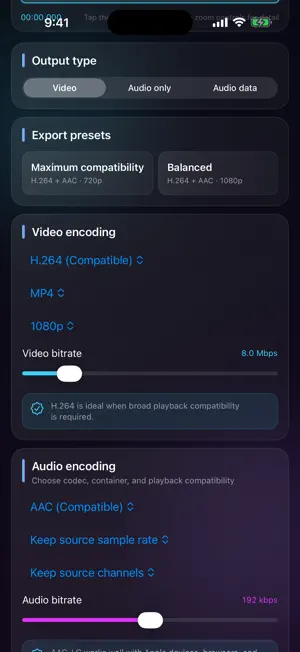

About MediaForge: Audio Video Studio
Convert and edit video, audio, images and animations in one workspace on iPhone and iPad. MediaForge processes your media on your device. Create the file you need Convert popular formats, extract audio, make animations, resize images and process image batches. Work with high-precision images, RAW photos and HDR video. Make it your own Trim, crop, rotate and adjust color. Add masks, motion tracking, text or logo watermarks, shapes and drawings. Edit sound with waveforms, gain curves, EQ, channel controls and fades. Organize and share Collect recording clips, prepare PDFs and frame sequences, and export audio samples as tables. Save drafts, choose output quality, and share or save your results. MediaForge Pro One lifetime purchase removes all ads. Unlimited advanced exports: animations, selected ranges, visual and audio edits, batches and delivery tools. Basic format conversion is free. Three Pro exports are included per installation, and an optional rewarded ad grants one additional export. Restore your purchase from Home > MediaForge Pro using the same Apple Account. No subscription. Combining Pro features still uses just 1 credit per export. The free version includes advertising. Your media files are never shared with advertisers. Privacy Policy: https://apps.prof.ws/mediaforge/privacy/ Terms of Use: https://www.apple.com/legal/internet-services/itunes/dev/stdeula/
What’s new
Version 1.1.0 · Updated October 12, 2026
A more capable media workspace with broader format support, richer color tools and smoother editing and export. Introducing MediaForge Pro for lifetime access to advanced exports and an ad-free experience.
App privacy
The developer, 伟 孙, reported these privacy practices to Apple.
Data Used to Track You
The following data may be used to track you across apps and websites owned by other companies:
- Identifiers: Device ID
Data Linked to You
The following data, which may be collected and linked to your identity, may be used for the following purposes:
- Location: Coarse Location
- Identifiers: Device ID
- Usage Data: Product Interaction, Advertising Data
Used for: Third-Party Advertising, Developer’s Advertising or Marketing, Analytics
Data Not Linked to You
The following data, which may be collected but is not linked to your identity, may be used for the following purposes:
- Diagnostics: Performance Data, Other Diagnostic Data, Crash Data
Used for: Third-Party Advertising, Developer’s Advertising or Marketing, Analytics
Alternatives to MediaForge: Audio Video Studio
Looking for apps like MediaForge: Audio Video Studio? Here are 6 similar apps on the App Store. The highest rated is Stitchi | Screenshot Stitcher (1.0/5), and all 6 are free to download.
-
 Compresso: Photo Compress
-
 Stitchi | Screenshot Stitcher
1.0
Stitchi | Screenshot Stitcher
1.0
-
 RecodeFlow: Video Converter
-
 Mic Sync 2
-
 VideoFix: HDR Video Converter
-
 Brighten Dark Video & Enhance
| App | Rating | Price | Last updated | Compare |
|---|---|---|---|---|
| MediaForge: Audio Video Studio | – | Free | October 12, 2026 | |
| Compresso: Photo Compress | – | Free | Jun 4, 2026 | Compare |
| Stitchi | Screenshot Stitcher | 1.0 / 5 (1) | Free | Jul 16, 2026 | Compare |
| RecodeFlow: Video Converter | – | Free | Oct 5, 2026 | Compare |
| Mic Sync 2 | – | Free | Sep 2, 2026 | Compare |
| VideoFix: HDR Video Converter | – | Free | Oct 12, 2026 | Compare |
| Brighten Dark Video & Enhance | – | Free | Sep 30, 2026 | Compare |