

Dayward: Calendar Day Planner
Jin Zhang Low Productivity iPhoneiPadiPod touch
Dayward: Calendar Day Planner is a free Productivity app for iPhone and iPad by Jin Zhang Low. Requires iOS 16.1. Updated October 23, 2026.
- Price
- Free
- on the App Store
- Size
- 29 MB
- Age 4+
- Updated
- Oct 23
- 2026 · v1.4.0
Screenshots



About Dayward: Calendar Day Planner
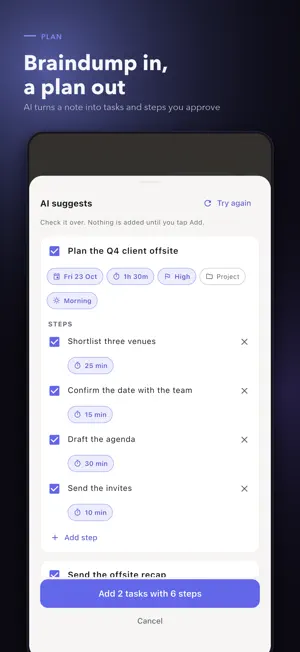
A to-do list tells you what exists. It never tells you when any of it gets done. Dayward reads your real calendar, finds the free hours between your meetings, and turns your tasks into actual time blocks you can see and move. Tap Confirm day and your plan lands in your calendar — synced both ways. WHY DAYWARD IS DIFFERENT A task list is not a plan. Dayward schedules your work around the commitments you already have, then learns from how your days actually go. • Two-way Apple Calendar sync. Confirm your day and blocks become real calendar events. Move, rename or delete one in Calendar and Dayward follows. A new event can become a task. • Learns your pace. Dayward credits focus time back to each task and compares it against your estimate, then sizes future blocks on what the work really takes — after five finished tasks, not before. • Plans in your best hours. Demanding work is placed in the hours your own past focus sessions ran to completion. • The Big 3. Pick at most three priorities that would make today a win. The cap is the point — Dayward won't let you add a fourth. • Your hours, your days. Set working hours per weekday, a best time per task, and hours per project. Dayward tells you what won't fit instead of quietly dropping it. NEW IN 1.4.0 • Confirm day, then two-way calendar sync both directions. • Plan with AI: type a braindump and review the tasks and steps before anything is added. • Shape your day: tap a free slot to fill it, drag a block to move it, swipe to push it to tomorrow. • Time away: plan trips, flights and days off that keep those days free and pause your streaks and reminders. • Create projects inline, the moment a task needs one. FOCUS A Pomodoro-style focus timer with an optional app shield to quiet distractions while you work, plus a Home Screen widget and a Lock Screen and Dynamic Island Live Activity. PRIVACY FIRST No account, no login, no Dayward server. Everything is stored on your device, and every core feature works offline. Optional sync runs through your own private iCloud. No ads, no tracking, no third-party analytics of any kind. ABOUT AI (OPTIONAL) Dayward's planning engine is plain on-device arithmetic, not AI. The optional AI features run on an API key you supply yourself — OpenAI, Google Gemini or an OpenAI-compatible endpoint of your choice. We don't resell or proxy model access, and AI is not a paid feature. DAYWARD PRO Free includes unlimited tasks, three projects, the day planner, calendar sync, the focus timer and the widget. Pro adds unlimited projects, the full analytics history, the Eisenhower matrix, the weekly review, renewal tracking and export. Dayward Pro Monthly: 2.99 USD per month. Dayward Pro Yearly: 19.99 USD per year, after a 3-day free trial. Dayward Pro Lifetime: 49.99 USD, a one-time purchase that does not renew. Payment will be charged to your Apple Account at confirmation of purchase. Subscriptions renew automatically unless auto-renew is turned off at least 24 hours before the end of the current period. Your account is charged for renewal within 24 hours prior to the end of the current period, at the price of the plan you chose. You can manage your subscription and turn off auto-renewal in your Apple Account settings after purchase. Any unused portion of a free trial is forfeited when you purchase a subscription. Privacy Policy: https://www.cortexbizsolution.com/products/ergon/privacy Terms of Use: https://www.cortexbizsolution.com/products/ergon/terms
What’s new
Version 1.4.0 · Updated October 23, 2026
Confirm your day, synced both ways Tap Confirm day to put your whole plan into your calendar in one step. Move, rename or delete a block in Calendar and Dayward follows — and a new event can become a task. Plan with AI Type a braindump and let AI turn it into tasks and steps you review and edit before anything is added. Bring your own OpenAI, Gemini or custom endpoint in Settings. AI is optional and never a paid feature. Shape your day Tap a free slot to fill it, drag a block to move it, and swipe a block left to push it to tomorrow or unpin it. Set a best time per task and hours per project — including different hours on different days. Time away Plan a trip, leave or a holiday. Dayward keeps those days free, adds your flights, and pauses streaks and reminders while you're away. Projects where you need them Make a project the moment a task needs one, from the picker or by typing +Name. Also in this release A tidier Today screen, refreshed header buttons, and a reorganised Settings — with no feature lost.
App privacy
The developer, Jin Zhang Low, reported these privacy practices to Apple.
Data Not Collected
The developer does not collect any data from this app.
Alternatives to Dayward: Calendar Day Planner
Looking for apps like Dayward: Calendar Day Planner? Here are 6 similar apps on the App Store. The highest rated is ILMUchat (5.0/5), and all 6 are free to download.
-
 DYP
-
 TopCalendar - Events & Widgets
-
 AutoPlan 2: Tiny Pomodoro Todo
-
 Zenvi - Earn Your Screen Time
4.2
-
 ILMUchat
5.0
-
 Time Wallet: Unrot Your Brain
4.5
| App | Rating | Price | Last updated | Compare |
|---|---|---|---|---|
| Dayward: Calendar Day Planner | – | Free | October 23, 2026 | |
| DYP | – | Free | Jul 9, 2026 | Compare |
| TopCalendar - Events & Widgets | – | Free | Oct 22, 2026 | Compare |
| AutoPlan 2: Tiny Pomodoro Todo | – | Free | Oct 6, 2024 | Compare |
| Zenvi - Earn Your Screen Time | 4.2 / 5 (12) | Free | Aug 31, 2026 | Compare |
| ILMUchat | 5.0 / 5 (2) | Free | Oct 16, 2026 | Compare |
| Time Wallet: Unrot Your Brain | 4.5 / 5 (22) | Free | Sep 17, 2026 | Compare |