

TopCalendar - Events & Widgets
rypox Productivity iPhoneiPadiPod touch
TopCalendar - Events & Widgets is a free Productivity app for iPhone and iPad by rypox. Requires iOS 17.0. Updated October 22, 2026.
- Price
- Free
- on the App Store
- Size
- 19 MB
- Age 4+
- Updated
- Oct 22
- 2026 · v1.3.2
Screenshots


About TopCalendar - Events & Widgets
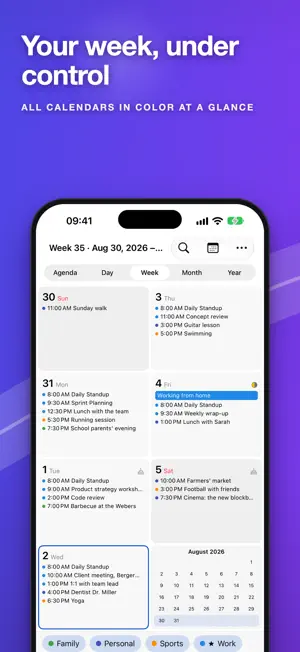
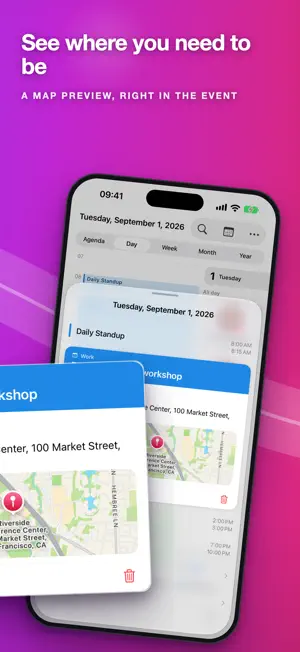
TopCalendar is a modern calendar for iPhone and iPad. It offers gesture-based navigation and a range of view layouts in a clean, native design with full dark mode support. Swipe, don't search Two clearly separated swipe axes make navigation intuitive: swipe horizontally to change the time period (year, month, week, day, agenda), swipe vertically to move through time. The day under your finger travels with you across view changes, so you always land exactly where you meant to. All views • Year: a multi-year overview with event density per day, showing multi-day events across their full length instead of only on the first day • Month: a grid with week numbers, events and a subtle moon phase indicator • Week: day tiles in a 2x4 grid with the week number • Day: an event list with times, birthdays and moon phase • Agenda: a chronological, scrollable list Reliable reminders Reminders arrive through your device as dependably as any system calendar alert, plus a TopCalendar notification of its own that takes you straight back to the event in the app. Short-notice reminders are classified as time-sensitive, so they break through Focus. Your data, your choice TopCalendar has no server of its own and no cloud. Your events stay in Apple's calendar store (EventKit), right where you already sync them via iCloud, Google or Exchange. There is no extra account, no sign-in, and nothing to lose if you are offline. What the app counts for you (events created, changed, deleted) only you see, on the statistics page. Widgets and more • Two home screen widgets: a month overview with event density, and a day view with your hours • A lock screen widget for your next event • Birthdays from your contacts (optional) or from the birthday calendar • Holidays from subscribed calendars, week numbers in the grid History A page of its own shows what you changed in TopCalendar, with calendar and account, and restores any of it. The undo toast is gone in seconds; that an event is missing you notice hours later. Automation Works with Siri and the Shortcuts app: say or type an event as free text. If it is recognised unambiguously, TopCalendar creates it directly, otherwise the app opens for confirmation. TopCalendar: power-user handling, thought through, in a modern design.
What’s new
Version 1.3.2 · Updated October 22, 2026
• iPhone Duo: the split week now follows the fold smoothly. The gap and columns move with the hinge, and the switch between the split week and the normal grid fades instead of jumping (no animation if Reduce Motion is on)
App privacy
The developer, rypox, reported these privacy practices to Apple.
Data Not Linked to You
The following data, which may be collected but is not linked to your identity, may be used for the following purposes:
- Location: Coarse Location
Used for: App Functionality
Alternatives to TopCalendar - Events & Widgets
Looking for apps like TopCalendar - Events & Widgets? Here are 6 similar apps on the App Store. The highest rated is Calm Focus: Pomodoro Timer (5.0/5), and all 6 are free to download.
-
 888Notes
-
 Calm Focus: Pomodoro Timer
5.0
-
 TaskBranch - Tree Task Manager
-
 Tilekit: AI Widget Builder
-
 3-Line Calendar for Watch Face
-
 Calendars: Organizer & Planner
| App | Rating | Price | Last updated | Compare |
|---|---|---|---|---|
| TopCalendar - Events & Widgets | – | Free | October 22, 2026 | |
| 888Notes | – | Free | Jun 16, 2026 | Compare |
| Calm Focus: Pomodoro Timer | 5.0 / 5 (2) | Free | Sep 4, 2026 | Compare |
| TaskBranch - Tree Task Manager | – | Free | Jul 17, 2026 | Compare |
| Tilekit: AI Widget Builder | – | Free | May 31, 2026 | Compare |
| 3-Line Calendar for Watch Face | – | Free | Jul 23, 2026 | Compare |
| Calendars: Organizer & Planner | – | Free | Oct 9, 2024 | Compare |