

SplitBill – Party Bill Split
Yusuke Takeuchi Finance iPhoneiPadiPod touch
SplitBill – Party Bill Split is a free Finance app for iPhone and iPad by Yusuke Takeuchi. Requires iOS 17.0. Updated October 14, 2026.
- Price
- Free
- on the App Store
- Size
- 6 MB
- Age 4+
- Updated
- Oct 14
- 2026 · v1.0.1
Screenshots


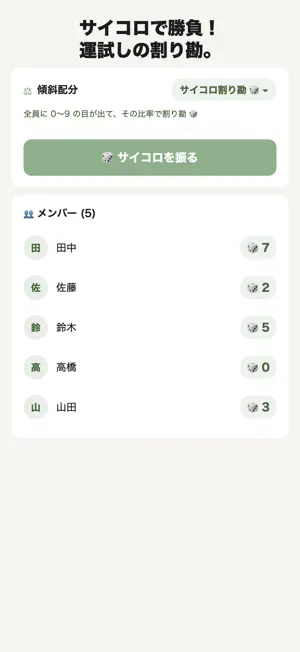

About SplitBill – Party Bill Split
"Boss pays more today", "The newbies get a discount", "Ladies pay less" — reflect the usual bill-splitting rules of Japanese drinking parties, year-end parties, and welcome/farewell dinners with a single tap. --- Key Features --- ■ Split Presets (6 types) Common Japanese group-dinner rules, each a single tap: ・Equal Split ・Boss Pays More (default 1.5x, adjustable) ・Organizer Free ・Newbie Discount (default 0.5x, adjustable) ・Ladies Discount (default 0.8x, adjustable) ・Non-Drinker Discount (default 0.7x, adjustable) Pick who's included via the chip on each member row. Multipliers are adjustable in ±0.05 steps on the card. ■ Dice Split (playful) Everyone rolls 0–9 randomly and the bill splits by the dice ratio. Example: 3 people, ¥1,000 total, dice 1/2/7 → ¥100 / ¥200 / ¥700. Includes a rolling animation and a re-roll button. Great party-ender. ■ Flexible Rounding ・Unit: ¥1 / ¥100 / ¥500 / ¥1000 ・Mode: "Leave remainder" (floor each) or "Collect extra" (ceil each) Great for "collect neatly in ¥1000 units" or "extra goes to tip". ■ Collection Tracking in Results Toggle each member as paid; a progress bar shows how much you've collected. No hard-coded organizer role — anyone can be the payer. ■ LINE-Optimized Text Copy result formatted "Tanaka-san: ¥3,500". Paste-and-go for LINE or SMS. ■ PayPay Launch One-tap open PayPay app (redirects to App Store if not installed). Amount is pre-copied to clipboard. ■ Saved Groups Save regular member groups ("Work Crew", "College Friends") and load them via horizontal chips on the main screen. Auto-saves the last 30 splits. ■ Widget (Small / Medium) Latest split result on Home Screen: total, member count, top 3 amounts. ■ iCloud Sync Groups and history sync between iPhone and iPad. No manual migration. ■ SF Symbols + Sage Green Design System icons instead of emojis. Full dark mode. --- Perfect For --- ・Company drinking parties, year-end (bounenkai) and new-year (shinnenkai) parties ・Welcome/farewell dinners (newbie discount, organizer free) ・Mixed-gender parties (ladies discount) ・When there are non-drinkers ・A fun end-of-night dice roll ・Collecting cleanly in ¥1000 units ・Quick LINE / PayPay share --- Other --- Full Dark Mode, 16 languages, iCloud sync, ¥480 Remove Ads IAP, privacy focused (device + iCloud only). --- Disclaimer --- PayPay payment requires manual action in the PayPay app. Sage Apps Series — Search "Sage Apps" on the App Store.
What’s new
Version 1.0.1 · Updated October 14, 2026
• The Remove Ads purchase screen now accurately describes what's included.
App privacy
The developer, Yusuke Takeuchi, reported these privacy practices to Apple.
Data Used to Track You
The following data may be used to track you across apps and websites owned by other companies:
- Identifiers: Device ID
- Usage Data: Advertising Data
Data Linked to You
The following data, which may be collected and linked to your identity, may be used for the following purposes:
- Usage Data: Advertising Data
Used for: Third-Party Advertising
Data Not Linked to You
The following data, which may be collected but is not linked to your identity, may be used for the following purposes:
- Identifiers: Device ID
Used for: Third-Party Advertising
Alternatives to SplitBill – Party Bill Split
Looking for apps like SplitBill – Party Bill Split? Here are 6 similar apps on the App Store.
-
 Oaiko
Oaiko
-
 GigatelNet
-
 Split Bills & Expenses - dvup
-
 Split Bill TONTON: Settle Up
-
 Lightsplit - Split Expenses
-
 ShareSlice - Split Bills
| App | Rating | Price | Last updated | Compare |
|---|---|---|---|---|
| SplitBill – Party Bill Split | – | Free | October 14, 2026 | |
| Oaiko | – | Free | Jun 20, 2026 | Compare |
| GigatelNet | – | Free | Sep 21, 2026 | Compare |
| Split Bills & Expenses - dvup | – | Free | Oct 14, 2026 | Compare |
| Split Bill TONTON: Settle Up | – | Free | Oct 7, 2026 | Compare |
| Lightsplit - Split Expenses | – | Free | Sep 12, 2026 | Compare |
| ShareSlice - Split Bills | – | Free | Oct 15, 2026 | Compare |