

Lightsplit - Split Expenses
Ping-Hsien Chou Finance iPhoneiPadiPod touch
Lightsplit - Split Expenses is a free Finance app for iPhone and iPad by Ping-Hsien Chou. Requires iOS 18.0. Updated September 12, 2026.
- Price
- Free
- on the App Store
- Size
- 49 MB
- Age 4+
- Updated
- Sep 12
- 2026 · v1.2.1
Screenshots


About Lightsplit - Split Expenses
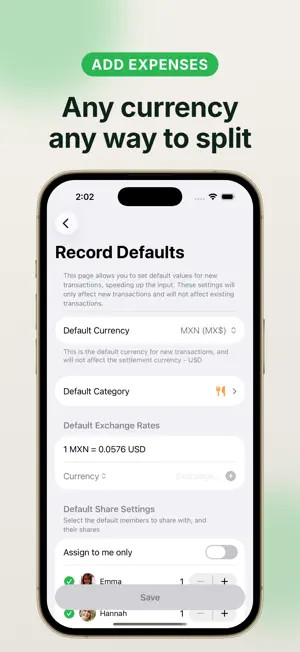
Split bills for trips, rent and meals with friends. Lightsplit tracks shared expenses and shows who owes whom, even when several people pay. Friends can also use Lightsplit on the web, LINE, Telegram or Discord. Start with virtual members, then share a group link when everyone is ready to join. START SPLITTING RIGHT AWAY • Create virtual members and track expenses before friends even sign up. When they join, they claim their records • Invite anyone in seconds with a QR code or link • Keep separate groups for trips, roommates, and nights out, and manage them all in one place SPLIT ANY EXPENSE • Split evenly, by shares, or by exact amounts, and mix them freely • Expenses, income, and transfers, with multiple payers • Built-in calculator and category icons AI RECEIPT SCAN • Scan a receipt or order screenshot with AI, then check the items and amounts before saving • Record it as one expense or split item by item • The free plan includes a limited number of scans; Premium raises the limit CONNECT AI APPS WITH MCP • Connect a compatible AI app to Lightsplit after signing in and approving access • Ask it to add expenses, look up transactions and review spending breakdowns • View and revoke connected apps from your profile SETTLE UP THE SMART WAY • Simplify group debts and see suggested repayments • Mark a debt as paid and the transfer is recorded automatically • Remind whoever still owes with one tap MULTI-CURRENCY • Record spending in different currencies with automatic conversion • Log each expense in its own currency, auto-converted to your group's settlement currency • Made for international trips STATS, BUDGETS & MORE • Category charts show exactly where the group's money went • Group budgets and personal spending limits • Shared to-do lists that convert into expenses • Save your payment details so friends know exactly how to pay you back Lightsplit Premium Subscribe to unlock: • An ad-free experience • Personal statistics • Record search and filters • Spreadsheet export • Full edit history • Unlimited records and to-dos • A higher AI scan limit Free to download, with limits on the free plan. Premium is an optional subscription. Create your first group and keep shared expenses clear. Terms of Use (EULA): https://www.apple.com/legal/internet-services/itunes/dev/stdeula/
What’s new
Version 1.2.1 · Updated September 12, 2026
Split expenses more easily with Siri and Shortcuts.
App privacy
The developer, Ping-Hsien Chou, reported these privacy practices to Apple.
Data Linked to You
The following data, which may be collected and linked to your identity, may be used for the following purposes:
- Identifiers: User ID
- Financial Info: Other Financial Info
- Contact Info: Email Address, Name
- User Content: Emails or Text Messages, Photos or Videos, Other User Content
- Search History: Search History
Used for: Analytics, App Functionality
Data Not Linked to You
The following data, which may be collected but is not linked to your identity, may be used for the following purposes:
- Usage Data: Product Interaction, Advertising Data
- Diagnostics: Crash Data, Performance Data
Used for: Analytics
Alternatives to Lightsplit - Split Expenses
Looking for apps like Lightsplit - Split Expenses? Here are 6 similar apps on the App Store. The highest rated is 萬記帳 (5.0/5), and all 6 are free to download.
-
 Pizo - Split Bills & AI Scan
4.0
Pizo - Split Bills & AI Scan
4.0
-
 BanBan Ledger - Couple Budget
-
 Minimal Expense: Travel, Split
-
 萬記帳
5.0
萬記帳
5.0
-
 Holdary - Track Your Wealth
5.0
Holdary - Track Your Wealth
5.0
-
 刷卡回饋隨手查
5.0
刷卡回饋隨手查
5.0
| App | Rating | Price | Last updated | Compare |
|---|---|---|---|---|
| Lightsplit - Split Expenses | – | Free | September 12, 2026 | |
| Pizo - Split Bills & AI Scan | 4.0 / 5 (1) | Free | Oct 22, 2026 | Compare |
| BanBan Ledger - Couple Budget | – | Free | Oct 23, 2026 | Compare |
| Minimal Expense: Travel, Split | – | Free | Oct 27, 2026 | Compare |
| 萬記帳 | 5.0 / 5 (1) | Free | May 31, 2024 | Compare |
| Holdary - Track Your Wealth | 5.0 / 5 (2) | Free | Oct 27, 2026 | Compare |
| 刷卡回饋隨手查 | 5.0 / 5 (1) | Free | Aug 19, 2025 | Compare |