

UsedWell - Keep or Replace?
Ryosuke Seki Lifestyle iPhoneiPadiPod touch
UsedWell - Keep or Replace? is a free Lifestyle app for iPhone and iPad by Ryosuke Seki. Requires iOS 26.0. Updated September 26, 2026.
- Price
- Free
- on the App Store
- Size
- 1 MB
- Age 4+
- Updated
- Sep 26
- 2026 · v2.0.0
Screenshots



About UsedWell - Keep or Replace?
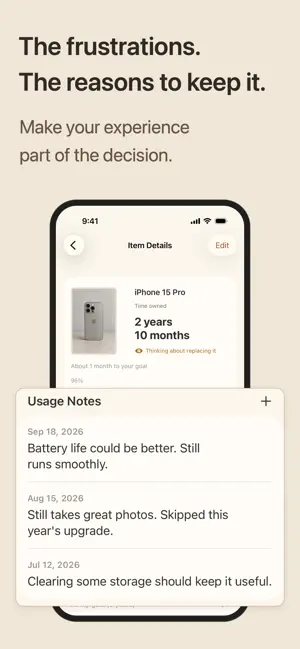
“Is it time to replace this Mac?” UsedWell helps you look back on the things you use and decide for yourself whether to keep using them or move on. Add the purchase date, price, and your own usage goal to see how long you've had an item, how far you've progressed toward your goal, and what it costs per day. You can also keep notes on what you've actually noticed while using it. “Maybe I've used it long enough.” “The battery is getting worse, but everything else still works.” “Maybe I can keep it for another year.” UsedWell brings those pieces together so you can make the decision with your own context in front of you. Your time with it. Your goal for it. Set your own usage goal and see where you are today. UsedWell shows three simple states: Still want to use it, Start considering replacement, and Goal reached. At 90%, it's simply a point to start reflecting. 100% is not a replacement deadline. It means you've reached the usage goal you set for yourself. If you're still happy with the item, you can keep using it well beyond your goal. The frustrations. The reasons to keep it. Add dated Usage Notes whenever something stands out. For example: “Battery life has been getting worse.” “Still runs smoothly.” “Clearing some storage should keep it useful.” “Skipped this year's upgrade.” When you're considering a replacement, you can look back on more than numbers—you can also review how your experience with the item has changed. There's no need to log something every day. Add a note only when there's something worth remembering. Cost per day. One more perspective. UsedWell calculates your current cost per day from the purchase price and time used. You can also compare what the cost per day would look like at your usage goal and after one more year of use. The point isn't to “get your money's worth.” Cost per day is simply one more perspective when you're deciding whether to replace something or keep using it. Add a photo to make each item easier to recognize. You can add one optional photo to each item. Photos appear on Home, item details, and History. If you don't add a photo, UsedWell shows a category icon instead. Photos stay on your device. Choose between Warm and Forest. UsedWell includes two visual themes. Warm uses a soft Sand / Ivory palette. Forest uses a calm Cream / Deep Forest palette. Light and Dark appearance continue to follow your iPhone settings. Keep the record after you're done. When you actually stop using an item, mark it as replaced. The record stays in History so you can look back on your final time used, Usage Notes, final cost per day, and the period from purchase to completion. Key features • Add, edit, and delete items • Add one optional photo per item • Track time owned and your own usage goal • See progress toward your goal • Add dated Usage Notes • See current cost per day • Compare cost per day at your goal and after another year • Optional notifications at 90% and 100% of your goal • Mark items as replaced and keep a usage history • Choose between Warm and Forest themes • Light and Dark appearance Don't replace it on a whim. UsedWell helps you review time owned, your goal, notes, and cost so you can decide for yourself whether to replace something or keep using it. Your data stays on your device. No account is required.
What’s new
Version 2.0.0 · Updated September 26, 2026
UsedWell 2.0 introduces a redesigned experience for reviewing the things you use. • A redesigned Home that makes time owned, goals, progress, and notes easier to review • Add an optional photo to each item • Choose between Warm and Forest themes • A new app icon • Visual and interaction improvements throughout the app We've also made smaller usability and presentation improvements across the app.
App privacy
The developer, Ryosuke Seki, reported these privacy practices to Apple.
Data Not Collected
The developer does not collect any data from this app.
Alternatives to UsedWell - Keep or Replace?
Looking for apps like UsedWell - Keep or Replace?? Here are 6 similar apps on the App Store. The highest rated is WILDSOUND: Eco-meditation (5.0/5), and all 6 are free to download.
-
 Itemee - Items & Cost Tracker
-
 Lumo: Mood Journal & To-Dos
-
 Orlo - 写真とカレンダーで続く日記 -
-
 Someday: Bucket List Notebook
-
 WILDSOUND: Eco-meditation
5.0
WILDSOUND: Eco-meditation
5.0
-
 Maker's Note - Craft Costing
| App | Rating | Price | Last updated | Compare |
|---|---|---|---|---|
| UsedWell - Keep or Replace? | – | Free | September 26, 2026 | |
| Itemee - Items & Cost Tracker | – | Free | Jul 16, 2026 | Compare |
| Lumo: Mood Journal & To-Dos | – | Free | Oct 21, 2026 | Compare |
| Orlo - 写真とカレンダーで続く日記 - | – | Free | Sep 16, 2026 | Compare |
| Someday: Bucket List Notebook | – | Free | Oct 8, 2026 | Compare |
| WILDSOUND: Eco-meditation | 5.0 / 5 (3) | Free | Sep 21, 2026 | Compare |
| Maker's Note - Craft Costing | – | Free | Oct 20, 2026 | Compare |