

Lumo: Mood Journal & To-Dos
SEUNGHWAN LEE Lifestyle iPhoneiPadiPod touch
Lumo: Mood Journal & To-Dos is a free Lifestyle app for iPhone and iPad by SEUNGHWAN LEE. Requires iOS 26.2. Updated October 21, 2026.
- Price
- Free
- on the App Store
- Size
- 40 MB
- Age 4+
- Updated
- Oct 21
- 2026 · v1.4.3
Screenshots


About Lumo: Mood Journal & To-Dos
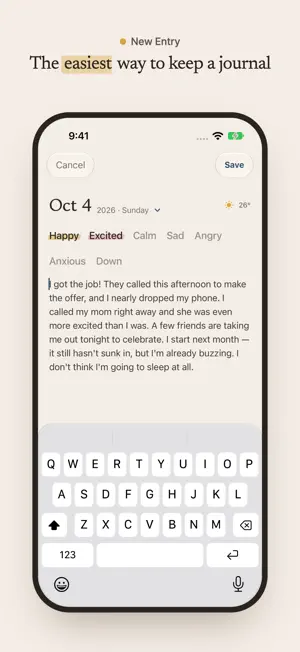
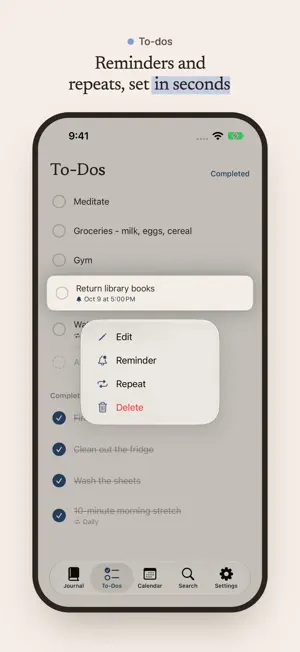
However your day went, a single line or a full page is enough. Lumo is the simplest way to capture each day along with how you felt. Your to-dos live here too, so there's no need to switch between apps. Effortless from start to finish - The date and weather fill in automatically. Just pick your emotions and start writing. - One line is enough, and so is a long entry. We kept only what you need, so writing every day never feels like a chore. Remember your feelings in color - Happy, Excited, Calm, Sad, Angry, Anxious, Down — pick as many as you felt that day, like marking them with a highlighter. - Each day on the calendar takes on the color of that day's emotion. Flip through a month and see how your mood flowed at a glance. Stats for any date range - Choose a period to see which emotions came up most and how your positive and negative moods balanced out. - See how many entries you wrote, your longest streak, and how many to-dos you finished. - This week, the past month, the whole year — set the range however you like. Your journal and to-dos in one place - Jot down a to-do the moment it comes to mind, then tap to check it off. - Completed to-dos stay on the calendar alongside that day's entry, so you can look back on what you got done. Jump straight to the day you're looking for - Search past entries, emotions, and even to-dos with a single keyword. - "Trip," "Mom," "moving" — a fragment of a memory is all it takes to open that day again. - Tap an emotion to instantly find every entry that has it. Right from your Home Screen and Lock Screen - Check your remaining to-dos in the To-Dos widget and complete them without opening the app. - The Calendar widget shows this month's emotions and completed to-dos, and the Write Today's Entry widget opens a new entry with a single tap. - See your recently completed to-dos on the Lock Screen, too. Safe with you, and always yours to take - Everything syncs through iCloud, so you can pick up where you left off on iPhone and iPad. - Switch devices and your journal stays just as it was. - Export all your entries as a PDF to keep a separate copy or print them. A journal grows more valuable the longer you keep it. That's why we made Lumo light enough to stay with you for years. ※ Lumo includes a 14-day free trial. To keep using all features afterward, a one-time purchase (lifetime access) is required. Exporting your journal as a PDF remains available anytime, even after the trial ends.
What’s new
Version 1.4.3 · Updated October 21, 2026
• Reorder your To-Dos right from the widget. Tap the button at the top to switch between Oldest First and Newest First. • Widgets now follow the accent color you picked in the app. Change it in Settings > Appearance and your widgets update right away.
App privacy
The developer, SEUNGHWAN LEE, reported these privacy practices to Apple.
Data Not Linked to You
The following data, which may be collected but is not linked to your identity, may be used for the following purposes:
- Identifiers: Device ID
- Usage Data: Product Interaction, Other Usage Data
- Diagnostics: Crash Data, Performance Data, Other Diagnostic Data
Used for: Analytics, App Functionality
Alternatives to Lumo: Mood Journal & To-Dos
Looking for apps like Lumo: Mood Journal & To-Dos? Here are 6 similar apps on the App Store.
-
 Dear Today: Visual Diary
-
 Thankful Routine
-
 UsedWell - Keep or Replace?
-
 Gon(言)- あなたのAI分身
-
 한 컷 - 하루 한 장면 일기
-
 diary.exe - 하루 한 줄 일기
| App | Rating | Price | Last updated | Compare |
|---|---|---|---|---|
| Lumo: Mood Journal & To-Dos | – | Free | October 21, 2026 | |
| Dear Today: Visual Diary | – | Free | Jul 21, 2026 | Compare |
| Thankful Routine | – | Free | Oct 11, 2026 | Compare |
| UsedWell - Keep or Replace? | – | Free | Sep 26, 2026 | Compare |
| Gon(言)- あなたのAI分身 | – | Free | May 25, 2026 | Compare |
| 한 컷 - 하루 한 장면 일기 | – | Free | Sep 28, 2026 | Compare |
| diary.exe - 하루 한 줄 일기 | – | Free | Oct 2, 2026 | Compare |