

FreeBeam
Thomas Blaxland Productivity iPhoneiPadiPod touch
FreeBeam is a free Productivity app for iPhone and iPad by Thomas Blaxland. Requires iOS 15.0. Updated September 29, 2026.
- Price
- Free
- on the App Store
- Size
- 77 MB
- Age 4+
- Updated
- Sep 29
- 2026 · v5.3
Screenshots


About FreeBeam
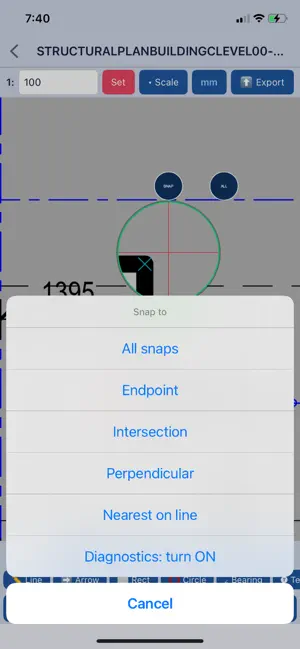
Measure and mark up construction drawings on site, in your hand, at the scale the drawing was drawn to. Set the scale once and every length, area and angle you take is real. Nothing you open ever leaves your phone. FreeBeam works on the PDFs you already have. Open a plan from email, from Files, from anywhere iOS can share to, set the scale from the drawing's own dimension string or pick a standard one, and start measuring. Lengths, areas, continuous runs and angles come straight off the sheet. Snapping catches the drawing's real geometry - endpoints, intersections, perpendiculars - so a measurement lands on the line rather than near it, and the loupe shows you exactly where the point is going before you commit it. Mark up as you go. Text, arrows, clouds, dimensions and freehand, in the colours and weights you choose. Everything is editable afterwards: select one item or several, move them, restyle them, undo and redo your way back through the work. Copy and paste markup between drawings. Export the result as a sharp, real PDF. Not a photograph of your drawing - the original vector sheet with your markup on top, so it prints and zooms the way the source did, and anyone can open it. FreeBeam Pro, a one-off purchase with no subscription, adds the rest: unlimited drawings, exports with no watermark, and the tools that take it past measuring. Lay one drawing over another in colour to read a revision at a glance, and flatten the pair into a single sharp sheet. Join several drawings into one document, in the order you choose. Count and tally items by type for a takeoff. Set a datum and read coordinates off the plan, rotate a sheet to site north, and take bearings and distances between points. Built for the people who actually carry drawings: surveyors, site engineers, estimators, builders and setting-out crews. It runs on an iPhone in a pocket and on an iPad on a tailgate, and it works with no signal, because everything happens on the device. Nothing is collected. No account, no sign-in, no analytics, no tracking, no cloud. Your drawings, your markup and your measurements stay on your phone, which matters when the sheet in your hand is a confidential tender. A sample drawing is included, in metric or in feet and inches, with dimensions printed on it you can check your measurements against. Questions or problems: [email protected]
App privacy
The developer, Thomas Blaxland, reported these privacy practices to Apple.
Data Not Collected
The developer does not collect any data from this app.
Alternatives to FreeBeam
Looking for apps like FreeBeam? Here are 6 similar apps on the App Store. The highest rated is ScaleTap: PDF Plan Measure (5.0/5), and all 6 are free to download.
-
 PDF Studio – Reader & Tools
-
 ACS Mobile
-
 PlanMeasure
-
 ScaleTap: PDF Plan Measure
5.0
-
 AI Detector : Text Humanizer
4.4
-
 SiteCam Construction Photo App
4.8
| App | Rating | Price | Last updated | Compare |
|---|---|---|---|---|
| FreeBeam | – | Free | September 29, 2026 | |
| PDF Studio – Reader & Tools | – | Free | Oct 5, 2026 | Compare |
| ACS Mobile | – | Free | Jun 10, 2026 | Compare |
| PlanMeasure | – | Free | Oct 15, 2026 | Compare |
| ScaleTap: PDF Plan Measure | 5.0 / 5 (1) | Free | Sep 17, 2026 | Compare |
| AI Detector : Text Humanizer | 4.4 / 5 (53) | Free | Oct 12, 2026 | Compare |
| SiteCam Construction Photo App | 4.8 / 5 (534) | Free | Oct 20, 2026 | Compare |
Compare FreeBeam with the top alternatives: ratings, updates, ASO score and keyword gaps →