

PlanMeasure
Niklaus Olsen Productivity iPhoneiPadiPod touch
PlanMeasure is a free Productivity app for iPhone and iPad by Niklaus Olsen. Requires iOS 26.2. Updated October 15, 2026.
- Price
- Free
- on the App Store
- Size
- 5 MB
- Age 4+
- Updated
- Oct 15
- 2026 · v1.2.3
Screenshots


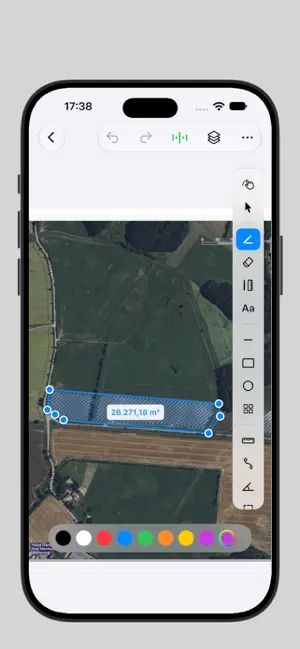
About PlanMeasure
Turn any floor plan, blueprint, site map, or aerial photo into a precision measuring tool. Import a plan from Files, Photos, or directly from Apple Maps, set the scale with two taps on a known reference, and then measure every distance, area, and angle without leaving your iPad or iPhone. CALIBRATE ONCE, MEASURE FOREVER PlanMeasure works on any image. Drop in a PDF blueprint, a photo of a printed plan, or pull a satellite view straight from the map. Tap two points on a known reference (a door, a parking space, a property edge), enter the real-world length, and every following measurement is calibrated to the same scale. EVERYTHING YOU NEED TO MEASURE • Ruler — tap two points, see the distance instantly with unit-correct labels • Polyline — measure complex paths and chained distances point by point • Area — trace a polygon, get the total area with Shoelace-formula precision • Angle — tap three points to measure any angle, with live arc preview • Protractor — drop a draggable, rotatable protractor anywhere on the plan • Apple Pencil ruler — draw straight lines along the native iOS ruler ANNOTATE WITHOUT LEAVING THE PLAN Add lines, rectangles, ellipses, freehand sketches, and industry-standard symbols (furniture, machinery, solar arrays) directly on your plan. Organize them in layers — show, hide, or fade individual layers as needed. The wipe-eraser carves through anything (drawings, symbols, measurements) with clean masking, not destructive deletes. BUILT FOR REAL WORK PlanMeasure is the tool architects, builders, solar installers, surveyors, landscapers, and real estate professionals use on site: • Quick wall-to-wall checks during a survey • Solar panel area calculations on satellite imagery • Square footage estimates for offers and quotes • Site distance planning for landscaping • Furniture placement on existing floor plans EXPORT & SHARE Export your annotated plan as PDF or PNG with a clean footer showing scale, date, and project name. Send it via Mail, Files, AirDrop — or feed it into your usual workflow. PRIVACY FIRST Your projects stay on your device by default. iCloud sync is opt-in during onboarding — you decide whether your plans live only on this iPad/iPhone or sync between your devices via your private iCloud account. No analytics, no third-party tracking, no servers in the middle. FREE TIER Start for free with up to 3 projects. Unlock unlimited projects, PDF and PNG export, and all advanced annotation features with PlanMeasure Pro (subscription, cancel anytime). WHAT'S INCLUDED • Multi-project organization with search • Unlimited measurement annotations per project • Layer-based annotation stack • Undo / redo everywhere • Units: meters, centimeters, millimeters, feet, inches, yards, miles • Universal iPad + iPhone, designed for Apple Pencil and finger input • Optional iCloud sync (no third-party cloud) • Localized: English, German, French, Spanish, Italian, Portuguese, Arabic, Danish Privacy Policy: https://planmeasure.nordicdatahub.de/en/privacy-app.html Terms of Use: https://planmeasure.nordicdatahub.de/en/terms.html LICENSED APPLICATION END USER LICENSE AGREEMENT: https://www.apple.com/legal/internet-services/itunes/dev/stdeula/
What’s new
Version 1.2.3 · Updated October 15, 2026
• Transparent PNG images on layers stay transparent • Layers can be moved up and down • Only the active layer is edited; images can be tapped and positioned with the select tool • Images on higher layers cover drawings below them, in the export too • Calibration can be deselected again on iPhone
App privacy
The developer, Niklaus Olsen, reported these privacy practices to Apple.
Data Not Collected
The developer does not collect any data from this app.
Alternatives to PlanMeasure
Looking for apps like PlanMeasure? Here are 6 similar apps on the App Store. The highest rated is PlanMeasure Takeoff (5.0/5), and all 6 are free to download.
-
 PlanMeasure Takeoff
5.0
PlanMeasure Takeoff
5.0
-
 ScaleTap: PDF Plan Measure
5.0
ScaleTap: PDF Plan Measure
5.0
-
 PlanTape: Blueprint Measure
-
 DraftPlanar: PDF Plan Viewer
5.0
DraftPlanar: PDF Plan Viewer
5.0
-
 PlanBridge: Measure PDF Plans
5.0
PlanBridge: Measure PDF Plans
5.0
-
 Takeoff Pro
| App | Rating | Price | Last updated | Compare |
|---|---|---|---|---|
| PlanMeasure | – | Free | October 15, 2026 | |
| PlanMeasure Takeoff | 5.0 / 5 (2) | Free | Oct 15, 2026 | Compare |
| ScaleTap: PDF Plan Measure | 5.0 / 5 (1) | Free | Sep 17, 2026 | Compare |
| PlanTape: Blueprint Measure | – | Free | Oct 26, 2026 | Compare |
| DraftPlanar: PDF Plan Viewer | 5.0 / 5 (2) | Free | Oct 24, 2026 | Compare |
| PlanBridge: Measure PDF Plans | 5.0 / 5 (9) | Free | Oct 27, 2026 | Compare |
| Takeoff Pro | – | Free | Jan 16, 2026 | Compare |
Compare PlanMeasure with the top alternatives: ratings, updates, ASO score and keyword gaps →