

Auto Motion: Video Maker
Pixaro Studio Graphics & Design iPhoneiPadiPod touch
Auto Motion: Video Maker is a free Graphics & Design app for iPhone and iPad by Pixaro Studio. Requires iOS 18.6. Updated October 28, 2026.
- Price
- Free
- on the App Store
- Size
- 36 MB
- Age 4+
- Updated
- Oct 28
- 2026 · v1.0.1
Screenshots


About Auto Motion: Video Maker
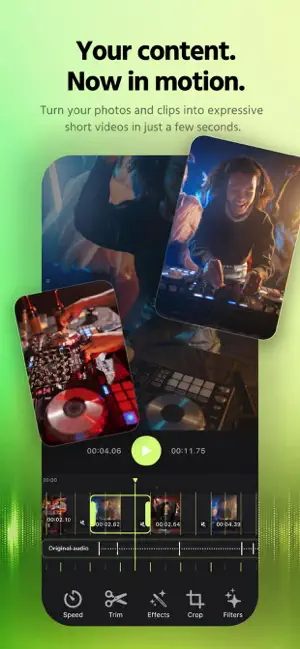
AUTO MOTION — automatic video editing. Turn your iPhone photos and videos into a ready-to-share vertical clip — without manual cutting, endless rearranging, or trying to hit every beat by eye. Choose your photos and videos, add music — Auto Motion analyzes the track and automatically edits your footage to its rhythm. The app detects the tempo, musical accents, and changes in energy, then finds the best moments in your original videos and arranges your clips so the visuals move with the music. This is more than a slideshow or a random cut. Auto Motion looks for the most expressive moments in your videos, determines where cuts work best, and turns your footage into a cohesive video that’s ready to share. Music changes the edit Changed the track? You don’t have to start over. Auto Motion can rebuild the edit around the new music — adjusting clip lengths, cut points, and the overall pace to match the new track. Calm music — smoother editing. An energetic track — more movement and more frequent cuts. A strong beat — cuts aim to land on musical accents. You control the result Automatic editing is only the beginning. After generation, open the editor and fine-tune the moments you want: trim clips, change their order, replace footage, adjust transitions, and more. Get started in just a few seconds: Photos & Videos → Music → Auto Motion → Ready-to-share clip. Built for vertical content, Auto Motion is perfect for TikTok, Instagram Reels, and YouTube Shorts. Add multiple videos, include photos, choose your music, and get an edit you don’t have to build from scratch. Auto Motion — music sets the rhythm. You set the mood. Not all features are available without a subscription. Basic automatic editing is available to try, while advanced tools, scenarios, and features are unlocked with a subscription. Privacy Policy: https://ios-dev-rv.github.io/pixaro-studio-website/apps/motion-site/privacy.html Terms of Use: https://www.apple.com/legal/internet-services/itunes/dev/stdeula/
What’s new
Version 1.0.1 · Updated October 28, 2026
minor updates
App privacy
The developer, Pixaro Studio, reported these privacy practices to Apple.
Data Used to Track You
The following data may be used to track you across apps and websites owned by other companies:
- Identifiers: Device ID
Data Not Linked to You
The following data, which may be collected but is not linked to your identity, may be used for the following purposes:
- Identifiers: Device ID
Used for: Analytics
Alternatives to Auto Motion: Video Maker
Looking for apps like Auto Motion: Video Maker? Here are 6 similar apps on the App Store. The highest rated is Makaron (5.0/5), and all 6 are free to download.
-
 Makaron
5.0
Makaron
5.0
-
 Photo Editor & AI Video Maker
4.7
Photo Editor & AI Video Maker
4.7
-
 VidWing: Video Editor & Maker
5.0
VidWing: Video Editor & Maker
5.0
-
 SpeiVive – AI Photo Restore
4.8
SpeiVive – AI Photo Restore
4.8
-
 Vexa AI: AI Video Generator
3.0
Vexa AI: AI Video Generator
3.0
-
 Beads Art
| App | Rating | Price | Last updated | Compare |
|---|---|---|---|---|
| Auto Motion: Video Maker | – | Free | October 28, 2026 | |
| Makaron | 5.0 / 5 (1) | Free | Aug 25, 2026 | Compare |
| Photo Editor & AI Video Maker | 4.7 / 5 (6) | Free | Oct 6, 2026 | Compare |
| VidWing: Video Editor & Maker | 5.0 / 5 (2) | Free | Oct 15, 2026 | Compare |
| SpeiVive – AI Photo Restore | 4.8 / 5 (12) | Free | Oct 22, 2026 | Compare |
| Vexa AI: AI Video Generator | 3.0 / 5 (2) | Free | Aug 27, 2026 | Compare |
| Beads Art | – | Free | Oct 25, 2026 | Compare |