

Photo Editor & AI Video Maker
Oya Technology HK Ltd Graphics & Design iPhoneiPadiPod touch
Photo Editor & AI Video Maker is a free Graphics & Design app for iPhone and iPad by Oya Technology HK Ltd. Rated 4.7/5 from 6 ratings. Requires iOS 16.
- Rating
- 4.7
- 6 ratings
- Price
- Free
- on the App Store
- Size
- 83 MB
- Age 4+
- Updated
- Oct 6
- 2026 · v1.1.3
Screenshots


About Photo Editor & AI Video Maker
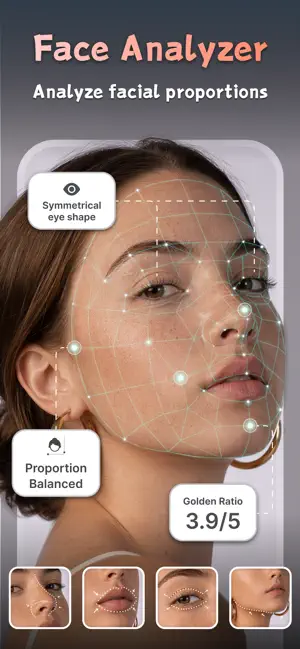
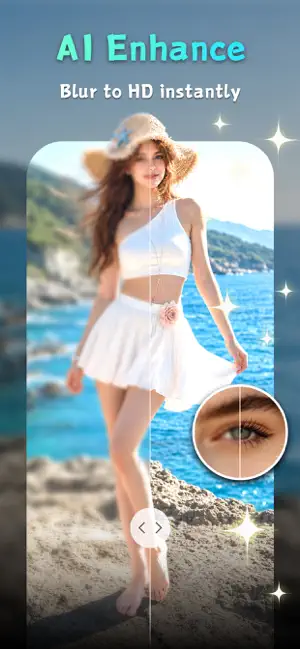
An AI photo editor with a new AI video experience for turning still photos into moving creations. Start with Dance AI: upload a portrait, selfie, pet photo, or favorite picture, choose a dance or motion template, and create an AI dance video from a photo. Then keep editing the same look with AI photo templates, retouch, enhance, object eraser, background tools, and creative portrait styles. AI VIDEO & DANCE AI - AI Dance Video: turn a photo into a short dance clip with realistic motion. - Photo to Video: animate selfies, portraits, pets, old photos, and favorite moments. - Image to Video Templates: use motion styles to create fast AI videos. - Animate Photo: bring a still picture to life without complex editing steps. - AI Video Maker: create fun clips from one image, then save and share them. - Motion Templates: try dance, pose, portrait, and video effects. This app is built for people who want a quick AI video hook without losing a full photo editing workflow. Your video starts from a photo, and your photo can keep improving after the video is made. AI PHOTO EDITOR & BEAUTY TEMPLATES Use it as your everyday AI photo editor: - AI Templates: try beauty, portrait, profile, fashion, hairstyle, and aesthetic looks. - AI Retouch: smooth small imperfections while keeping portraits natural. - AI Enhance: improve clarity, sharpen details, and make blurry photos cleaner. - Object Eraser: remove unwanted people, objects, clutter, or distractions. - Background Editing: clean up backgrounds, change the mood, or focus on the subject. - Old Photo Restore: refresh faded memories and improve low-quality images. - Text-to-Edit: describe the change you want and let AI help. - Partial Edit: brush the area you want to adjust. - Hairstyle & Makeover: preview new looks before changing your real style. - Portrait Studio: create profile pictures, headshots, and polished personal photos. AI TEMPLATES FOR EVERY STYLE Explore creative templates for different use cases: - Dance AI clips from selfies - Animated portrait videos - Profile pictures and avatars - Professional headshots - Beauty retouch photos - Aesthetic photo edits - Hairstyle previews - Outfit and makeover looks - Old photo restoration - Clean product-style photos - Background cleanup - High-definition photo enhancement WHO IS THIS APP FOR? It is for creators who want fresh AI videos, people who want better portraits, users who need fast photo edits, and anyone who likes trying new AI templates. Make an AI dance video when you want motion. Use AI retouch when a selfie needs polish. Try AI enhance when a picture looks blurry. Use object eraser when something distracts from the subject. FAQ Can it make an AI dance video from a photo? Yes. Upload a photo and use Dance AI or AI video templates. Can I still use it as an AI photo editor? Yes. The app remains focused on AI photo editing, beauty templates, retouch, enhancement, object eraser, and portrait styles. What is the difference between AI video and AI photo templates? AI video templates turn a photo into motion. AI photo templates create still edits such as portraits, headshots, hairstyles, and aesthetic styles. Can I edit after creating a video? You can keep using the photo tools to improve portraits, selfies, and source images. SUBSCRIPTION INFORMATION The app offers an optional auto-renewing subscription for premium features. Payment is charged to your Apple ID account at confirmation. Subscriptions auto-renew unless cancelled at least 24 hours before the end of the current period. You can manage subscriptions in Apple ID account settings. Privacy Policy: https://chisel-hour-d57.notion.site/Privacy-Policy-33445364fcf18000934bcf70fcff2d32 Terms of Use: https://chisel-hour-d57.notion.site/Terms-of-Service-33445364fcf1807fb84ed0192376340d
Ratings & reviews
4.7
6 ratings
What’s new
Version 1.1.3 · Updated October 6, 2026
Feature optimization and bug fixes.
App privacy
The developer, Oya Technology HK Ltd, reported these privacy practices to Apple.
Data Used to Track You
The following data may be used to track you across apps and websites owned by other companies:
- Identifiers: Device ID
Data Not Linked to You
The following data, which may be collected but is not linked to your identity, may be used for the following purposes:
- Identifiers: Device ID
- Usage Data: Product Interaction
- Diagnostics: Crash Data
Used for: Analytics, App Functionality
Alternatives to Photo Editor & AI Video Maker
Looking for apps like Photo Editor & AI Video Maker? Here are 6 similar apps on the App Store. The highest rated is Makaron (5.0/5), and all 6 are free to download.
-
 Makaron
5.0
Makaron
5.0
-
 Auto Motion: Video Maker
-
 SpeiVive – AI Photo Restore
4.8
SpeiVive – AI Photo Restore
4.8
-
 Seamless Pattern Studio
-
 Object Remover - AI Eraser
4.4
Object Remover - AI Eraser
4.4
-
 Face AI - Face Photo Editor
5.0
Face AI - Face Photo Editor
5.0
| App | Rating | Price | Last updated | Compare |
|---|---|---|---|---|
| Photo Editor & AI Video Maker | 4.7 / 5 (6 ratings) | Free | October 6, 2026 | |
| Makaron | 5.0 / 5 (1) | Free | Aug 25, 2026 | Compare |
| Auto Motion: Video Maker | – | Free | Oct 28, 2026 | Compare |
| SpeiVive – AI Photo Restore | 4.8 / 5 (12) | Free | Oct 22, 2026 | Compare |
| Seamless Pattern Studio | – | Free | Sep 17, 2026 | Compare |
| Object Remover - AI Eraser | 4.4 / 5 (5) | Free | Aug 5, 2026 | Compare |
| Face AI - Face Photo Editor | 5.0 / 5 (2) | Free | Dec 7, 2025 | Compare |