

Floor Plan Studio
Denis Berton Productivity iPhoneiPadiPod touch
Floor Plan Studio is a free Productivity app for iPhone and iPad by Denis Berton. Requires iOS 26.0. Updated October 19, 2026.
- Price
- Free
- on the App Store
- Size
- 46 MB
- Age 4+
- Updated
- Oct 19
- 2026 · v1.0.1
Screenshots



About Floor Plan Studio
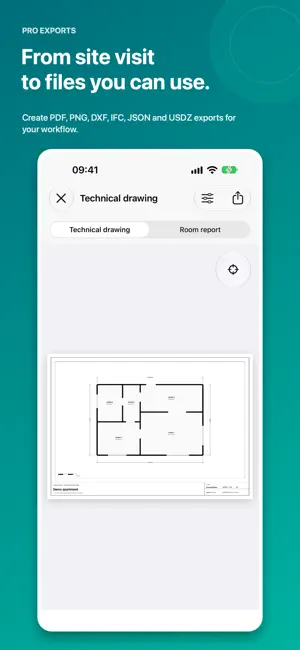
Turn a room scan into a clear 2D floor plan, an inspectable CAD 3D model, and an optional detailed Real 3D capture—privately on your iPhone. Floor Plan Studio is built for surveyors, architects, designers, renovation teams, and anyone who needs a practical spatial record without uploading camera or LiDAR data to a service. CAPTURE THE SPACE • Scan one room or coordinate a multi-room layout with Apple RoomPlan. • Choose Room Scan for a measured 2D plan and clean CAD 3D. • Choose Real 3D for detailed LiDAR surfaces with an optional captured-color result. • Create a Photo Tour from separate directional photographs and linked viewpoints. INSPECT AND REFINE • Review dimensions in a navigable 2D plan. • Select walls and furniture in CAD 3D. • Verify or correct furniture measurements, move and rotate objects, add spacing dimensions, and undo the last edit. • Reopen saved scans, add rooms, and keep project notes and an optional map position. EXPORT FOR YOUR WORKFLOW • Create PDF technical drawings and PNG plan images. • Export metric DXF, IFC 4, normalized JSON, and USDZ. • Import compatible DXF and Floor Plan Studio IFC files. • Share or restore complete .floorplanstudio project packages. • Open USDZ in AR Quick Look and compatible Apple spatial workflows. PRIVATE BY DESIGN Room, camera, LiDAR, photo, note, and optional location data stay on your device unless you explicitly export or share a file. Floor Plan Studio does not require an account or cloud upload. DEVICE SUPPORT Room Scan and neutral Real 3D require a LiDAR-equipped iPhone Pro. Detailed color Real 3D requires iPhone 15 Pro or a newer Pro model. Photo Tour, the Library, imports, exports, and saved-project viewing remain available on supported non-LiDAR iPhones. IMPORTANT LiDAR and RoomPlan measurements are estimates. Always verify dimensions before construction, legal, safety-critical, or purchasing decisions. Floor Plan Studio is not a substitute for a certified survey or professional judgment.
What’s new
Version 1.0.1 · Updated October 19, 2026
Floor Plan Studio is now available in Italian, German, French, Spanish and Brazilian Portuguese, including guidance, controls, permissions and technical report text.
App privacy
The developer, Denis Berton, reported these privacy practices to Apple.
Data Linked to You
The following data, which may be collected and linked to your identity, may be used for the following purposes:
- Location: Coarse Location
- Identifiers: Device ID
- Usage Data: Product Interaction, Other Usage Data
- Diagnostics: Crash Data, Other Diagnostic Data
Used for: Analytics, App Functionality
Alternatives to Floor Plan Studio
Looking for apps like Floor Plan Studio? Here are 6 similar apps on the App Store. The highest rated is TTS-plus: Text to Speech 2026 (4.0/5), and all 6 are free to download.
-
 Jause Plano
-
 Text Scanner - Text From Photo
1.0
Text Scanner - Text From Photo
1.0
-
 TTS-plus: Text to Speech 2026
4.0
TTS-plus: Text to Speech 2026
4.0
-
 ACTA Obra
-
 Draw Floor Plan: Design Studio
1.0
Draw Floor Plan: Design Studio
1.0
-
 Voice Recorder Audio Memos
3.7
Voice Recorder Audio Memos
3.7
| App | Rating | Price | Last updated | Compare |
|---|---|---|---|---|
| Floor Plan Studio | – | Free | October 19, 2026 | |
| Jause Plano | – | Free | Oct 1, 2026 | Compare |
| Text Scanner - Text From Photo | 1.0 / 5 (2) | Free | Mar 20, 2026 | Compare |
| TTS-plus: Text to Speech 2026 | 4.0 / 5 (4) | Free | Feb 25, 2026 | Compare |
| ACTA Obra | – | Free | Oct 15, 2026 | Compare |
| Draw Floor Plan: Design Studio | 1.0 / 5 (1) | Free | Oct 18, 2026 | Compare |
| Voice Recorder Audio Memos | 3.7 / 5 (7) | Free | Aug 21, 2026 | Compare |
Compare Floor Plan Studio with the top alternatives: ratings, updates, ASO score and keyword gaps →