

Draw Floor Plan: Design Studio
Ron Modi Productivity iPhoneiPadiPod touch
Draw Floor Plan: Design Studio is a free Productivity app for iPhone and iPad by Ron Modi. Rated 1.0/5 from 1 ratings. Requires iOS 15.0.
- Rating
- 1.0
- 1 ratings
- Price
- Free
- on the App Store
- Size
- 77 MB
- Age 4+
- Updated
- Oct 9
- 2026 · v2.0.27
Screenshots


About Draw Floor Plan: Design Studio
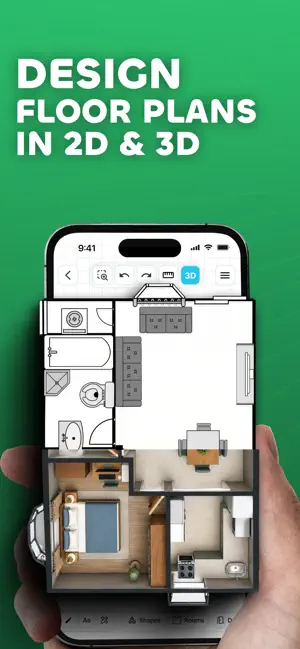
Draw Floor Plan App by VebBuilders is an easy-to-use floor plan creator, floor planner, and home design app for creating house plans, room layouts, interior designs, and property layouts. Draw walls, add furniture, customize your space, measure dimensions, and explore your design with an interactive 3D walkthrough. Whether you're planning a new home, designing an interior, remodeling a room, or creating a professional floor plan, Draw Floor Plan gives you the tools to bring your ideas to life. CREATE FLOOR PLANS Create detailed house plans, home floor plans, room layouts, and interior layouts with simple drawing and editing tools. - Draw walls, lines, rectangles, and circles - Add doors, windows, stairs, furniture, and other objects - Add text and labels - Move, resize, rotate, and edit objects - Use grid and snapping for accurate placement - Measure distances while designing - Customize your canvas and workspace CUSTOMIZE WALLS - Design walls to match your actual space. Adjust wall height, thickness, color, and style. Create accurate room boundaries and flexible floor plan layouts. 2D & 3D FLOOR PLAN DESIGN - Turn your 2D floor plan into 3D and visualize rooms, walls, furniture, and objects from different angles. Use the interactive 3D walkthrough to explore your design. - Create realistic renders of your design with detailed lighting, materials, furniture, and camera views. DESIGN ROOMS & INTERIORS - Create realistic room designs, home layouts, and interior designs using ready-to-use objects. - Add beds, sofas, tables, chairs, cabinets, doors, windows, stairs, and more. Resize, rotate, move, and arrange objects to create your ideal room layout. CREATE CUSTOM OBJECTS - Build your own furniture, fixtures, equipment, or other elements and reuse them across your projects. MEASURE & PLAN WITH PRECISION Use built-in tools to create accurate layouts: - Measurement tools - Grid & snapping - Compass - Level - Object positioning - Canvas customization POWERFUL DRAWING TOOLS - Free Draw - Line, Rectangle & Circle - Text & labels - Eraser - Select & Move - Object editing - Grid and measurement tools SAVE, SYNC & MANAGE PROJECTS Keep your floor plans organized and accessible. - Create and manage projects - Save and sync projects to the cloud - Continue across sessions and supported devices MOBILE & WEB FLOOR PLAN APP - Create and manage your designs across mobile and web. Start a house plan on your phone and continue on a larger desktop workspace. EXPORT, PRINT & SHARE - Export floor plans and house plans as high-quality PNG images or PDF files. Print or share designs with clients, architects, builders, contractors, teams, or friends. - HD and watermark-free export options are available. LEARN WITH INTERACTIVE TUTORIALS - Step-by-step interactive tutorials help you learn the tools, create rooms, add objects, edit layouts, and build your first floor plan with confidence. MADE FOR EVERY PROJECT - Perfect for homeowners, architects, interior designers, builders, contractors, property professionals, students, freelancers, and DIY home planners. - Use Draw Floor Plan for home design, house planning, interior design, room planning, renovation, remodeling, and architectural layouts. FLEXIBLE PLANS Choose the option that fits your needs. - Single Plan Pass - Get premium access for one floor plan with a one-time purchase. - Creator & Pro - Get more floor plans, premium objects, custom objects, advanced features, and export options for larger projects. From a simple room sketch to a complete 3D house plan, Draw Floor Plan gives you everything you need to draw, design, plan, and visualize your space. Start creating your floor plan today. Draw Floor Plan by VebBuilders Need help? Contact: [email protected] - Privacy Policy: https://drawfloorplan.app/privacy - Terms of Use: https://drawfloorplan.app/terms
What’s new
Version 2.0.27 · Updated October 9, 2026
Whats New: • Introducing 3D Render - Give your floor plans a more realistic look with high-quality renders. Customize your view, lighting, and visual details to create the perfect presentation of your space. • Introducing 3D Preview & Walkthrough - Bring your 2D floor plans to life in 3D and experience your space from a whole new perspective. Explore your layout from different angles, view your created rooms and objects in three dimensions, and move through your space with the interactive walkthrough experience to get a better understanding of how everything comes together. • Introducing Single Plan Pass - Get premium access for one floor plan with a one-time purchase, including ad-free use, full access to objects, HD image & PDF exports, and watermark-free exports for 7 days. • Cross-Platform Access - Draw Floor Plan is now available on the web, allowing you to access and manage your projects across mobile and desktop devices. • New Wall Drawing Tool - Draw and customize walls with greater flexibility. Adjust wall height, thickness, color, and style even after drawing. • Introducing Creator & Pro Plans - Choose from new subscription plans with more floor plans, custom objects, premium features, ad-free use, and advanced export options. • Improved Workflow & Navigation - The app flow has been redesigned to make creating and managing projects faster and more intuitive. Tools positioning are now easier to access, interactions feel more natural, and the overall journey from idea to final layout is significantly improved. • Performance Enhancements - We’ve optimised the app for better speed and stability. Drawing, editing, and navigation are now faster and more fluid across all devices. • Bug Fixes & Stability Improvements - Multiple issues have been resolved to ensure a more reliable experience with fewer interruptions during your workflow.
App privacy
The developer, Ron Modi, reported these privacy practices to Apple.
Data Linked to You
The following data, which may be collected and linked to your identity, may be used for the following purposes:
- Identifiers: Device ID
- Contact Info: Email Address, Name
- User Content: Customer Support, Other User Content
Used for: Third-Party Advertising, Developer’s Advertising or Marketing, Analytics, Product Personalization, App Functionality
Alternatives to Draw Floor Plan: Design Studio
Looking for apps like Draw Floor Plan: Design Studio? Here are 6 similar apps on the App Store. The highest rated is Draw Floor Plan, 3D Templates (4.8/5), and all 6 are free to download.
-
 Home Design : Draw Floor Plan
1.0
Home Design : Draw Floor Plan
1.0
-
 Draw Floor Plan, 3D Templates
4.8
Draw Floor Plan, 3D Templates
4.8
-
 SecondFloor
4.2
SecondFloor
4.2
-
 AI Floor Plan Creator - ARoom
4.4
AI Floor Plan Creator - ARoom
4.4
-
 Scribe Sketch
1.0
Scribe Sketch
1.0
-
 OrthoGraph – Floor Plan
2.4
OrthoGraph – Floor Plan
2.4
| App | Rating | Price | Last updated | Compare |
|---|---|---|---|---|
| Draw Floor Plan: Design Studio | 1.0 / 5 (1 rating) | Free | October 9, 2026 | |
| Home Design : Draw Floor Plan | 1.0 / 5 (1) | Free | Jul 31, 2026 | Compare |
| Draw Floor Plan, 3D Templates | 4.8 / 5 (36) | Free | Jul 6, 2026 | Compare |
| SecondFloor | 4.2 / 5 (17) | Free | Mar 17, 2026 | Compare |
| AI Floor Plan Creator - ARoom | 4.4 / 5 (11) | Free | Oct 9, 2026 | Compare |
| Scribe Sketch | 1.0 / 5 (3) | Free | Jun 18, 2026 | Compare |
| OrthoGraph – Floor Plan | 2.4 / 5 (9) | Free | Oct 12, 2026 | Compare |