

blarblar: Quick Notes Widget
ZIPPERS Productivity iPhoneiPadiPod touch
blarblar: Quick Notes Widget is a free Productivity app for iPhone and iPad by ZIPPERS. Rated 4.0/5 from 1 ratings. Requires iOS 16.4.
- Rating
- 4.0
- 1 ratings
- Price
- Free
- on the App Store
- Size
- 47 MB
- Age 4+
- Updated
- Nov 14
- 2026 · v2.1.3
Screenshots

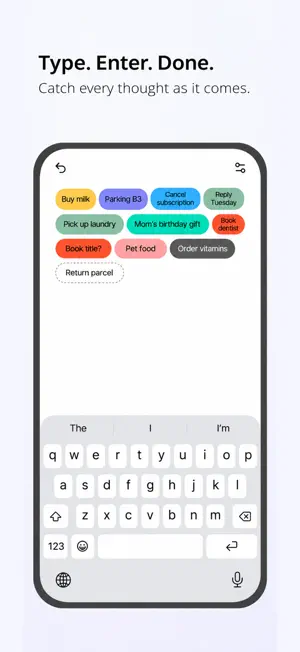


About blarblar: Quick Notes Widget
Wait, what was I about to write? And when am I ever going to clear out all these notes? “Type it, hit enter. Hold to delete. That’s the whole thing.” blarblar is a widget that keeps one-line notes. A grocery list, an idea that showed up uninvited, the call you have to make this afternoon. Write it the way you thought it, press enter, and a small pill lands on your home screen. [A memo widget, and nothing more] ・ No button to hunt for. Enter is the whole interface. ・ Pour out one thought after another without stopping. ・ Colors pick themselves. Nothing to choose. ・ Want to change one? Just tap the pill. [Right there on your home screen] Your notes are visible without opening the app. Wake the screen and what you have to do, what you have to buy — it’s already there. Small, medium and large widgets are all supported. [Clearing them out is just as easy] Press and hold a note and it slowly fades away. No more tapping DELETE over and over. Deleted the wrong one? The undo button brings it right back. [You’ll probably like this if] ・ You’ve forgotten a thought while waiting for a notes app to open ・ You rebuild the same grocery list every week ・ Folders and tags wore you out ・ Your notes pile up faster than you can clear them ・ A to-do app feels like too much for “buy milk” ・ You’d rather glance at a widget than open an app [Unlock unlimited] Five notes are free. Want to hold more thoughts? One payment, one time. Not a subscription. Terms of Use (EULA): https://www.apple.com/legal/internet-services/itunes/dev/stdeula Privacy Policy: https://iamheaming.notion.site/Privacy-Policy-3c857bfee36c80d3b133dd2e8424a9ef
What’s new
Version 2.1.3 · Updated November 14, 2026
2.1.3 Update:D • New themes are here Give your notes a fresh look with Sweet Potato and Bubble Tea. • More languages are now supported We’ve added German, Simplified and Traditional Chinese, French, Spanish, Brazilian Portuguese, and Italian. • You can now change your note colors Tap "Sort·Pin·Color" at the top, then tap a note to choose your favorite color.
App privacy
The developer, ZIPPERS, reported these privacy practices to Apple.
Data Not Linked to You
The following data, which may be collected but is not linked to your identity, may be used for the following purposes:
- Purchases: Purchase History
- Identifiers: User ID
Used for: App Functionality
Alternatives to blarblar: Quick Notes Widget
Looking for apps like blarblar: Quick Notes Widget? Here are 6 similar apps on the App Store. The highest rated is Clips: Work Photo Camera (5.0/5), and all 6 are free to download.
-
 Clips: Work Photo Camera
5.0
-
 Habit Tracker: HabitBead
5.0
-
 Wheneri: Task Tracker
4.7
-
 KeepNest: Screenshot Organizer
-
 Nemos: Second Brain & Memos
5.0
-
 Timely: Daily Planner Todo
5.0
| App | Rating | Price | Last updated | Compare |
|---|---|---|---|---|
| blarblar: Quick Notes Widget | 4.0 / 5 (1 rating) | Free | November 14, 2026 | |
| Clips: Work Photo Camera | 5.0 / 5 (9) | Free | Nov 17, 2026 | Compare |
| Habit Tracker: HabitBead | 5.0 / 5 (1) | Free | Nov 15, 2026 | Compare |
| Wheneri: Task Tracker | 4.7 / 5 (81) | Free | Nov 17, 2026 | Compare |
| KeepNest: Screenshot Organizer | – | Free | Nov 18, 2026 | Compare |
| Nemos: Second Brain & Memos | 5.0 / 5 (4) | Free | Nov 5, 2026 | Compare |
| Timely: Daily Planner Todo | 5.0 / 5 (4) | Free | Nov 18, 2026 | Compare |