

LumiDoc:PDF Scanner
Ashlee Heiston Utilities iPhoneiPadiPod touch
LumiDoc:PDF Scanner is a free Utilities app for iPhone and iPad by Ashlee Heiston. Rated 3.5/5 from 26 ratings. Requires iOS 15.0. Updated October 26, 2026.
- Rating
- 3.5
- 26 ratings
- Price
- Free
- on the App Store
- Size
- 40 MB
- Age 4+
- Updated
- Oct 26
- 2026 · v1.2.4
Screenshots


About LumiDoc:PDF Scanner
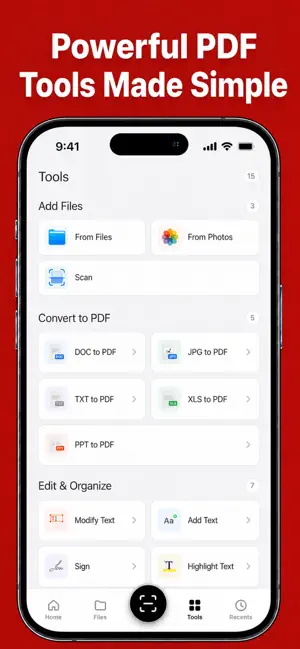
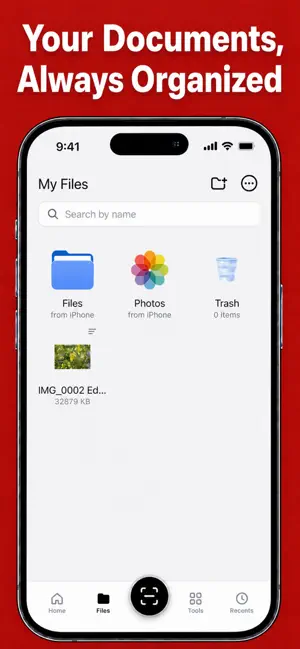
LumiDoc is an all-in-one document scanner, PDF converter, and document editor designed to make everyday document work faster and easier. Scan paperwork, convert common file formats to PDF, recognize text, edit pages, fill forms, add signatures, and keep documents organized directly on your iPhone. SCAN DOCUMENTS Turn your iPhone into a convenient portable document scanner. • Scan receipts, contracts, notes, IDs, forms, and other paperwork • Automatically detect document edges • Crop, rotate, and adjust scanned pages • Improve the appearance and readability of scans • Import existing images from your photo library • Combine multiple scanned pages into one document CONVERT FILES TO PDF Create PDF documents from common file formats and images. • Convert Word documents to PDF • Convert Excel spreadsheets to PDF • Convert PowerPoint presentations to PDF • Convert TXT files to PDF • Convert JPG and other supported images to PDF • Create single-page or multi-page PDF documents • Preview documents before saving or sharing EDIT AND ORGANIZE PDF FILES Review documents and make changes without printing them first. • Add and modify text • Add images to document pages • Highlight important information • Add annotations, marks, and drawings • Hide sensitive or unwanted page content • Reorder, rotate, or remove pages • Merge multiple documents into one PDF • Rename and organize files • Export and share completed documents FILL AND SIGN DOCUMENTS Complete forms and sign documents directly from your device. • Fill in PDF forms • Add text to blank fields • Create a handwritten signature • Import a signature image • Place, resize, and position signatures • Save and share completed documents OCR TEXT RECOGNITION Use optical character recognition to identify text in scanned pages and images. • Recognize printed text from scans • Extract useful text from images and PDF pages • Review recognized content • Turn printed information into reusable digital text • Reduce the need to type content manually BUILT FOR EVERYDAY DOCUMENT WORK LumiDoc is designed for professionals, small businesses, and anyone who regularly works with documents. Use it to digitize paperwork, convert files, complete forms, review documents, sign agreements, save important records, and share finished PDFs wherever you are. SUBSCRIPTION INFORMATION LumiDoc may offer auto-renewable subscription plans that provide access to premium features. Available plans, durations, prices, and any trial offers are displayed in the app before purchase. Payment is charged to your Apple Account after confirmation. Subscriptions automatically renew unless canceled at least 24 hours before the end of the current billing period. You can manage or cancel your subscription in your Apple Account settings. Any unused portion of a free trial, if offered, may be forfeited when a subscription is purchased. Download LumiDoc and simplify your document workflow today. Terms of Use: https://docs.google.com/document/d/e/2PACX-1vRLuRnXAGOVz4ZhtkM2BE9ouKBHYvNPD9TYfh8AKUP8CBwTjcT7LZkKVEaVQMXSXvVi4RvGxvsbtiwJ/pub Privacy Policy: https://docs.google.com/document/d/e/2PACX-1vRhjlxvafc4ddNw8NoxgLqwYsPmew5-tSEyt2IjuNHHzNJJ1sny-7Em3s9Iidj9jYmUGVFpUYIN6R6X/pub Contact Us: [email protected]
Ratings & reviews
3.5
26 ratings
What’s new
Version 1.2.4 · Updated October 26, 2026
Bug fixes and performance improvements
App privacy
The developer, Ashlee Heiston, reported these privacy practices to Apple.
Data Used to Track You
The following data may be used to track you across apps and websites owned by other companies:
- Identifiers: Device ID
Data Not Linked to You
The following data, which may be collected but is not linked to your identity, may be used for the following purposes:
- Usage Data: Product Interaction, Other Usage Data
- Diagnostics: Crash Data, Performance Data, Other Diagnostic Data
- Other Data: Other Data Types
- User Content: Photos or Videos
- Identifiers: Device ID
Used for: Analytics, App Functionality
Alternatives to LumiDoc:PDF Scanner
Looking for apps like LumiDoc:PDF Scanner? Here are 6 similar apps on the App Store. The highest rated is Clean Ninja: Storage Cleaner (5.0/5), and all 6 are free to download.
-
 Clean Ninja: Storage Cleaner
5.0
-
 CleanUp Master:Storage Cleaner
4.6
-
 LiteGallery: Free Up Space
4.7
-
 Scanner & Editor: PDF Tools
4.5
-
 Clean Phone-AI Storage Cleaner
4.2
-
 Lumina: Photo Clean & Journal
3.3
| App | Rating | Price | Last updated | Compare |
|---|---|---|---|---|
| LumiDoc:PDF Scanner | 3.5 / 5 (26 ratings) | Free | October 26, 2026 | |
| Clean Ninja: Storage Cleaner | 5.0 / 5 (3) | Free | Oct 10, 2026 | Compare |
| CleanUp Master:Storage Cleaner | 4.6 / 5 (128) | Free | Oct 27, 2026 | Compare |
| LiteGallery: Free Up Space | 4.7 / 5 (67) | Free | Aug 22, 2026 | Compare |
| Scanner & Editor: PDF Tools | 4.5 / 5 (26) | Free | Aug 24, 2026 | Compare |
| Clean Phone-AI Storage Cleaner | 4.2 / 5 (47) | Free | Aug 5, 2026 | Compare |
| Lumina: Photo Clean & Journal | 3.3 / 5 (18) | Free | Jul 10, 2026 | Compare |