

OmniFrame: Video Recorder
Kien Nguyen Photo & Video iPhoneiPadiPod touch
OmniFrame: Video Recorder is a free Photo & Video app for iPhone and iPad by Kien Nguyen. Requires iOS 17.6. Updated September 8, 2026.
- Price
- Free
- on the App Store
- Size
- 8 MB
- Age 4+
- Updated
- Sep 8
- 2026 · v1.0
Screenshots

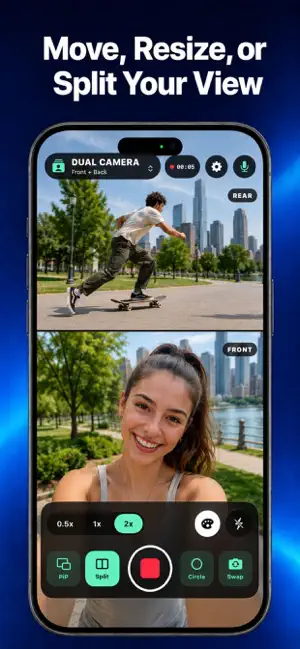


About OmniFrame: Video Recorder
Capture more in one take with OmniFrame, a video recorder built for creators who publish in more than one format. DUAL CAMERA Record the front and rear cameras together in one video. Keep the rear camera full screen with a movable picture-in-picture reaction, or switch to a clean split-screen layout. • Picture-in-Picture and Split layouts • Drag and resize the small camera • Rounded rectangle or circle PiP • Swap the front and rear cameras • Color filters, microphone control, flash, and zoom DUAL FORMAT Record once and create two ready-to-use videos from the same take: Landscape 16:9 and Portrait 9:16. Preview both results in a continuous loop, then keep either format or save both to your Library. • Landscape 16:9 for widescreen video • Portrait 9:16 for short-form video • 1080p and 4K recording • One recording, two separate output files LIBRARY Keep Dual Camera and Dual Format projects organized in separate tabs. Play, rename, share, download, or delete saved videos at any time. FREE Use every recording layout and tool. The Free Library stores up to three videos. Free downloads include an OmniFrame watermark, and interstitial ads may appear after recording and before downloading to Photos. OMNIFRAME PRO Unlock unlimited Library saves, remove interstitial ads, and download clean videos without watermarks with a single lifetime purchase. Camera and microphone recordings are processed on your device. OmniFrame does not upload your recorded video or audio to its advertising provider. Feature availability, including 0.5x zoom, flash, simultaneous cameras, and 4K, depends on the device hardware.
App privacy
The developer, Kien Nguyen, reported these privacy practices to Apple.
Data Used to Track You
The following data may be used to track you across apps and websites owned by other companies:
- Identifiers: Device ID
- Diagnostics: Crash Data
Data Linked to You
The following data, which may be collected and linked to your identity, may be used for the following purposes:
- Identifiers: Device ID
- Diagnostics: Crash Data
Used for: Third-Party Advertising
Alternatives to OmniFrame: Video Recorder
Looking for apps like OmniFrame: Video Recorder? Here are 6 similar apps on the App Store. The highest rated is AlterVault: Hidden Photo Vault (5.0/5), and all 6 are free to download.
-
 TwinLens: Dual Video Recorder
-
 AlterVault: Hidden Photo Vault
5.0
AlterVault: Hidden Photo Vault
5.0
-
 Video Splitter & Resizer
5.0
Video Splitter & Resizer
5.0
-
 Loop Cam: Self Timer Camera
4.2
Loop Cam: Self Timer Camera
4.2
-
 617 Camera: Cinematic Panorama
-
 Bicamly: Dual Camera
3.0
Bicamly: Dual Camera
3.0
| App | Rating | Price | Last updated | Compare |
|---|---|---|---|---|
| OmniFrame: Video Recorder | – | Free | September 8, 2026 | |
| TwinLens: Dual Video Recorder | – | Free | May 1, 2026 | Compare |
| AlterVault: Hidden Photo Vault | 5.0 / 5 (2) | Free | Oct 17, 2026 | Compare |
| Video Splitter & Resizer | 5.0 / 5 (1) | Free | Mar 13, 2025 | Compare |
| Loop Cam: Self Timer Camera | 4.2 / 5 (5) | Free | Oct 21, 2026 | Compare |
| 617 Camera: Cinematic Panorama | – | Free | Oct 18, 2026 | Compare |
| Bicamly: Dual Camera | 3.0 / 5 (2) | Free | Oct 10, 2026 | Compare |