

Loop Cam: Self Timer Camera
Vignesh Jayaprakash Photo & Video iPhoneiPadiPod touchApple Watch
Loop Cam: Self Timer Camera is a free Photo & Video app for iPhone and iPad by Vignesh Jayaprakash. Rated 4.2/5 from 5 ratings. Requires iOS 17.0.
- Rating
- 4.2
- 5 ratings
- Price
- Free
- on the App Store
- Size
- 193 MB
- Age 4+
- Updated
- Oct 21
- 2026 · v25
Screenshots


About Loop Cam: Self Timer Camera
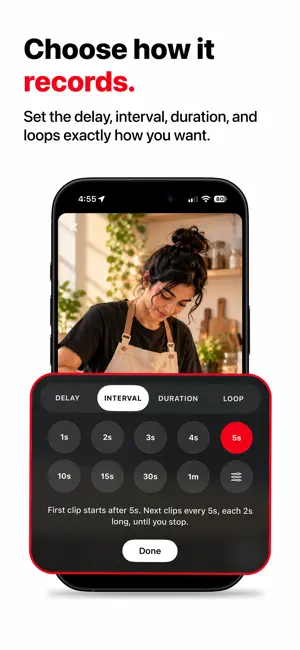
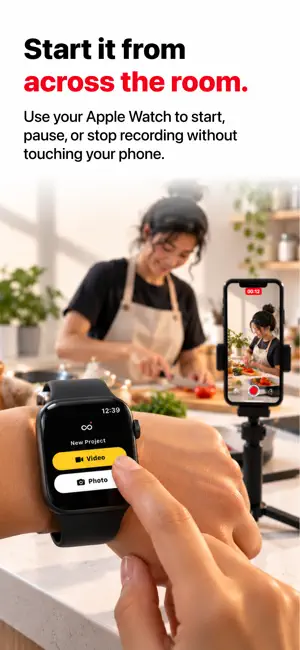
Shoot and Edit Content Without Constantly Touching Your Phone. Loop Cam is a creator-focused self timer camera, photo booth and video editor built for filming Reels, Shorts, mini vlogs, routines, tutorials, workouts, cooking videos, study sessions, and everyday moments. Instead of manually starting and stopping recordings over and over, Loop Cam automatically captures clips and photos based on your timing settings — then lets you edit everything right inside the app. Focus on creating instead of controlling the camera. Perfect for creators who film alone. KEY FEATURES*** Automatic Clip Recording Set your recording duration and delay time once. Loop Cam records clips automatically with pauses in between. Pause the countdown, skip the wait, or record instantly. Perfect for: Outfit transitions Cooking videos Study content Gym routines Daily vlogs Product showcases Desk setups DIY videos Timed Photo Capture — NEW Your personal photographer. Set a delay and a photo count, get in position, and Loop Cam shoots hands-free. Live Photos with motion Portrait shots with real depth blur RAW (DNG) capture Burst, volume-button shutter and double-tap capture Up to 48 MP — HEIF, JPEG or PNG Photos organized into per-project albums, saved to your library with location Apple Watch Remote — NEW Start, pause, skip and snap right from your wrist — with a live countdown and photo count on the watch. Voice Control Say "Record", "Capture" or "Pause" and stay in frame. Bluetooth clickers and AirPods shutter buttons work too. Every Aspect Ratio Create in 16:9, 9:16, 4:5 or 1:1. The camera, editor and export all match your ratio — perfectly framed for TikTok, Reels, Shorts, YouTube and Instagram. 16:9 projects get a full landscape recording experience. Built-In Video Editor Edit without leaving the app: Timeline editing with trim, split, reorder and snapping Clip transitions: Dissolve, Fade, Zoom, Slide, Wipe Text with outlines, caption bubbles and animations Image and video layers with 16 blend modes Masks, filters, speed control and voiceover Music and audio layers High quality export straight to Photos Hands-Free Filming Place your phone down and move naturally. No need to constantly walk back to tap record. Unlimited or Fixed Clip Sessions Choose how many clips you want to capture. Infinite recording mode Fixed clip count mode Creator Presets Quickly start with ready-made workflows: Daily Travel Cooking Study Custom Built-In Stickers Add creator-style stickers and overlays for your videos: Daily vlog Mini vlog Morning routine Study session Travel day Coffee run GRWM POV Weekend Memories Composition Overlays Frame every shot with grids, guides and a live level indicator. Clean & Minimal Interface Loop Cam is designed to stay simple and distraction-free so you can focus entirely on creating. BUILT FOR Content creators TikTok creators Reels creators YouTube Shorts creators Lifestyle vloggers Students Fitness creators Solo creators Small business owners Everyday memories WHY LOOP CAM? Most camera apps are designed like traditional cameras, and most editors make you switch apps. Loop Cam is designed around modern short-form content workflows — shoot hands-free, edit on a timeline, and export ready to post, all in one app. Whether you are filming transitions, mini vlogs, tutorials, routines, or daily life content, Loop Cam helps you create faster with less friction. Privacy Policy : https://www.getappstudio.com/privacy Terms of Use : https://www.apple.com/legal/internet-services/itunes/dev/stdeula/
Ratings & reviews
4.2
5 ratings
What’s new
Version 25 · Updated October 21, 2026
Auto Shorts: turn one landscape video into ready-made 9:16 shorts, right on your iPhone. Each cut picks a strong moment and is framed on the person or subject. Dual camera: every shot in portrait and landscape at once, each on its own timeline. Turn on Front camera to add a small selfie layer too. Frames for every shape: 44 new frames for 9:16, 16:9, 1:1 and 4:5. Effects: give any clip a slow Zoom In or Zoom Out, or a Fade In or Fade Out. Bin: deleted projects stay in the Bin for 30 days, so you can restore them. Add Clip: bring videos and photos from your library straight into the timeline. Continue Shooting: a card on Home takes you right back to your last project. A clearer Pro screen that shows what's free and what Pro adds. Plus fixes: exports use the quality you pick, clips record sound from the first take, voice control listens more reliably, and more.
App privacy
The developer, Vignesh Jayaprakash, reported these privacy practices to Apple.
Data Not Collected
The developer does not collect any data from this app.