

Live Translate: Subtitles, PDF
Jiangsu Xinghui Shuzhi Technology Co., Ltd Business iPhoneiPadiPod touch
Live Translate: Subtitles, PDF is a free Business app for iPhone and iPad by Jiangsu Xinghui Shuzhi Technology Co., Ltd. Requires iOS 15.0.
- Price
- Free
- on the App Store
- Size
- 49 MB
- Age 4+
- Updated
- Oct 19
- 2026 · v1.6.0
Screenshots

About Live Translate: Subtitles, PDF
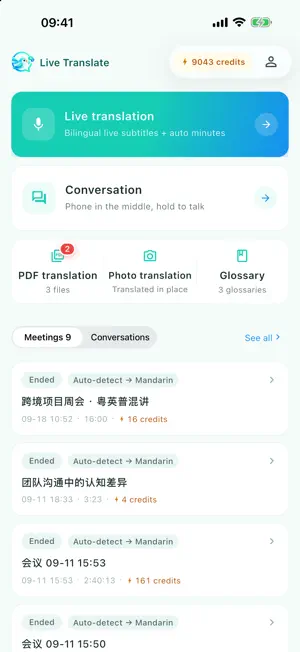
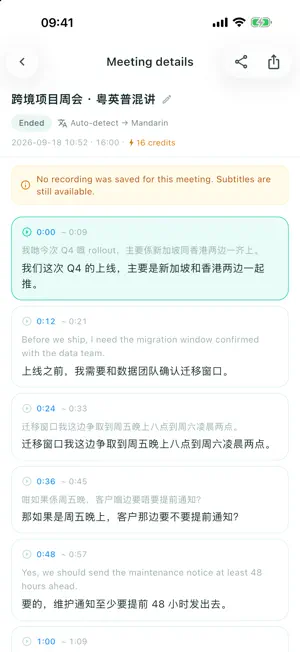
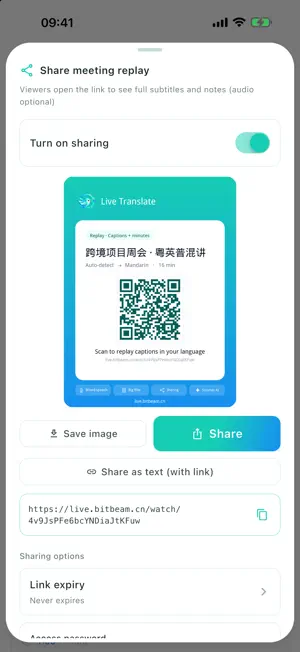
AI-powered live translation. English, Mandarin, Cantonese and Japanese in one meeting, no switching. Subtitles appear sentence by sentence. Upload a PDF hundreds of pages long and the layout stays largely intact. Up to 500 pages per file; a 300-plus-page document took about 20 minutes in our tests. WHAT MAKES THIS DIFFERENT · Other apps ask you to pick one source language; here English, Mandarin, Cantonese and Japanese can be mixed in one meeting with nothing to switch · Other document tools charge by character count and want long files split up; here a single PDF of up to 500 pages goes in whole, layout largely intact, and you are only charged once it finishes · Other interpreters show the text to you alone; here a link lets people who could not attend read the subtitles live, each in their own language, with no account needed · Other tools translate each sentence in isolation; here the AI reads your material first and keeps proper nouns consistent for the whole meeting LIVE INTERPRETATION FOR MIXED-LANGUAGE MEETINGS · People can switch between English, Mandarin, Cantonese and Japanese mid-meeting — nobody stops to change a setting · Bilingual subtitles appear while people speak, one sentence at a time · 17 languages to choose from · Colloquial Cantonese is normalised into natural written form before translation, not mapped character by character · Glossary: add product, client and system names and both transcription and translation follow your spelling · Missed a line? Ask: what it meant or whether it was translated right — answers come only from this meeting, without interrupting anyone LARGE DOCUMENT TRANSLATION · Upload a whole PDF, up to 500 pages; tables, figures and columns stay where they were · Get a translation-only version and a bilingual side-by-side version, ready to share · Excel (.xlsx / .xlsm) up to 30 MB and 2 million characters, with formulas, formatting and charts kept · A notification tells you when it is done; no charge if translation fails · Scanned and encrypted PDFs are not supported LIVE SHARING — FOLLOW WITHOUT BEING IN THE ROOM · Send a link or QR code; people who could not attend watch the subtitles live · Everyone picks their own language, up to 4 at a time in one meeting · Viewers need no account and pay nothing; links can carry a password and last 7 days or forever · Minutes and subtitle export stay available while the link is valid · A shared session carries subtitles only, no audio AFTER THE MEETING · Minutes written automatically: summary, key points, decisions, action items · Full timestamped transcript to look back on FACE-TO-FACE CONVERSATION · Put the phone between you and hold to talk; both sides see the text and translations are read aloud WHO IT IS FOR · Teams working with clients in Hong Kong and overseas · Cross-border business, negotiations, customer interviews · Anyone translating contracts, proposals or technical manuals WEB APP AND BROWSER EXTENSION · Web app: https://live.bitbeam.cn — works in any browser, including inside WeChat, with nothing to install · Browser extension: bilingual web pages and video subtitles, same account, same credits Requires an internet connection. Make sure you have permission from participants before recording. Website: https://live.bitbeam.cn FAQ: https://live.bitbeam.cn/faq Questions or feedback: [email protected]
What’s new
Version 1.6.0 · Updated October 19, 2026
New - Now on iPad, in portrait and landscape - Now on iPhone Duo, fold without losing your place - Lists and details side by side on wide screens - Find your meetings from system search - Set as default translation app for selected text Improved - Tidier layout on phones in landscape - Minor improvements for stability and experience
App privacy
The developer, Jiangsu Xinghui Shuzhi Technology Co., Ltd, reported these privacy practices to Apple.
Data Linked to You
The following data, which may be collected and linked to your identity, may be used for the following purposes:
- Purchases: Purchase History
- Contact Info: Email Address, Name, Phone Number
- User Content: Audio Data, Other User Content
- Identifiers: User ID
- Diagnostics: Other Diagnostic Data
Used for: App Functionality
Alternatives to Live Translate: Subtitles, PDF
Looking for apps like Live Translate: Subtitles, PDF? Here are 6 similar apps on the App Store. The highest rated is ClearScribe AI (5.0/5), and all 6 are free to download.
-
 Cargo411
-
 ClearScribe AI
5.0
ClearScribe AI
5.0
-
 Aqarly
-
 Toki: Live Translator
-
 Elistrius - AI Friend
-
 Invoice Maker PDF Generator
1.0
Invoice Maker PDF Generator
1.0
| App | Rating | Price | Last updated | Compare |
|---|---|---|---|---|
| Live Translate: Subtitles, PDF | – | Free | October 19, 2026 | |
| Cargo411 | – | Free | Apr 18, 2026 | Compare |
| ClearScribe AI | 5.0 / 5 (2) | Free | Oct 16, 2026 | Compare |
| Aqarly | – | Free | Sep 5, 2026 | Compare |
| Toki: Live Translator | – | Free | Oct 12, 2026 | Compare |
| Elistrius - AI Friend | – | Free | May 23, 2025 | Compare |
| Invoice Maker PDF Generator | 1.0 / 5 (1) | Free | Jan 31, 2024 | Compare |