

ClearScribe AI
Nagib Araman Productivity iPhoneiPadiPod touchApple Watch
ClearScribe AI is a free Productivity app for iPhone and iPad by Nagib Araman. Rated 5.0/5 from 2 ratings. Requires iOS 15.1. Updated October 16, 2026.
- Rating
- 5.0
- 2 ratings
- Price
- Free
- on the App Store
- Size
- 147 MB
- Age 4+
- Updated
- Oct 16
- 2026 · v1.0.7
Screenshots


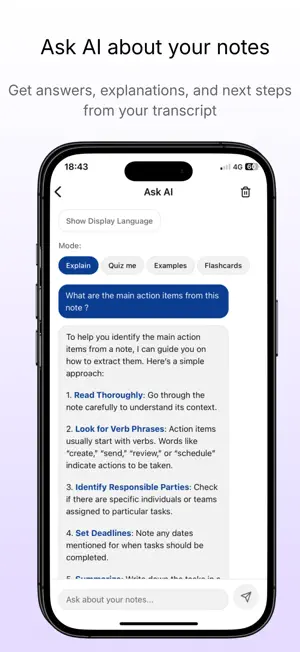

About ClearScribe AI
ClearScribe AI transforms meetings, conversations, lectures, interviews, recordings, and videos into searchable transcripts, structured meeting minutes, summaries, action items, and organized knowledge. Record with your iPhone or Apple Watch, import audio, or work with supported video links. Go beyond transcription: ask AI questions, identify key decisions, listen to voice briefings, and find information when you need it. RECORD & TRANSCRIBE • Record meetings, lectures, interviews, and everyday conversations. • Capture audio directly from Apple Watch. • Import audio files and convert speech into editable text. • Keep transcripts and recordings organized in your Library. • Work with spoken content in multiple languages. MEETINGS THAT LEAD TO ACTION • Record, transcribe, and organize meetings in one place. • Generate structured meeting minutes with key discussion points, decisions, next steps, and open questions. • Extract action items and follow-ups from meeting content. • View speaker-labeled conversations where supported. • Save highlights from important moments and revisit them later. • Ask AI questions about what was discussed. • Connect supported calendars and meeting services for meeting workflows. Some connections require separate authorization. ASK AI & CREATE USEFUL NOTES • Ask questions about your notes and transcripts. • Produce concise or detailed summaries. • Generate explanations, keywords, study aids, and other useful outputs. • Translate or reformat content for different needs. • Use folders and templates to keep your information organized. VIDEO SUMMARIES & FULL TRANSCRIPTS • Paste a supported video link to summarize its contents. • Generate a full video transcript where available. • Find the information that matters without replaying an entire video. Video availability and transcription options depend on the source. LIVE CAPTIONS Follow speech as text in real time. Live Captions can help you keep up with conversations, classes, and other spoken content in supported environments and languages. AI VOICE BRIEFINGS Turn content into spoken briefings so you can listen to key points instead of reading everything on screen. Useful for reviewing information while commuting or multitasking. AI MEMORY & MCP • Search and retrieve knowledge saved in ClearScribe. • Use AI-powered tools with your own stored content. • Connect supported external services and AI agents through authorized integrations. • Build on past notes and transcripts rather than starting from scratch. Availability varies by connected service and subscription access. EXPORT, SEARCH & ORGANIZE • Find past recordings, notes, and meeting information. • Export or share supported transcripts, summaries, and meeting results. • Save outputs as PDF and other available formats. • Return to important information when you need it. BUILT FOR MULTILINGUAL WORK Use ClearScribe AI with a multilingual interface and transcription options. Supported languages and capabilities may vary by feature. SUBSCRIPTIONS & PRIVACY Some advanced features and usage levels require a Pro subscription. Available plans and terms are shown in the app. Basic app use does not require an account. To provide transcription, AI, video, captions, and voice features, relevant audio, text, or video information may be sent to our backend and service providers for processing. External integrations may require you to sign in to the connected service and grant permission. Terms of Use (EULA): https://www.apple.com/legal/internet-services/itunes/dev/stdeula/
What’s new
Version 1.0.7 · Updated October 16, 2026
ClearScribe AI 1.0.7 brings a more complete experience for meetings, AI Memory & MCP, Apple Watch recording, multilingual use, and everyday navigation. This update focuses on making recorded information easier to organize, review, search, and turn into practical next steps. MORE USEFUL MEETING MINUTES • Improved structured meeting minutes with sections for the meeting overview, speakers mentioned, key discussion points, decisions, action items, next steps, and open questions. • Clearer presentation of meeting summaries and important outcomes, so you can review a discussion without rereading the entire transcript. • Refined meeting details and speaker information when speaker-labeled content is available. • A more useful meeting history, with updated organization and navigation to previous recordings. HIGHLIGHTS AND FOLLOW-UPS • Save important moments as meeting highlights when timestamped segments are available. • Return to highlighted passages and include them in supported meeting exports. • Review action items and next steps alongside meeting summaries and minutes. • Improved access to meeting content when asking AI questions about a recorded discussion. MEETING BOT AND CALENDAR EXPERIENCE • Clearer status information for meeting bots, including scheduled, joining, recording, processing, and failed states. • Improved safeguards against duplicate meeting-bot creation requests. • More visible connection status for supported calendars. • Refinements to the interface for supported calendar and meeting-bot workflows. Calendar connections and online meeting features depend on the provider, permissions, and configuration. AI MEMORY & MCP • AI Memory & MCP is easier to find from the main app navigation. • Updated screens for discovering available tools and working with saved knowledge. • Improved descriptions and navigation for supported AI tools and connections. • Access to authorized integrations with compatible external services and AI agents. • A more consistent experience when moving between your notes, meetings, and connected knowledge. External connections may require separate sign-in and authorization. APPLE WATCH RECORDING • Record audio directly from the ClearScribe companion app on Apple Watch. • Capture ideas or conversations from your wrist without opening the iPhone app first. • Refined the recording experience across the companion app and main app. REFRESHED DESIGN AND NAVIGATION • Updated bottom navigation with colorful, easier-to-recognize icons. • More prominent access to Meetings and AI Memory & MCP. • Improved layout and visual consistency across major screens. • Clearer controls, labels, and meeting-history presentation. • Easier access to the information and actions you use most often. MORE COMPLETE MULTILINGUAL SUPPORT • Expanded the app's available display languages. • Improved translations across key screens, menus, messages, and feature descriptions. • More consistent language selection and localized navigation. • Continued improvements for right-to-left layouts, including Arabic and Hebrew. RELIABILITY AND POLISH • Bug fixes and interface refinements. • More consistent interactions, navigation, and screen presentation. • Improvements to the overall experience of recording, managing meetings, and using AI-powered features. Some advanced features require a Pro subscription. Supported external services may require separate authorization. AI-generated content should be reviewed for accuracy before important decisions.
App privacy
The developer, Nagib Araman, reported these privacy practices to Apple.
Data Not Linked to You
The following data, which may be collected but is not linked to your identity, may be used for the following purposes:
- User Content: Audio Data, Other User Content
Used for: App Functionality
Alternatives to ClearScribe AI
Looking for apps like ClearScribe AI? Here are 6 similar apps on the App Store. The highest rated is Fieldist Scribe (5.0/5), and all 6 are free to download.
-
 Fieldist Scribe
5.0
-
 Renewal Vault
-
 Deep Notes AI: Meeting & Notes
-
 Whisper Record
-
 Dokitscript: Video to Text
5.0
-
 MicOne
| App | Rating | Price | Last updated | Compare |
|---|---|---|---|---|
| ClearScribe AI | 5.0 / 5 (2 ratings) | Free | October 16, 2026 | |
| Fieldist Scribe | 5.0 / 5 (1) | Free | Oct 24, 2026 | Compare |
| Renewal Vault | – | Free | Mar 21, 2026 | Compare |
| Deep Notes AI: Meeting & Notes | – | Free | Sep 15, 2026 | Compare |
| Whisper Record | – | Free | Jun 9, 2026 | Compare |
| Dokitscript: Video to Text | 5.0 / 5 (3) | Free | Oct 20, 2026 | Compare |
| MicOne | – | Free | Oct 24, 2026 | Compare |
Compare ClearScribe AI with the top alternatives: ratings, updates, ASO score and keyword gaps →