

Piego: PDF Scanner
Roberto Bello Productivity iPhoneiPadiPod touch
Piego: PDF Scanner is a free Productivity app for iPhone and iPad by Roberto Bello. Requires iOS 26.0. Updated October 12, 2026.
- Price
- Free
- on the App Store
- Size
- 10 MB
- Age 4+
- Updated
- Oct 12
- 2026 · v1.3.1
Screenshots



About Piego: PDF Scanner
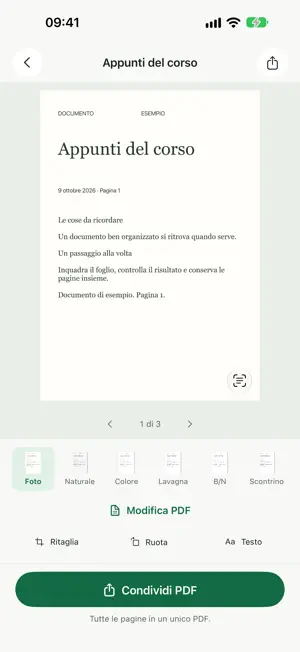
Turn paper documents and receipts into PDFs you can store, search and share from your iPhone. Piego combines scanning, cropping and text recognition with a document library on your device. The app interface is currently in Italian. SCAN AND ADJUST YOUR PAGES Take a picture manually or use automatic capture when the document stays steady in the frame. Scan multiple pages, check the result and adjust the crop by moving its corners. Rotate pages and choose Photo, Natural, Color, Whiteboard, Black & White or Receipt filters. IMPORT AND RENAME Import PDFs and images from Files or Photos into your Piego library. Rename new scans and saved documents; your chosen name is also used for the exported PDF. ORGANIZE WITH FREE AUTOMATIONS Create rules that look for words in document names and recognized text to rename documents and file them in your chosen folders. Start with templates for Home, Work and Study or create your own rule. Preview proposed changes before organizing existing documents. Pause rules whenever you want. Optionally save an additional PDF copy to a folder selected through Files, including iCloud Drive, or to your own WebDAV server. Transfers run while Piego is open; cloud synchronization depends on your chosen service. FIND YOUR DOCUMENTS Optical character recognition (OCR) makes recognized text available for searching and copying. Search document names or recognized text and organize your library with folders and tags. Reopen saved pages, make adjustments, then save or discard your changes. SHARE FROM YOUR IPHONE Create searchable PDFs and open the iOS share sheet directly. Save to Files or choose an available app on your device. Export JPEG images too; documents with multiple pages are packaged in a ZIP file. EDIT, SIGN, FILL IN AND REDACT PDFS WITH PIEGO PRO A Piego Pro subscription gives you a complete PDF editor on your iPhone: • correct the text of PDFs, scanned pages included, keeping their look; • sign with a signature and initials drawn once, on every page if you like; • fill in PDF forms, even ones without fields or photographed, with your details suggested in the right fields; • redact names, IBANs and other data: in the copy they are really gone from the file, and it works with signed PDFs too. Piego Pro also completes document names with the number and supplier read from the text. Choose a monthly or yearly plan, with a free week if you subscribe for the first time. The subscription renews automatically unless you turn it off at least 24 hours before the end of the current period; manage or cancel it in your Apple Account settings. PROCESSING ON YOUR DEVICE Scanning, filters, OCR and the document library work on your iPhone without a Piego account. Documents are shared or copied to destinations you choose and configure. Everything else is free with no ads, including automations; the PDF editor is part of Piego Pro. OCR results depend on the legibility of the document and capture conditions. Check recognized text before reusing it. Terms of Use (in Italian): https://www.nebello.com/docscan/termini Privacy Policy (in Italian): https://www.nebello.com/docscan/privacy
What’s new
Version 1.3.1 · Updated October 12, 2026
• Automatic filing, more ready to go: 29 ready-made rules for home, finances, health, vehicles, work, study, travel and family (bills, taxes, health insurance, payslips, fines, tickets, ID documents and more). They recognise documents in Italian, English, French and German: pick the one you need, try it and turn it on. • Rules now find phrases that wrap onto the next line in a document, and each rule can look for up to 20 words.
App privacy
The developer, Roberto Bello, reported these privacy practices to Apple.
Data Not Collected
The developer does not collect any data from this app.
Alternatives to Piego: PDF Scanner
Looking for apps like Piego: PDF Scanner? Here are 6 similar apps on the App Store. The highest rated is Paperix - PDF Secure and Local (5.0/5), and 5 of the 6 are free to download.
-
 PDF Compressor: Sign Scan
-
 Paperix - PDF Secure and Local
5.0
-
 Focus AI - Habit Tracker
-
 Secure Local Notes
5.0
-
 MyAduan MBI
-
 Infomaniak kChat
| App | Rating | Price | Last updated | Compare |
|---|---|---|---|---|
| Piego: PDF Scanner | – | Free | October 12, 2026 | |
| PDF Compressor: Sign Scan | – | Free | Sep 21, 2026 | Compare |
| Paperix - PDF Secure and Local | 5.0 / 5 (4) | Free | Oct 10, 2026 | Compare |
| Focus AI - Habit Tracker | – | Free | Jan 14, 2026 | Compare |
| Secure Local Notes | 5.0 / 5 (2) | 1.99 USD | Oct 22, 2025 | Compare |
| MyAduan MBI | – | Free | Sep 19, 2024 | Compare |
| Infomaniak kChat | – | Free | Oct 17, 2026 | Compare |
Compare Piego: PDF Scanner with the top alternatives: ratings, updates, ASO score and keyword gaps →