

Takeform: 1-Click Video Editor
YARIMAI BILISIM TEKNOLOJILERI VE YAZILIM ANONIM SIRKETI Photo & Video iPhoneiPadiPod touch
Takeform: 1-Click Video Editor is a free Photo & Video app for iPhone and iPad by YARIMAI BILISIM TEKNOLOJILERI VE YAZILIM ANONIM SIRKETI. Requires iOS 17.0.
- Price
- Free
- on the App Store
- Size
- 124 MB
- Age 4+
- Updated
- Aug 31
- 2026 · v1.0.0
Screenshots

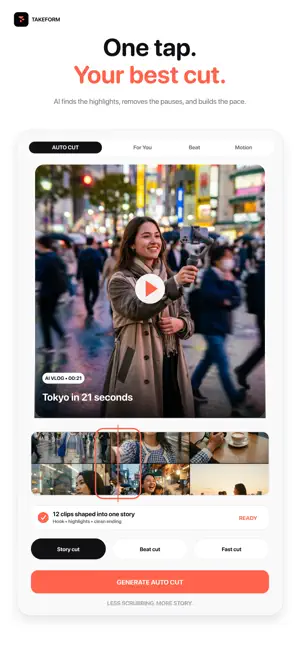
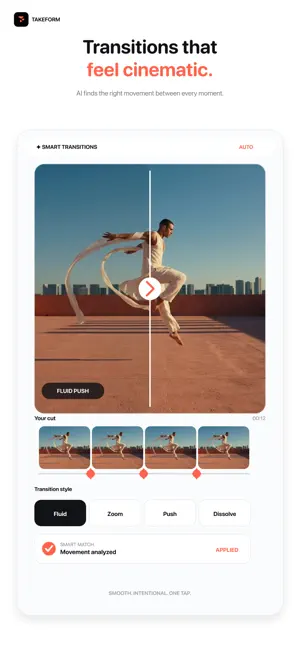
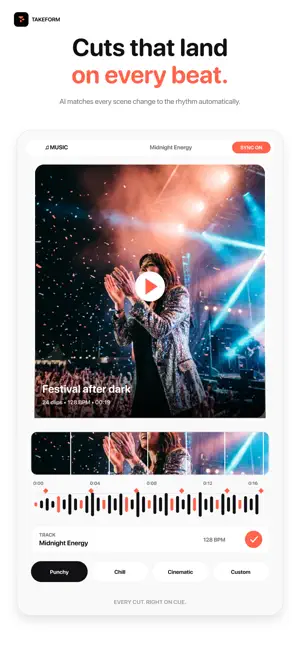
About Takeform: 1-Click Video Editor
Turn the photos and clips you already have into polished, ready-to-share videos—without learning a complicated timeline. Takeform is your personal AI video-making agent. Select moments from your camera roll, describe the result you want, and receive three distinct edits designed around your story. CREATE IN A FEW TAPS • Choose only the photos and videos you want to use • Start with Highlight, Talking Head, Product, Photo Reel, or Surprise Me • Choose your format and a 15, 30, or 60-second target • Compare Balanced, Fast Cut, and Cinematic drafts DIRECT THE EDIT Skip the maze of editing tools. Tell Takeform what to change in plain language: make the opening faster, use fewer captions, warm up the look, lock a favorite scene, or change the ending. Fine-tune captions, music, pacing, and visual style. Quick changes, scene locks, and version history help you experiment without losing an edit you love. MADE FOR YOUR MOMENTS Create travel recaps, product launches, talking-head clips, photo reels, event highlights, vlogs, and everyday stories. Export the finished video and share it wherever you publish. YOUR STYLE, REMEMBERED Build a consistent look with Brand Kit and optional Style Memory. Takeform can remember the creative choices you prefer while keeping you in control. PRIVATE BY DESIGN Takeform never scans or uploads your entire photo library. It can access only the media you explicitly select. Standard editing and rendering happen on your device. When AI direction is used, lightweight proxy media may be processed securely in the cloud with short retention. Originals are uploaded only when you explicitly request a cloud enhancement. TAKEFORM PRO Some features and usage limits require an auto-renewing Takeform Pro subscription. Payment is charged to your Apple ID at confirmation. Your subscription renews automatically unless canceled at least 24 hours before the end of the current period. You can manage or cancel it in your App Store account settings. Privacy Policy: https://takeform--takeform-efd1f.europe-west4.hosted.app/privacy Terms of Use: https://takeform--takeform-efd1f.europe-west4.hosted.app/terms
App privacy
The developer, YARIMAI BILISIM TEKNOLOJILERI VE YAZILIM ANONIM SIRKETI, reported these privacy practices to Apple.
Data Not Linked to You
The following data, which may be collected but is not linked to your identity, may be used for the following purposes:
- User Content: Photos or Videos
- Identifiers: User ID
Used for: App Functionality
Alternatives to Takeform: 1-Click Video Editor
Looking for apps like Takeform: 1-Click Video Editor? Here are 4 similar apps on the App Store. The highest rated is Liro: AI Video Caption Editor (4.5/5), and all 4 are free to download.
-
 Ai Video Creator - Art Maker
2.3
Ai Video Creator - Art Maker
2.3
-
 Reel Maker, Templates by Beatz
3.0
Reel Maker, Templates by Beatz
3.0
-
 Video Eraser & Remove Objects
3.9
Video Eraser & Remove Objects
3.9
-
 Liro: AI Video Caption Editor
4.5
Liro: AI Video Caption Editor
4.5
| App | Rating | Price | Last updated | Compare |
|---|---|---|---|---|
| Takeform: 1-Click Video Editor | – | Free | August 31, 2026 | |
| Ai Video Creator - Art Maker | 2.3 / 5 (3) | Free | Mar 27, 2024 | Compare |
| Reel Maker, Templates by Beatz | 3.0 / 5 (3) | Free | Oct 21, 2026 | Compare |
| Video Eraser & Remove Objects | 3.9 / 5 (133) | Free | Feb 19, 2025 | Compare |
| Liro: AI Video Caption Editor | 4.5 / 5 (274) | Free | Mar 25, 2026 | Compare |