

Folio: Markdown to PDF
RUEBEN ANSOLIWEN AKANKOBATENG Productivity iPhoneiPadiPod touch
Folio: Markdown to PDF is a free Productivity app for iPhone and iPad by RUEBEN ANSOLIWEN AKANKOBATENG. Rated 1.0/5 from 1 ratings. Requires iOS 18.0.
- Rating
- 1.0
- 1 ratings
- Price
- Free
- on the App Store
- Size
- 18 MB
- Age 4+
- Updated
- Oct 7
- 2026 · v1.1
Screenshots


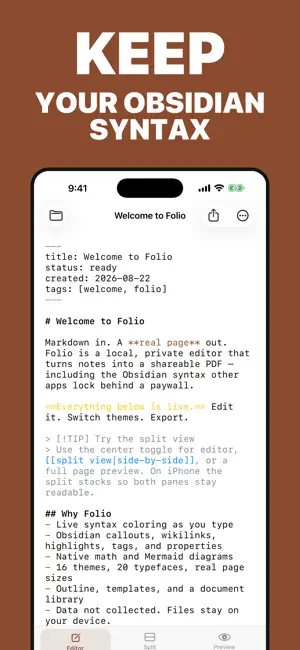

About Folio: Markdown to PDF
Write a note in Markdown and see it laid out as a real page — then export it when it is ready. Folio is for people who already write in Markdown, including Obsidian vaults. The preview is paginated, so you can check margins, page breaks, and the finished reading experience as you write. WRITE AND PREVIEW • See your note on a page with margins and page breaks, not only as a continuous web preview • Use Markdown and Obsidian-style callouts, wikilinks, highlights, tags, properties, math, and Mermaid diagrams • Link a notes folder to resolve embedded images and notes on your device • Start from a blank page or a built-in template STYLE AND EXPORT • Choose from 16 built-in themes and 20 typefaces • Export PDF, Word (.docx), EPUB, RTF, or plain text • Share a Markdown file into Folio or convert with Shortcuts • Save back to the original file or replace the last export in the same folder FREE AND FOLIO PRO Writing, live preview, built-in themes, and Markdown features are free. Your first three PDF exports are free. Folio Pro unlocks unlimited PDF exports, Word, EPUB, RTF, and the custom theme builder. Folio Pro is available monthly, annually, or as a one-time lifetime purchase. The annual plan includes a 7-day free trial. Subscription terms and the current price are shown before purchase. No account is required. Folio renders documents on your device; notes are not uploaded for preview or export. You choose when to export or share a file. Terms of Use (EULA): https://www.apple.com/legal/internet-services/itunes/dev/stdeula/
What’s new
Version 1.1 · Updated October 7, 2026
Added Japanese and Traditional Chinese localization, with clearer details about free exports and Folio Pro.
App privacy
The developer, RUEBEN ANSOLIWEN AKANKOBATENG, reported these privacy practices to Apple.
Data Not Linked to You
The following data, which may be collected but is not linked to your identity, may be used for the following purposes:
- Purchases: Purchase History
Used for: App Functionality
Alternatives to Folio: Markdown to PDF
Looking for apps like Folio: Markdown to PDF? Here are 6 similar apps on the App Store. The highest rated is PDF to Markdown: PDF Lift (5.0/5), and all 6 are free to download.
-
 PDF to Markdown: Smart Export
1.0
PDF to Markdown: Smart Export
1.0
-
 PDF to Markdown: PDF Lift
5.0
PDF to Markdown: PDF Lift
5.0
-
 Markdown to PDF: Pro Editor
4.4
Markdown to PDF: Pro Editor
4.4
-
 NoteSam: Handwritten Notes
-
 SinceWhen: Days Since Counter
4.4
SinceWhen: Days Since Counter
4.4
-
 Winmail Reader Lite
4.2
Winmail Reader Lite
4.2
| App | Rating | Price | Last updated | Compare |
|---|---|---|---|---|
| Folio: Markdown to PDF | 1.0 / 5 (1 rating) | Free | October 7, 2026 | |
| PDF to Markdown: Smart Export | 1.0 / 5 (1) | Free | Sep 14, 2026 | Compare |
| PDF to Markdown: PDF Lift | 5.0 / 5 (1) | Free | Oct 28, 2026 | Compare |
| Markdown to PDF: Pro Editor | 4.4 / 5 (9) | Free | Oct 21, 2026 | Compare |
| NoteSam: Handwritten Notes | – | Free | Sep 30, 2026 | Compare |
| SinceWhen: Days Since Counter | 4.4 / 5 (14) | Free | Oct 28, 2026 | Compare |
| Winmail Reader Lite | 4.2 / 5 (82) | Free | Jan 23, 2026 | Compare |