
Markdown to PDF: Pro Editor
Zain Aaban Productivity iPhoneiPadiPod touch
Markdown to PDF: Pro Editor is a free Productivity app for iPhone and iPad by Zain Aaban. Rated 4.4/5 from 9 ratings. Requires iOS 18.0.
- Rating
- 4.4
- 9 ratings
- Price
- Free
- on the App Store
- Size
- 10 MB
- Age 4+
- Updated
- Oct 21
- 2026 · v2.34
Screenshots


About Markdown to PDF: Pro Editor
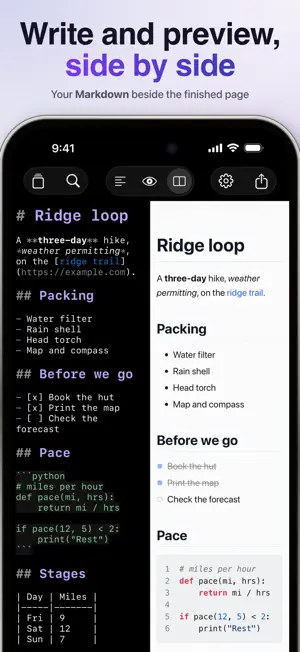
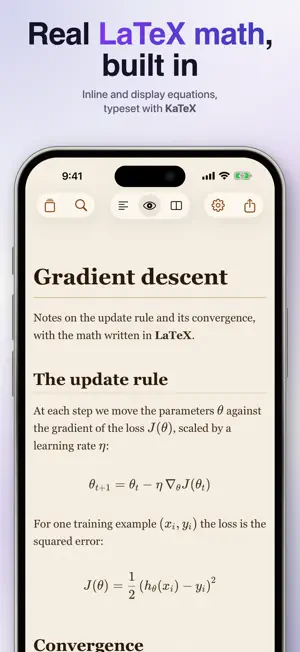
Markdown to PDF converts any markdown file into a clean, shareable PDF right on your iPhone or iPad. Write or paste your Markdown, see a live preview as you type, and export a polished PDF in seconds. Whether you're turning notes into a document, sharing a README, or exporting class notes, Markdown to PDF handles the formatting so you don't have to. This app will convert more than just basic markdown with support for an extensive list of markdown supersets (i.e. code blocks, highlights, embeds, callouts, etc..). Conversions: - PDF - Word (DOCX) - EPUB - HTML - Rich Text (RTF) - Plain Text - Markdown Features - Live preview: see your formatted document update as you type - Editor and split-screen modes for a comfortable writing experience - Export to PDF and share or save to Files - Multiple page sizes: A4, A3, Letter, Legal, Tabloid - Portrait and landscape orientation - Font options: System, Serif, Sans-Serif, Monospace, New York - Color themes: Light, Dark, Sepia, and 22 more! - Import existing Markdown files - Siri & Shortcuts Support: convert a file or text into a PDF Additional Features - Syntax highlighting for code blocks - Table of contents generation - Page numbers - Soft line breaks - Obsidian-compatible syntax (callouts, wikilinks, math via KaTeX, highlights) - Rich Markdown editor with live syntax coloring - Fit preview to screen width - Mermaid diagrams (render flowcharts, sequence diagrams, class diagrams, and more) All current and future "additional features" are available as a monthly or annual subscription, or a one-time lifetime purchase. A 7-day free trial is included with the annual plan. By downloading this app, you agree to Apple's Standard EULA: https://www.apple.com/legal/internet-services/itunes/dev/stdeula/
Ratings & reviews
4.4
9 ratings
What’s new
Version 2.34 · Updated October 21, 2026
Bug fixes and performance improvements.
App privacy
The developer, Zain Aaban, reported these privacy practices to Apple.
Data Not Collected
The developer does not collect any data from this app.
Alternatives to Markdown to PDF: Pro Editor
Looking for apps like Markdown to PDF: Pro Editor? Here are 6 similar apps on the App Store. The highest rated is LaTeX Editor Tex Pro (4.8/5), and all 6 are free to download.
-
 Stash Anything: Save Links
4.6
Stash Anything: Save Links
4.6
-
 TaskForge - Obsidian Tasks
4.7
TaskForge - Obsidian Tasks
4.7
-
 Obsidian Web Clipper
4.3
Obsidian Web Clipper
4.3
-
 LaTeX Editor Tex Pro
4.8
LaTeX Editor Tex Pro
4.8
-
 Raindrop.io
4.5
Raindrop.io
4.5
-
 Drafts
4.8
Drafts
4.8
| App | Rating | Price | Last updated | Compare |
|---|---|---|---|---|
| Markdown to PDF: Pro Editor | 4.4 / 5 (9 ratings) | Free | October 21, 2026 | |
| Stash Anything: Save Links | 4.6 / 5 (80) | Free | Sep 29, 2026 | Compare |
| TaskForge - Obsidian Tasks | 4.7 / 5 (110) | Free | Oct 12, 2026 | Compare |
| Obsidian Web Clipper | 4.3 / 5 (104) | Free | Jul 22, 2026 | Compare |
| LaTeX Editor Tex Pro | 4.8 / 5 (1,670) | Free | Jun 1, 2026 | Compare |
| Raindrop.io | 4.5 / 5 (420) | Free | Oct 21, 2026 | Compare |
| Drafts | 4.8 / 5 (10,834) | Free | Oct 21, 2026 | Compare |