

Rokkaku Camera Pro (DSSC-1)
Daisuke Oide Photo & Video iPhoneiPadiPod touch
Rokkaku Camera Pro (DSSC-1) is a free Photo & Video app for iPhone and iPad by Daisuke Oide. Requires iOS 18.0. Updated October 17, 2026.
- Price
- Free
- on the App Store
- Size
- 16 MB
- Age 4+
- Updated
- Oct 17
- 2026 · v2.2.0
Screenshots


About Rokkaku Camera Pro (DSSC-1)
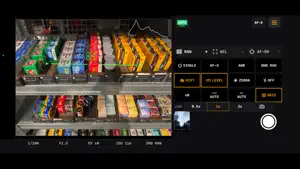
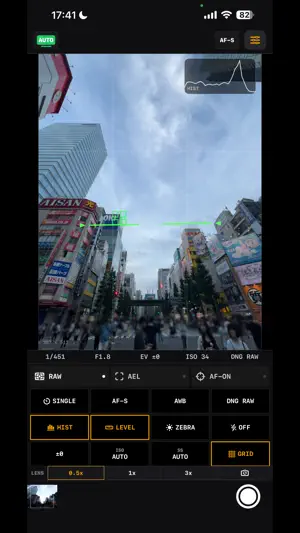
Pro RAW Photo Capture & Intuitive Manual Focus. Take control of image quality, focus, and exposure. Rokkaku Camera Pro is a professional manual camera app built for photographers who demand RAW image quality and tactile control. Capture RAW image data for flexible color and tonal adjustments, and fine-tune focus with intuitive manual controls. --- 【 RAW CAPTURE & FLEXIBLE PHOTO FORMATS 】 ◆ Choose Your Photo Format Capture RAW (DNG / Bayer RAW), Apple ProRAW, HEIF, or JPEG based on your workflow and the formats supported by your device and lens. ◆ Pure Sensor-Grade RAW Formats ・RAW (DNG / Bayer RAW): Pure, unprocessed sensor data free from built-in sharpening or heavy noise reduction. Ideal for classic DSLR-style editing in Adobe Lightroom. ・Apple ProRAW: Combines Apple's advanced computational dynamic range with the deep color-grading flexibility of RAW (*Available on supported Pro models). ◆ Full Native Resolution Capture (12MP to 48MP*) Record fine textures at your sensor's full native resolution (*48MP capture available on supported models). * RAW capture is supported on rear cameras. Front camera captures in JPEG/HEIF. --- 【 GET CLOSER WITH MACRO MODE 】 Select Macro on the mode dial to capture the details of flowers, small objects, and more. Try Macro mode before purchasing Pro. ◆ Close-Up Capture with the 0.5× Ultra-Wide Lens Macro mode uses the 0.5× ultra-wide lens on supported devices, with digital zoom up to 15×. ◆ MF Slider & AF-ON Fine-tune focus with an always-available MF slider or autofocus with AF-ON. Choose to retain your current focus mode or start in AF-S or MF. ◆ Live Overview at High Magnification Above 5×, a small live preview shows the unzoomed view and the area being enlarged to help you keep track of your composition. * Macro requires an ultra-wide lens that supports close-up focusing. Maximum zoom depends on device capabilities. JPEG/HEIF and Apple ProRAW on supported devices and lenses are available; Bayer RAW (DNG) is not supported in Macro mode. Pro features such as high-resolution saving and Apple ProRAW require purchase. --- 【 INCREDIBLY INTUITIVE MANUAL FOCUS (MF) 】 ◆ Smooth Precision Focus Slider Effortlessly glide from extreme macro to infinity with buttery-smooth focus control. ◆ Focus Peaking with Custom Colors Instantly identify what's in sharp focus with vivid edge-highlight outlines. ◆ Magnified Focus Assist Automatically zooms into the frame while focusing for pixel-perfect sharpness on eyes and intricate textures. ◆ AF-ON (Back-Button Focus) & AE Lock Quickly acquire autofocus with a tap, then fine-tune with manual focus just like a professional camera. --- 【 PROFESSIONAL CONTROLS & ESSENTIAL TOOLS 】 ・Customizable Shutter Placement (Right, Center, Left with landscape mirroring) ・Always-On Light / Torch (Assists manual focusing in dark environments) ・Tactile Mode Dial (Program, Shutter Priority, Manual, Macro, Custom Presets C1/C2) ・Full Manual Exposure (ISO, Shutter Speed, Exposure Compensation) ・White Balance Control (Daylight, Shade, Tungsten, Fluorescent, Custom Kelvin) ・100% Coverage Viewfinder ・3-Axis Digital Level & 3x3 Composition Grid ・Live RGB Histogram & Exposure Zebra Striping 【 VINTAGE DATE STAMP 】 ・Classic orange date stamp embedding for that nostalgic film camera vibe. 【 100% PAY ONCE, KEEP FOREVER 】 ・No monthly subscriptions. ・A single one-time purchase unlocks all Pro features forever.
What’s new
Version 2.2.0 · Updated October 17, 2026
[Version 2.2.0] Zoom continuously across lenses with the W/T buttons or a pinch gesture. ◆ Seamless Zoom • Adjust magnification continuously from wide angle to telephoto on supported rear cameras. • Tap a zoom button to jump directly to its magnification. • Check the wide-camera-based zoom level and current primary camera in the preview. ◆ Choose Your Zoom Style • Seamless zoom is now the default for new and existing users. • Switch to Individual lenses at any time in Settings > Appearance & Controls > Zoom mode. Your choice is remembered after restarting the app. • A one-time introduction explains where to change this setting. ◆ Works Alongside Manual Controls • DNG RAW, MF, manual exposure, manual WB, AEL, and AF-ON temporarily lock the lens. Continuous zoom resumes when those settings are released. • Macro mode continues to use the ultra-wide camera. Continuous lens switching and maximum zoom depend on your device. High-resolution capture and RAW remain existing Pro features that require a purchase. We welcome your feedback through Contact Support in Settings.
App privacy
The developer, Daisuke Oide, reported these privacy practices to Apple.
Data Not Linked to You
The following data, which may be collected but is not linked to your identity, may be used for the following purposes:
- Usage Data: Product Interaction
- Diagnostics: Crash Data, Performance Data
Used for: Analytics, App Functionality
Alternatives to Rokkaku Camera Pro (DSSC-1)
Looking for apps like Rokkaku Camera Pro (DSSC-1)? Here are 6 similar apps on the App Store.
-
 Momente - A Real Film Camera
-
 UTSURI - 連写写真コラージュ・フィルム加工
-
 Make It 2004: Digicam Filter
-
 Morrow - City Camera
-
 MITO CAM - Retro Digicam
-
 Filmera: Photo & Film Editor
| App | Rating | Price | Last updated | Compare |
|---|---|---|---|---|
| Rokkaku Camera Pro (DSSC-1) | – | Free | October 17, 2026 | |
| Momente - A Real Film Camera | – | Free | Apr 8, 2026 | Compare |
| UTSURI - 連写写真コラージュ・フィルム加工 | – | Free | Oct 5, 2026 | Compare |
| Make It 2004: Digicam Filter | – | Free | Sep 9, 2026 | Compare |
| Morrow - City Camera | – | Free | Jun 16, 2026 | Compare |
| MITO CAM - Retro Digicam | – | Free | Oct 25, 2026 | Compare |
| Filmera: Photo & Film Editor | – | Free | Oct 21, 2026 | Compare |