

Space – Precision Drawing
FFORM LLC Graphics & Design iPadMac
Space – Precision Drawing is a free Graphics & Design app for iPad and Mac by FFORM LLC. Requires iOS 18.0. Updated October 15, 2026.
- Price
- Free
- on the App Store
- Size
- 15 MB
- Age 4+
- Updated
- Oct 15
- 2026 · v1.1
Screenshots
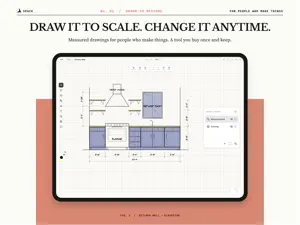
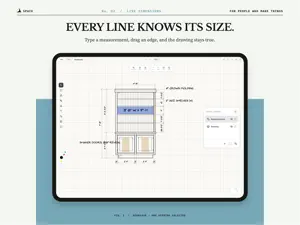


About Space – Precision Drawing
Space is the drawing tool for people who make things. Measured from the first line, easy to change, clean enough to print, and yours to keep. Think in space. Draw a bookcase, a pair of garage doors, a garden bed, a laser-cut pattern, a room, and work it out at the size it will be. Every shape has a size you can read and set. MEASURED FROM THE FIRST LINE Every line knows its size. Dimensions show as you draw. Type a measurement or drag an edge, and the drawing stays true. Snapping keeps the work square. MADE TO CHANGE Plans change. Your drawing keeps up. How many fit on a sheet? How wide for six rows of six? Ask the drawing. Bring it into the space you are designing for, at the bench, in the room or on the job site, and adjust as the build goes. ONE CANVAS, THEN SHEETS The canvas is infinite, so every idea for a job has room in one place. When you are ready, arrange the drawings into sheets, laid out your way. PRINT IT. CUT IT. SEND IT. Clean sheets, ready to print. Export a PDF, an image, or an SVG for the laser cutter or another design tool. SEE IT STAND UP Turn flat plans into isometric views, without modelling in 3D. Use them to explain the job, or just to see the thing. EVERY PART, ACCOUNTED FOR Sizes and counts gathered from your drawing into a parts list you can read. YOU SHOULD OWN YOUR TOOLS Space is made by a maker, for the bench and the job site. Try it for 14 days. Then buy it once and keep it, on iPad and Mac.
What’s new
Version 1.1 · Updated October 15, 2026
• A magnifying loupe appears while you drag a set-scale handle, so you can place it exactly. • Each photo shows the scale it was set from. Tap or click the label to set it again. • Fixes and refinements.
App privacy
The developer, FFORM LLC, reported these privacy practices to Apple.
Data Not Linked to You
The following data, which may be collected but is not linked to your identity, may be used for the following purposes:
- Usage Data: Product Interaction
- Diagnostics: Crash Data
Used for: Analytics, Product Personalization, App Functionality
Alternatives to Space – Precision Drawing
Looking for apps like Space – Precision Drawing? Here are 6 similar apps on the App Store. The highest rated is Roof AI - Roofing Visualizer (5.0/5), and all 6 are free to download.
-
 Escher Blocks
-
 Modelize Home
-
 DrafterPro 2D CAD & DWG Editor
4.0
DrafterPro 2D CAD & DWG Editor
4.0
-
 Roof AI - Roofing Visualizer
5.0
Roof AI - Roofing Visualizer
5.0
-
 BuildCAD - Design & DWG Viewer
-
 Blueprint: Cabinet Design
4.5
Blueprint: Cabinet Design
4.5
| App | Rating | Price | Last updated | Compare |
|---|---|---|---|---|
| Space – Precision Drawing | – | Free | October 15, 2026 | |
| Escher Blocks | – | Free | Aug 29, 2026 | Compare |
| Modelize Home | – | Free | Oct 28, 2026 | Compare |
| DrafterPro 2D CAD & DWG Editor | 4.0 / 5 (2) | Free | Oct 22, 2026 | Compare |
| Roof AI - Roofing Visualizer | 5.0 / 5 (14) | Free | Oct 2, 2026 | Compare |
| BuildCAD - Design & DWG Viewer | – | Free | Aug 8, 2026 | Compare |
| Blueprint: Cabinet Design | 4.5 / 5 (2) | Free | Sep 16, 2026 | Compare |