

Autotab
Islam Eltokhy Productivity iPhoneiPadiPod touchMac
Autotab is a free Productivity app for iPhone and iPad by Islam Eltokhy. Requires iOS 26.0. Updated October 20, 2026.
- Price
- Free
- on the App Store
- Size
- 23 MB
- Age 4+
- Updated
- Oct 20
- 2026 · v3.5
Screenshots


About Autotab
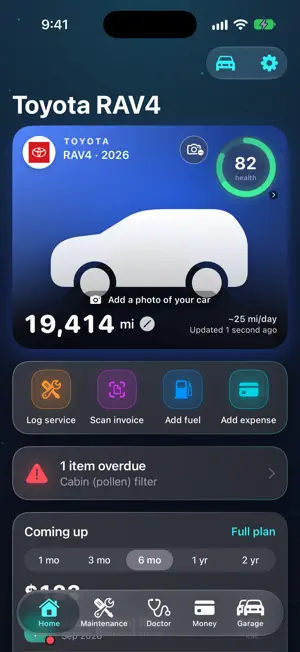
Autotab keeps a tab on your car: every fill-up, service and bill in one place, so you always know what's due and what the car really costs. Add a small OBD-II adapter and it goes further: Autotab AI reads the car itself and tells you, in plain words, how it really is. And you can simply ask it: Chat with your car answers from the car's own records, typed or by Siri. SILVER: YOUR CAR, ORGANISED The logbook that thinks ahead. Silver is maintenance and fuel tracking, done properly. • A maintenance plan for your exact car, by distance and time, with reminders before anything falls due • Real fuel economy between full tanks, price per litre by station, and fill-ups noticed for you • Photograph an invoice, a certificate or a warning light and Autotab fills in the details for you to check • Chat with your car: ask anything and get answers from its own records, from a calm car doctor or from the car itself, typed, by Siri or in CarPlay, with every conversation kept • Cost per mile and per month, fuel against servicing, and what the coming months will cost • Up to 3 cars, CarPlay, safety recalls, car-to-car comparison and a spec sheet from each VIN • 8 Sparks a month for Autotab AI (100 a year on the yearly plan) No adapter needed: everything in Silver works from what you log. GOLD: PLUG IN AND SEE INSIDE YOUR ENGINE Gold connects to the car itself. Plug a Bluetooth LE OBD-II adapter (sold separately) into the port under the dashboard and your iPhone becomes a live technical dashboard. • Live gauges and readings: coolant and oil temperature, fuel trims, airflow, charging voltage and more, on your iPhone and in CarPlay • Every stored fault code explained in everyday words for your car, with the likeliest fixes, cheapest first • AI health checks: Autotab AI weighs every reading together and gives a verdict in green, amber or red, says whether it is safe to keep driving and what to do next • An alert the moment a reading leaves its healthy range, with one tap to ask whether it matters • A driving score for every trip, updated as you drive, with a short tip on the spot when a habit costs points, on your iPhone and in CarPlay, and your trend and records over time • Drive reports with a health score and the technician's detail, battery health over time, and performance runs • Everything in Silver, up to 5 cars, and 18 Sparks a month (210 a year on the yearly plan) The gauges, live readings and diagnostics need the OBD-II adapter plugged in. Without one, Gold still gives you everything in Silver. FREE, FOREVER One car, unlimited logging, your whole history, documents with renewal reminders, the warning-light guide and iCloud sync of your garage and settings. YOUR RECORDS STAY YOURS Records live on your device and, if you choose, in your own private iCloud. There is no advertising or tracking code; usage statistics are anonymous and you can switch them off in Settings. Only what you choose to send to Autotab AI (a scan, a reading, a recording or a VIN) is sent to be read, and it is not kept. Every Autotab AI job shows its price in Sparks before you ask, usually one or two. Spark packs are there when you need more. Silver and Gold are offered monthly or yearly. Monthly plans include a one-week free trial and yearly plans a two-week trial. Subscriptions renew automatically unless cancelled at least 24 hours before the end of the period, and can be managed in your Apple Account settings. OBD-II port: most petrol cars from 2001 and diesels from 2004 in Europe, and cars from 1996 in the US. Autotab AI gives guidance, not a guarantee: for anything that affects safety, see a qualified mechanic. Terms of use: https://autotabapp.com/terms Privacy policy: https://autotabapp.com/privacy
What’s new
Version 3.5 · Updated October 20, 2026
• NEW — CarPlay, your way: choose any tile from the app for CarPlay's Home, engine readings included, in groups you name and order, in four tile styles — kept for each car • NEW — Your coach on the car screen: a Coach tab with every habit, and tips as a message you can dismiss or mute for the rest of the drive. Over Maps or music they arrive as a notification • NEW — Smoother driving, measured: with your iPhone in a mount, its motion sensor adds harsh cornering and bumps taken fast to your driving score • Trip drive score and Trip distance for the drive under way, and an Average drive score over the period you choose in Settings ▸ CarPlay • Coach sensitivity: choose how easily the live coach counts each habit, high revs included • Chat with your car knows your drives: ask about your driving, a trend or your coolant over time • NEW — Trip log: every drive with your adapter connected is kept, with speed, distance and engine readings on a timeline. Ask Autotab AI to read a trip, or share it as a PDF (Gold) • Your last drive on Home: distance, time, average speed and consumption, one tap from the whole trip • The live coach on your iPhone's Lock Screen, in the Dynamic Island and on CarPlay's Dashboard • A fill-up is noticed even when you drive off straight after filling, and the range left now comes from how you drove the last stretch • Plug into a car that isn't in your garage and Autotab offers to add it, VIN filled in; when Autotab recognises your car, CarPlay welcomes you • After each answer Siri asks if there's anything else, so you can follow up • Typed twice? A fill-up or service that looks already logged is flagged before it's saved, and Costs ▸ All records lists the pairs to settle • Every cost traceable: tap a slice of Total cost, or hold a category, to see the records behind it and open any one • Insights in four tabs, Service discipline visit by visit, and Money is now called Costs • Tyre pressure in psi, bar or kPa; odometer readings are checked before they're saved • Older cars connect more reliably: when the adapter can't find the protocol, Autotab tries each one, K-line and J1850 included • Choose per device whether the theme and card order follow your other devices: Settings ▸ iCloud ▸ Sync appearance and layout • Anonymous statistics help us improve how Autotab performs — never anything from your records. Switch them off any time in Settings ▸ Privacy
App privacy
The developer, Islam Eltokhy, reported these privacy practices to Apple.
Data Not Linked to You
The following data, which may be collected but is not linked to your identity, may be used for the following purposes:
- Purchases: Purchase History
- Usage Data: Product Interaction
- Diagnostics: Other Diagnostic Data
- Other Data: Other Data Types
- Financial Info: Other Financial Info
- User Content: Photos or Videos, Other User Content
Used for: Analytics, App Functionality
Alternatives to Autotab
Looking for apps like Autotab? Here are 6 similar apps on the App Store. The highest rated is Nomostar: AI PDF Scanner App (5.0/5), and all 6 are free to download.
-
 Nomostar: AI PDF Scanner App
5.0
Nomostar: AI PDF Scanner App
5.0
-
 Control My Mac: Remote Mouse
5.0
Control My Mac: Remote Mouse
5.0
-
 Pauz - Time off, mastered.
-
 Swifly - The Voice Keyboard
5.0
Swifly - The Voice Keyboard
5.0
-
 Tolls: Screen Time Control
-
 Stash: Save & Reuse
| App | Rating | Price | Last updated | Compare |
|---|---|---|---|---|
| Autotab | – | Free | October 20, 2026 | |
| Nomostar: AI PDF Scanner App | 5.0 / 5 (2) | Free | Jun 10, 2026 | Compare |
| Control My Mac: Remote Mouse | 5.0 / 5 (1) | Free | Oct 21, 2026 | Compare |
| Pauz - Time off, mastered. | – | Free | Jun 10, 2026 | Compare |
| Swifly - The Voice Keyboard | 5.0 / 5 (1) | Free | Sep 30, 2026 | Compare |
| Tolls: Screen Time Control | – | Free | Oct 2, 2026 | Compare |
| Stash: Save & Reuse | – | Free | Oct 1, 2026 | Compare |
Compare Autotab with the top alternatives: ratings, updates, ASO score and keyword gaps →