

Swifly - The Voice Keyboard
Swifly Productivity iPhoneiPadiPod touch
Swifly - The Voice Keyboard is a free Productivity app for iPhone and iPad by Swifly. Rated 5.0/5 from 1 ratings. Requires iOS 26.0.
- Rating
- 5.0
- 1 ratings
- Price
- Free
- on the App Store
- Size
- 81 MB
- Age 4+
- Updated
- Sep 30
- 2026 · v1.3.4
Screenshots


About Swifly - The Voice Keyboard
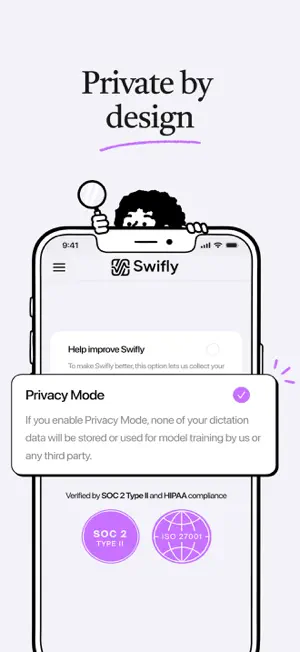
Swifly - The Voice Keyboard The keyboard you love. Now with the most advanced AI voice dictation. Speak naturally. Swifly writes it perfectly. Built with one simple goal: perfect dictation, every time you speak. Why people chose Swifly • The original keyboard, now with a powerful dictation tool. No need to switch between keyboards to make small corrections. • Adapt your style - Formal, Casual, Very Casual — Swifly writes the way you write. • Native experience - Swifly is perfectly integrated into iOS. • Works in every app - it’s a keyboard, so it just works everywhere. • Speak naturally - you get perfectly formatted and punctuated text. • And you can even whisper - Swifly will understand you perfectly. 100+ LANGUAGES Use Swifly with English, Spanish, German, French, Polish, Russian, Portuguese, Italian, Hindi, Arabic, Mandarin, Japanese, Korean and many more. Select the languages you dictate in or use auto-detect. BUILT FOR PEOPLE WHO WRITE A LOT Founders, developers, executives, sales teams, lawyers, support teams, and anyone who spends too much time typing messages, emails, notes, and documents. PRIVACY CONTROLS Swifly is designed with privacy controls for dictation data. Privacy Mode lets you avoid storing dictation history after processing. Audio is not used for model training by default, and product improvement uses require explicit consent. We give your time back. Terms of Use (EULA): https://www.apple.com/legal/internet-services/itunes/dev/stdeula/ Terms of Service: https://swifly.me/terms-of-service Privacy Policy: https://swifly.me/privacy-policy
What’s new
Version 1.3.4 · Updated September 30, 2026
A new guide on the Home screen helps you get started: pick one of your apps, open it in a tap and dictate with the Swifly keyboard. Keyboard tips: a few pointers show up as you dictate to help you get the most out of Swifly. Signing up with email: confirm your address by entering the 6-digit code from the email right in the app. Something wrong? In Settings, "Send to Swifly" sends your diagnostic log to our team in one tap. Redesigned Settings and menu: clearer icons and labels. "Rate Swifly" now lives in Settings, and invite codes are now called "promo codes". First launch: the "Continue" button always stays visible, even with many keyboards installed. Various fixes and improvements.
App privacy
The developer, Swifly, reported these privacy practices to Apple.
Data Linked to You
The following data, which may be collected and linked to your identity, may be used for the following purposes:
- Identifiers: User ID
- Usage Data: Product Interaction, Other Usage Data
- Purchases: Purchase History
- Contact Info: Email Address, Name
- User Content: Customer Support, Other User Content
- Diagnostics: Crash Data, Performance Data, Other Diagnostic Data
- Other Data: Other Data Types
Used for: Analytics, App Functionality
Alternatives to Swifly - The Voice Keyboard
Looking for apps like Swifly - The Voice Keyboard? Here are 6 similar apps on the App Store. The highest rated is Nomostar: AI PDF Scanner App (5.0/5), and all 6 are free to download.
-
 Nomostar: AI PDF Scanner App
5.0
-
 VoiceKey: AI Voice Keyboard
4.9
-
 WHSPR – AI Voice Keyboard
-
 DicText AI Voice Keyboard
-
 VoiceType: AI Voice Keyboard
3.0
-
 DictaFlow: AI Voice Keyboard
4.6
| App | Rating | Price | Last updated | Compare |
|---|---|---|---|---|
| Swifly - The Voice Keyboard | 5.0 / 5 (1 rating) | Free | September 30, 2026 | |
| Nomostar: AI PDF Scanner App | 5.0 / 5 (2) | Free | Jun 10, 2026 | Compare |
| VoiceKey: AI Voice Keyboard | 4.9 / 5 (7) | Free | Jun 17, 2026 | Compare |
| WHSPR – AI Voice Keyboard | – | Free | Sep 11, 2026 | Compare |
| DicText AI Voice Keyboard | – | Free | Aug 10, 2026 | Compare |
| VoiceType: AI Voice Keyboard | 3.0 / 5 (1) | Free | Sep 29, 2026 | Compare |
| DictaFlow: AI Voice Keyboard | 4.6 / 5 (14) | Free | Oct 20, 2026 | Compare |