

Lede: Transcript & AI Summary
Zheng Pan Lim Productivity iPhoneiPadiPod touch
Lede: Transcript & AI Summary is a free Productivity app for iPhone and iPad by Zheng Pan Lim. Requires iOS 15.1. Updated October 19, 2026.
- Price
- Free
- on the App Store
- Size
- 26 MB
- Age 4+
- Updated
- Oct 19
- 2026 · v1.0.4
Screenshots


About Lede: Transcript & AI Summary
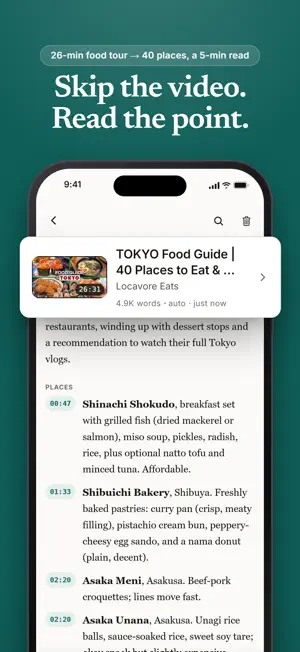
Some videos are worth watching. Most are worth reading in two minutes. Lede turns a video link into a clean, searchable transcript, then writes an AI summary shaped to what the video actually is. A recipe becomes ingredients and steps. A review ends with the verdict. A travel vlog becomes a list of places with prices. A lecture becomes the points that matter, each with a timestamp that jumps you to the moment it was said. HOW IT WORKS 1. Copy a YouTube link and open Lede. The full transcript appears in seconds. 2. Read it, search it, or jump around by timestamp. 3. Tap Summarise when you want the short version. Summaries are written in your device's language, whatever language the video is in. TRANSCRIPTS ARE UNLIMITED AND FREE Every transcript, every video, every day. No account, no sign-up, no ads, no tracking. Extraction happens on your phone, and your library is stored on your phone, readable offline. SUMMARIES THAT KNOW WHAT THEY ARE SUMMARISING Most summary tools flatten everything into the same bullet soup. Lede reads the video first and picks a shape: - Recipes: ingredients, then steps - Reviews: what was tested, what stood out, the verdict - Travel: places, areas, prices - Tutorials: the steps, in order - Talks and podcasts: the arguments, with timestamps Summaries use credits. Each new device includes 3 free credits, and packs are available if you want more. Repeating a summary you have already generated is always free. READS ANY LANGUAGE, WRITES IN YOURS A Japanese interview, a Spanish tutorial, a French lecture: the transcript comes through in the video's language, and the summary is written in yours. You can also translate any finished summary into 20 languages. BUILT FOR READING - Full-text search inside any transcript - Tap a timestamp to jump to that moment in the video - Offline library: everything you save is readable without a connection - Copy or share transcripts and summaries as text WHAT LEDE IS NOT Lede works with the caption text a video already has. It does not save video or audio, and it cannot transcribe videos that have no captions. Text in, text out, that is the whole idea. One more thing about the name: the lede is journalism's word for the part of the story you must not bury. That is what this app is for.
What’s new
Version 1.0.4 · Updated October 19, 2026
Summaries now show bold subheadings properly, with no stray asterisks. Plus small fixes and improvements.
App privacy
The developer, Zheng Pan Lim, reported these privacy practices to Apple.
Data Not Linked to You
The following data, which may be collected but is not linked to your identity, may be used for the following purposes:
- Usage Data: Product Interaction
- Purchases: Purchase History
- User Content: Other User Content
- Identifiers: User ID
Used for: Analytics, App Functionality
Alternatives to Lede: Transcript & AI Summary
Looking for apps like Lede: Transcript & AI Summary? Here are 6 similar apps on the App Store. The highest rated is Brainbubble: Ace your Job (4.8/5), and 4 of the 6 are free to download.
-
 xigps
xigps
-
 Mockify – App Screenshot Maker
-
 BloopBrowser
-
 Brainbubble: Ace your Job
4.8
Brainbubble: Ace your Job
4.8
-
 Prompt Up: AI Content Creator
4.0
Prompt Up: AI Content Creator
4.0
-
 Video Transcriber - Transcript
2.3
Video Transcriber - Transcript
2.3
| App | Rating | Price | Last updated | Compare |
|---|---|---|---|---|
| Lede: Transcript & AI Summary | – | Free | October 19, 2026 | |
| xigps | – | Free | Oct 7, 2026 | Compare |
| Mockify – App Screenshot Maker | – | Free | Jul 15, 2025 | Compare |
| BloopBrowser | – | 1.99 USD | Jun 3, 2026 | Compare |
| Brainbubble: Ace your Job | 4.8 / 5 (511) | Free | Jul 11, 2024 | Compare |
| Prompt Up: AI Content Creator | 4.0 / 5 (4) | Free | Sep 10, 2026 | Compare |
| Video Transcriber - Transcript | 2.3 / 5 (3) | 0.99 USD | Oct 24, 2026 | Compare |