

Screen Time Control: App Limit
Venish Rakholia Productivity iPhoneiPadiPod touch
Screen Time Control: App Limit is a free Productivity app for iPhone and iPad by Venish Rakholia. Requires iOS 17.0. Updated September 7, 2026.
- Price
- Free
- on the App Store
- Size
- 22 MB
- Age 4+
- Updated
- Sep 7
- 2026 · v1.1
Screenshots

About Screen Time Control: App Limit
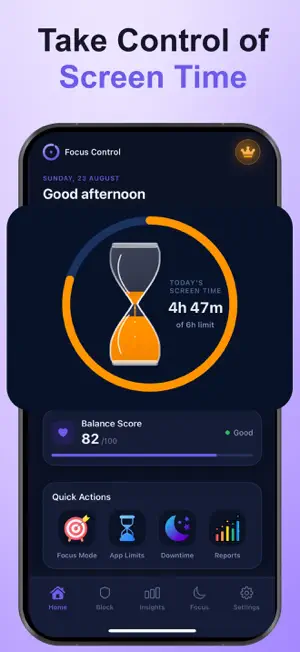
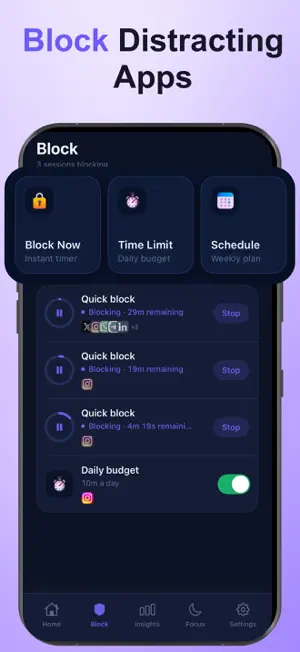
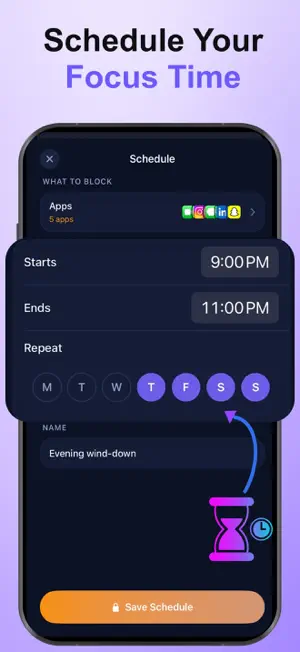
You picked up your phone to check one thing. That was forty minutes ago. Focus Control shows you where your day actually goes and gives you the tools to take it back. SEE THE REAL NUMBER Your screen time, at a glance. See which apps took the most time and how today compares to yesterday. No guessing, no judgment, just the truth about where your hours went. BLOCK WHAT PULLS YOU IN Choose the apps that break your focus and shut them out. Instagram, TikTok, whatever yours are. When you try to open one, it simply won’t be there. FOCUS SESSIONS THAT ACTUALLY HOLD Start a session and the distractions disappear until you’re done. Work, study, dinner, sleep, pick your window and stay in it. SET A LIMIT, GET A NUDGE Give yourself a daily allowance. Focus Control warns you as you approach it, so you can stop by choice instead of noticing at midnight. DOWNTIME ON A SCHEDULE Set the hours that belong to you, mornings, evenings, weekends, and let them stay that way automatically. BUILT TO BE PRIVATE Focus Control only ever sees how long you spend in an app, never what you do inside it. Your data stays on your device. Take back one hour a day, and you get fifteen days back a year. Privacy Policy: https://screentimer-privacypolicy.blogspot.com/p/privacy-policy.html Terms of Use: https://sites.google.com/view/terms-of-use-00/home
What’s new
Version 1.1 · Updated September 7, 2026
-Bug FIxes
App privacy
The developer, Venish Rakholia, reported these privacy practices to Apple.
Data Used to Track You
The following data may be used to track you across apps and websites owned by other companies:
- Identifiers: Device ID
- Usage Data: Advertising Data
Data Linked to You
The following data, which may be collected and linked to your identity, may be used for the following purposes:
- Identifiers: Device ID
- Usage Data: Advertising Data, Product Interaction
- Purchases: Purchase History
Used for: Third-Party Advertising, Developer’s Advertising or Marketing, Analytics, App Functionality
Alternatives to Screen Time Control: App Limit
Looking for apps like Screen Time Control: App Limit? Here are 6 similar apps on the App Store. The highest rated is Reclaim: Screen Time Blocker (5.0/5), and all 6 are free to download.
-
 DopaGuard: Digital Wellbeing
-
 Reclaim: Screen Time Blocker
5.0
Reclaim: Screen Time Blocker
5.0
-
 Viraam: Focus & Screen Time
1.0
Viraam: Focus & Screen Time
1.0
-
 Time Wallet: Focus
-
 ScrollTax: Earn Screen Time
4.8
ScrollTax: Earn Screen Time
4.8
-
 LOCKD: Block Apps & Focus
| App | Rating | Price | Last updated | Compare |
|---|---|---|---|---|
| Screen Time Control: App Limit | – | Free | September 7, 2026 | |
| DopaGuard: Digital Wellbeing | – | Free | Aug 24, 2026 | Compare |
| Reclaim: Screen Time Blocker | 5.0 / 5 (1) | Free | Oct 20, 2026 | Compare |
| Viraam: Focus & Screen Time | 1.0 / 5 (1) | Free | Oct 1, 2026 | Compare |
| Time Wallet: Focus | – | Free | Oct 19, 2026 | Compare |
| ScrollTax: Earn Screen Time | 4.8 / 5 (4) | Free | Oct 23, 2026 | Compare |
| LOCKD: Block Apps & Focus | – | Free | Sep 21, 2026 | Compare |