

.html — HTML Reader
LUCAS LONGUEIRA MARINO Productivity iPhoneiPadiPod touch
.html — HTML Reader is a free Productivity app for iPhone and iPad by LUCAS LONGUEIRA MARINO. Rated 4.5/5 from 2 ratings. Requires iOS 18.0.
- Rating
- 4.5
- 2 ratings
- Price
- Free
- on the App Store
- Size
- 1 MB
- Age 4+
- Updated
- Oct 16
- 2026 · v1.3
Screenshots

About .html — HTML Reader
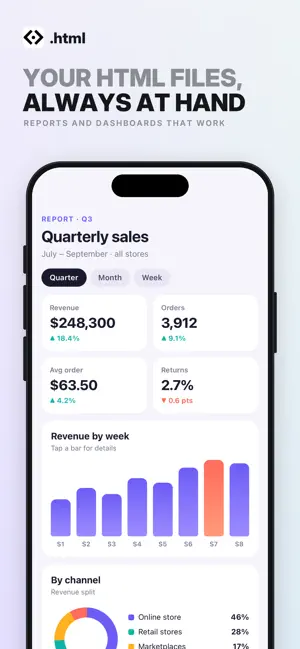
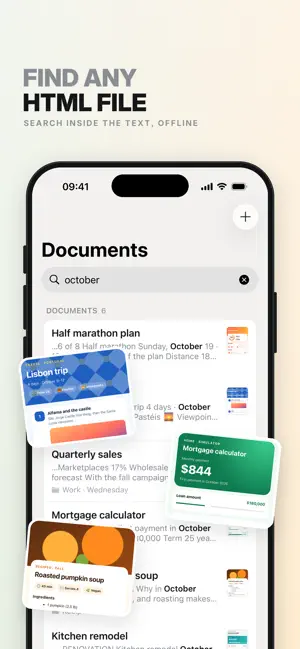
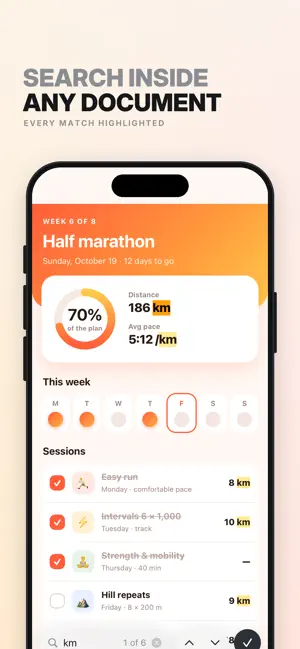
.html is an HTML document viewer. It is not an editor: no code writing, no console, no syntax highlighting. It stores the HTML files you already have, keeps them organized, and opens them when you need them. AI generates more HTML files than ever: reports, calculators, dashboards, interactive summaries. They come out of a chat, get opened once in a browser, and disappear among tabs and downloads. .html is the tool for handling them. WHAT IT DOES • Saves every HTML inside the app — its own copy, which opens offline. • Shows it full screen, with no address bar and no tabs. • Runs the document as it is: its scripts, styles and buttons all work. • Organizes files into folders, with pinned documents on top and sorting by date, name, or your own order by dragging. • Groups them by date automatically: today, yesterday, last 7 days, last 30 days. • Shows each document with a real thumbnail. • Follows your iPhone's light or dark appearance. PASTE HTML Did the chat give you code instead of a file? Copy it, tap + and choose "Paste HTML". It's saved as a document instantly, even if it's just a snippet. EXPORT AS PDF Share any document as a PDF, exactly as you see it on screen: with anything you checked or filled in, and with its colors. Ready to send, print or save to Files. SEARCH • Searches titles, folders and the text inside every document, ignoring case and accents. • Inside a document, the magnifying glass highlights every match and takes you from one to the next. VERSIONS Import a file with the same name again and it isn't duplicated: it's saved as a new version of the same document, which moves to the top. Earlier versions stay there, with their dates, and you can open any of them. MEMORY A document opened in Safari starts from scratch every time. Not here: whatever the document saves stays saved. Tick a checkbox in a list, fill in a form, switch a tab in a dashboard — close the app, come back days later, and it is exactly as you left it. Each document keeps its own state, and none can read another's. PRIVACY No account, no sign-up, no ads, no analytics. The app never connects to a server: your documents never leave your iPhone. ADDING DOCUMENTS Through the + button: pick a file from the Files app or paste the code you've copied. Also via "Open with" from Files, Safari or Mail.
What’s new
Version 1.3 · Updated October 16, 2026
• Dark mode: the app follows your iPhone's light or dark appearance. • Export as PDF: share any document as a PDF, exactly as you see it, including anything you checked or filled in. • Paste HTML: copy the code a chat gives you and paste it from the + button. It's saved as a document instantly.
App privacy
The developer, LUCAS LONGUEIRA MARINO, reported these privacy practices to Apple.
Data Not Collected
The developer does not collect any data from this app.
Alternatives to .html — HTML Reader
Looking for apps like .html — HTML Reader? Here are 6 similar apps on the App Store. The highest rated is HTML Reader Offline (5.0/5), and all 6 are free to download.
-
 Pagira - HTML & Comic Reader
4.0
Pagira - HTML & Comic Reader
4.0
-
 HTML Reader Offline
5.0
HTML Reader Offline
5.0
-
 Folio — Offline HTML Viewer
5.0
Folio — Offline HTML Viewer
5.0
-
 HTML Editor - Local Files
-
 HTML Viewer & Editor - Code
4.4
HTML Viewer & Editor - Code
4.4
-
 All Document Reader
4.2
All Document Reader
4.2
| App | Rating | Price | Last updated | Compare |
|---|---|---|---|---|
| .html — HTML Reader | 4.5 / 5 (2 ratings) | Free | October 16, 2026 | |
| Pagira - HTML & Comic Reader | 4.0 / 5 (2) | Free | Oct 19, 2026 | Compare |
| HTML Reader Offline | 5.0 / 5 (1) | Free | Sep 27, 2026 | Compare |
| Folio — Offline HTML Viewer | 5.0 / 5 (1) | Free | Aug 30, 2026 | Compare |
| HTML Editor - Local Files | – | Free | Jul 2, 2026 | Compare |
| HTML Viewer & Editor - Code | 4.4 / 5 (25) | Free | Oct 18, 2026 | Compare |
| All Document Reader | 4.2 / 5 (326) | Free | Sep 17, 2026 | Compare |