

Remote for ProPresenter
Serge Kornew Utilities iPhoneiPadiPod touch
Remote for ProPresenter is a free Utilities app for iPhone and iPad by Serge Kornew. Rated 5.0/5 from 8 ratings. Requires iOS 17.0.
- Rating
- 5.0
- 8 ratings
- Price
- Free
- on the App Store
- Size
- 5 MB
- Age 4+
- Updated
- Sep 8
- 2026 · v1.0
Screenshots



About Remote for ProPresenter
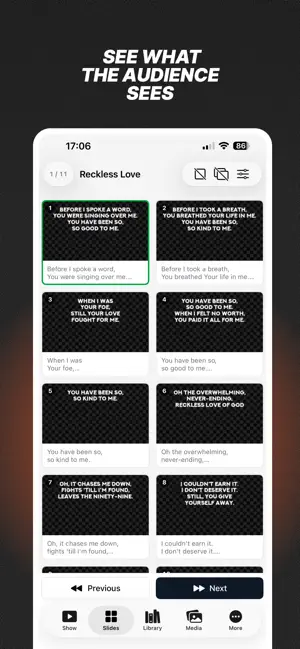
Remote for ProPresenter puts the show in your hand. Advance slides, trigger playlists, and clear layers from your iPhone — no extra clicker, no walking back to the booth. Find ProPresenter on your Wi-Fi, tap to connect, and stay in control while you move. LIVE SHOW See the current and next slide as a thumbnail or text. Big Next and Previous buttons, swipe to advance, jump to slide groups, and read presenter notes. Check layer status and clear audience, props, messages, audio, or announcements in one tap. Show or hide house and stage screens, control timeline and video transport, watch the video countdown, and keep an eye on capture and active timers. WIDGETS & LOCK SCREEN Control the show from the Home Screen, Lock Screen, and Dynamic Island. Advance or go back, and clear every layer without opening the app. SLIDES Browse the active presentation as a grid. Thumbnails, group colors, text search, auto-scroll to the current slide, and tap any slide to fire it. PLAYLISTS, LIBRARIES & MEDIA Open the playlist tree, preview items with duration, and trigger a cue or a single slide. Search libraries. Run media and audio playlists with thumbnails, control audio transport, and switch video inputs. TOOLS Start, stop, reset, or add a minute to timers — one or all. Fill message tokens, trigger props and macros, switch looks, send a stage message, pick stage layouts, start capture or streaming, manage announcements, and open the chord chart. MADE FOR THE ROOM Designed for worship, conferences, and live events. Twelve languages, saved connections, and a screen that stays awake during the service. Built as a native iPhone app for ProPresenter 7. SETUP iPhone and the ProPresenter computer must be on the same local network. In ProPresenter: Preferences → Network → Enable Network. Tap Find, or enter the address and port (default 50001). Remote for ProPresenter is an independent companion app and is not affiliated with Renewed Vision.
Ratings & reviews
5.0
8 ratings
App privacy
The developer, Serge Kornew, reported these privacy practices to Apple.
Data Not Linked to You
The following data, which may be collected but is not linked to your identity, may be used for the following purposes:
- Diagnostics: Other Diagnostic Data
Used for: Analytics
Alternatives to Remote for ProPresenter
Looking for apps like Remote for ProPresenter? Here are 6 similar apps on the App Store. The highest rated is ProFix Company (5.0/5), and 5 of the 6 are free to download.
-
 ProFix Company
5.0
ProFix Company
5.0
-
 SHIMBOL-TECH
-
 MultiCalc: All-in-1 Calculator
5.0
MultiCalc: All-in-1 Calculator
5.0
-
 HamWatch
5.0
HamWatch
5.0
-
 AccessSecurium™
-
 CrushClient
5.0
CrushClient
5.0
| App | Rating | Price | Last updated | Compare |
|---|---|---|---|---|
| Remote for ProPresenter | 5.0 / 5 (8 ratings) | Free | September 8, 2026 | |
| ProFix Company | 5.0 / 5 (1) | Free | Mar 8, 2026 | Compare |
| SHIMBOL-TECH | – | Free | Sep 11, 2026 | Compare |
| MultiCalc: All-in-1 Calculator | 5.0 / 5 (4) | Free | Oct 26, 2023 | Compare |
| HamWatch | 5.0 / 5 (3) | 4.99 USD | Jul 16, 2026 | Compare |
| AccessSecurium™ | – | Free | May 30, 2024 | Compare |
| CrushClient | 5.0 / 5 (1) | Free | May 13, 2026 | Compare |