

Tackpad: Kanban Task Board
Serkan DAL Productivity iPhoneiPadiPod touch
Tackpad: Kanban Task Board is a free Productivity app for iPhone and iPad by Serkan DAL. Requires iOS 18.0. Updated October 3, 2026.
- Price
- Free
- on the App Store
- Size
- 2 MB
- Age 4+
- Updated
- Oct 3
- 2026 · v1.4.0
Screenshots


About Tackpad: Kanban Task Board
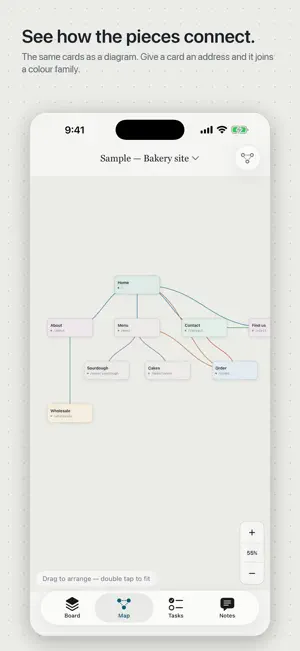
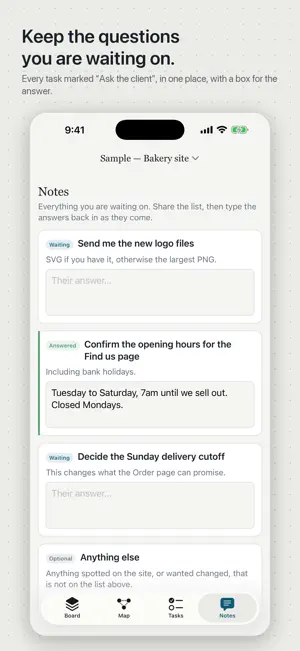
Tackpad is a simple kanban board. Cards move through stages you name, one project at a time. There is no account to make. Your boards live on your devices and in your own iCloud, so your iPhone, iPad and Mac show the same ones, and an AI assistant on your computer can work on them with you. Four screens, one board. Board — your cards, grouped by the stage they are in. Add stages, rename them, give each its own colour. The last stage is the finish line, whatever you call it, and the bar at the top counts what has reached it. Map — the same cards as a diagram, so you can see how they connect. Drag them where you like. If the project is a website, give a card an address like /menu/cakes and it is grouped with everything else under /menu, in a shared colour. If it is not, leave the address empty; a card is a card. Tasks — a second board for the work itself. Mark a task as blocking and the top of the screen counts how many things are left before you can ship. Notes — every task you ticked "Ask the client", collected in one place with a box for the answer. Send your client a link to the board and their answers arrive here by themselves, or type them in as they come. Moving a card is a swipe, a press-and-hold menu, or a tap. On iPad, and on a phone turned sideways, the board lays out in columns and you drag cards between them. Every move can be undone. Keep as many boards as you have projects. Cards can be given a colour of their own, and cards, tasks and whole projects a deadline: tap "1 week" or "1 month", or pick a day. Due soon, at the top of Projects, lists what is late or due this week across all your boards. The same boards on every device. Your boards are kept in your own iCloud, so an iPhone, an iPad and a Mac with Apple silicon signed in to the same Apple Account show the same boards. It is on when the device is signed in to iCloud, and there is a switch to turn it off. The boards go to Apple under your account, not to us; we cannot read them. Your boards are files. Export a board and you get a plain, readable file. It opens unchanged in the original web version of this tool, and a board can also be kept in a file in iCloud Drive and opened on a Mac. Import works the other way. Share a board with your client. Send your client a private link to one board. It opens in any browser, with no app and no account, and shows the board read-only with a box under each question you are waiting on them for. Their answers arrive in Notes by themselves. One shared board at a time is free. Connect your AI assistant, if you want to. An AI assistant on your computer — Claude, Cursor, or anything else that can add an MCP server — can read your boards, add and move cards and set deadlines while you work, and what it does shows up on your phone. Pair it with a code from the app. Nothing goes to our server until you tap Connect; the server holds your boards under a random code and nothing else, and Disconnect deletes its copy. Tackpad Pro. An optional subscription, yearly or monthly, each with a free week: share every board with its client, with your name on the client’s page. It renews automatically until you cancel it in your Apple Account settings. Free, with no ads, no analytics, no tracking and no third-party code. It works offline, and apart from your own iCloud it sends nothing anywhere unless you connect your AI assistant or share a board. https://twohertz.github.io/tackpad/ Terms of Use: https://www.apple.com/legal/internet-services/itunes/dev/stdeula/ Privacy Policy: https://twohertz.github.io/tackpad/privacy/
What’s new
Version 1.4.0 · Updated October 3, 2026
Deadlines. Give a card, a task or the whole project a date: tap "1 week" or "1 month", or pick a day. Due soon, at the top of Projects, lists everything late or due this week across all your boards, and your AI assistant can set deadlines too. Share a board with your client. A private link opens in any browser, with a box under each question you're waiting on them for, and their answers arrive in Notes by themselves. One shared board is free; Tackpad Pro shares them all, with your name on the page. "Connect to your computer" is now "Connect your AI assistant". Fixed: blank "Untitled project" boards could appear while an assistant was connected. Using Tackpad on more than one device? Update it on all of them, so the deadlines you set on one are kept by the others.
App privacy
The developer, Serkan DAL, reported these privacy practices to Apple.
Data Not Linked to You
The following data, which may be collected but is not linked to your identity, may be used for the following purposes:
- User Content: Other User Content
- Identifiers: User ID
Used for: App Functionality
Alternatives to Tackpad: Kanban Task Board
Looking for apps like Tackpad: Kanban Task Board? Here are 6 similar apps on the App Store. The highest rated is Truly Simple Kanban (5.0/5), and 5 of the 6 are free to download.
-
 Kanban Planner
-
 Proselens: Writing Style Guide
-
 Modrift
-
 Kanban Board: Task & Projects
4.3
-
 Truly Simple Kanban
5.0
-
 WonderPlan
| App | Rating | Price | Last updated | Compare |
|---|---|---|---|---|
| Tackpad: Kanban Task Board | – | Free | October 3, 2026 | |
| Kanban Planner | – | Free | Oct 26, 2026 | Compare |
| Proselens: Writing Style Guide | – | 3.99 USD | Sep 30, 2026 | Compare |
| Modrift | – | Free | Aug 19, 2026 | Compare |
| Kanban Board: Task & Projects | 4.3 / 5 (3) | Free | Aug 8, 2026 | Compare |
| Truly Simple Kanban | 5.0 / 5 (6) | Free | Oct 10, 2026 | Compare |
| WonderPlan | – | Free | Sep 21, 2026 | Compare |