

Kanban Planner
Claudius Kristmann Productivity iPhoneiPadiPod touchMac
Kanban Planner is a free Productivity app for iPhone and iPad by Claudius Kristmann. Requires iOS 18.0. Updated September 30, 2026.
- Price
- Free
- on the App Store
- Size
- 4 MB
- Age 4+
- Updated
- Sep 30
- 2026 · v1.0.1
Screenshots


About Kanban Planner
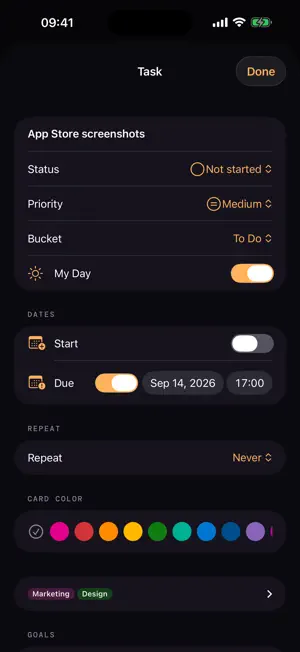
Kanban Planner is a kanban app for iPhone, iPad and Mac. Your tasks are cards in columns, so you can see at a glance what’s coming up. Drag cards to the next column with a finger or a mouse as the work moves along. Due date, priority and checklist show right on the card. MY DAY Anything due or planned for today shows up in My Day on its own. Add other cards yourself; your own picks start fresh each morning. WEEK PLANNING Let the app spread your open tasks across the week. Due dates are hard limits, goals with a near deadline pull their tasks forward, and a long checklist counts as more work. You decide how much fits into one day, and you can still drag anything to another. BOARDS • Name your columns and give them a color • New cards take on the color of their column • Moving a card updates its status for you • Priorities, labels, checklists and attachments • Recurring tasks: checking one off creates the next • Optional reminders before a task comes due GOALS Gather cards from across your plans under a single goal and track the progress. CLAUDE INTEGRATION With Pro, the AI assistant Claude Code can manage your board. It reads what’s due, adds cards, checks off checklist items and plans your week. For this you download the MCP server, a small add-on program for the Mac, for free. Other MCP clients work too; the Mac app syncs the changes to your iPhone and iPad through iCloud. FOR DEVELOPERS Connect your GitHub repositories, and their issues and pull requests show up as cards, with the due date from the milestone. The connection is read-only: nothing is ever written back to GitHub. ON EVERY DEVICE iPhone, iPad and Mac share one board through your own iCloud. Widgets keep the next tasks on the Home Screen, and checklist items can be checked off right there. FREE OR PRO Every feature is unlocked for seven days after you install the app. After that, the free version stays available with no time limit: one plan with three columns and five cards per column. Pro is a one-time purchase with no subscription. It lifts the free limits and unlocks week planning, goals, recurring tasks, GitHub, widgets and the Claude integration. A single purchase covers iPhone, iPad and Mac together. PRIVACY Your tasks stay on your devices and in your own iCloud. The app needs no account, and we don’t run servers of our own or any analytics.
What’s new
Version 1.0.1 · Updated September 30, 2026
When you drag a recurring card to “Done”, the next card in the series now appears back in the bucket it came from. Previously it ended up under “Done”, still open. New in Settings under Help: use “Feedback & requests” to write to me directly, or “Rate the app” to go to the App Store.
App privacy
The developer, Claudius Kristmann, reported these privacy practices to Apple.
Data Not Linked to You
The following data, which may be collected but is not linked to your identity, may be used for the following purposes:
- Purchases: Purchase History
Used for: Analytics, App Functionality
Alternatives to Kanban Planner
Looking for apps like Kanban Planner? Here are 6 similar apps on the App Store.
-
 Simple Kanban Board & Planner
-
 KBoard: Recursive Kanban
-
 Fosterwell: Foster Care Log
-
 Reminq - Reminder Kanban
-
 Packing List: Round Trip
-
 TidyCards - Kanban Boards
| App | Rating | Price | Last updated | Compare |
|---|---|---|---|---|
| Kanban Planner | – | Free | September 30, 2026 | |
| Simple Kanban Board & Planner | – | Free | Oct 6, 2026 | Compare |
| KBoard: Recursive Kanban | – | Free | Mar 25, 2026 | Compare |
| Fosterwell: Foster Care Log | – | Free | Aug 19, 2026 | Compare |
| Reminq - Reminder Kanban | – | Free | May 5, 2026 | Compare |
| Packing List: Round Trip | – | Free | Aug 13, 2025 | Compare |
| TidyCards - Kanban Boards | – | Free | Oct 7, 2026 | Compare |
Compare Kanban Planner with the top alternatives: ratings, updates, ASO score and keyword gaps →