

Fokus: AI Planner & Calendar
Islam Askar Productivity iPhoneiPadiPod touchApple Watch
Fokus: AI Planner & Calendar is a free Productivity app for iPhone and iPad by Islam Askar. Requires iOS 16.4. Updated October 10, 2026.
- Price
- Free
- on the App Store
- Size
- 84 MB
- Age 12+
- Updated
- Oct 10
- 2026 · v1.0.1
Screenshots
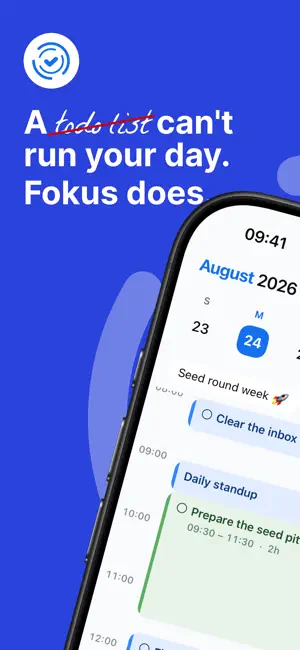


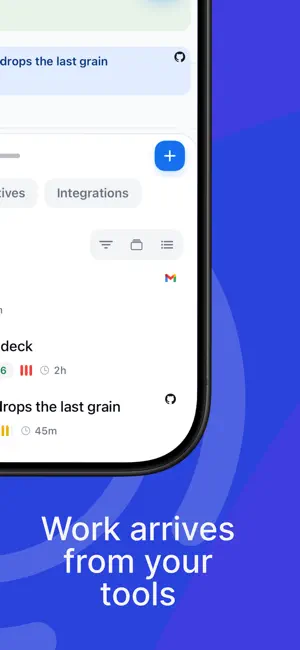
About Fokus: AI Planner & Calendar
Fokus is the AI-powered planner that builds your day for you. Most apps hand you another list to manage. Fokus gives you a chief of staff: tell Captain Fokus what needs to happen and it places the work into your real calendar — protecting focus time, respecting your energy, and keeping your goals moving. CAPTAIN FOKUS — AN AI THAT ACTUALLY DOES THINGS • Ask in plain language: "What should I focus on this afternoon?" • Say "move my code review to tomorrow morning" and it's moved • It reads your tasks, calendar, notes and goals before it answers YOUR WHOLE DAY ON ONE SCREEN • Calendar events and scheduled tasks share a single timeline • Auto-scheduling drops your to-dos into the gaps that are actually free • Drag to re-plan, and the rest of the day rebalances around it • Pinned work, hard deadlines and rolled-over tasks are placed first TASKS THAT STAY ORGANIZED • Buckets for projects, with subtasks, priorities and time estimates • Due dates, do-dates, energy levels and tags • The Reservoir holds everything you have not scheduled yet • A focus timer on every task — Pomodoro or continuous GOALS THAT ACTUALLY MOVE • Objectives for this week, this month, this quarter and this year • Link tasks to a goal and watch the progress fill in • Unfinished goals roll forward instead of quietly disappearing NOTES AND MEETINGS • A rich editor with headings, checklists, code blocks and an AI writing assistant • Record a meeting from your phone — no bot joins the call • Get back a summary, a transcript and action items with owners A BRIEFING EVERY MORNING • A short read on what today looks like, what is at risk and what rolled over • An end-of-day review of what you finished and where the time went • Listen to either one instead of reading it WIDGETS AND LOCK SCREEN • Your timeline, today's tasks and the focus timer on your home screen • Quick Add and voice capture without opening the app CONNECTS TO WHAT YOU ALREADY USE • Two-way calendar sync with Google Calendar and Outlook • Tasks from Google Tasks, Microsoft To Do, Todoist, Trello, Asana, Jira, Linear and Notion • Work pulled in from GitHub, Gmail, Outlook Mail, Slack and Microsoft Teams • Zoom, Google Meet, Spotify, Toggl and RescueTime — 20+ integrations in total BUILT FOR REAL DAYS • Working hours, peak hours and rest hours the scheduler will not cross • Light and dark themes, English, German, French and Arabic • App lock with Face ID, and two-factor authentication Download Fokus and let the AI handle the logistics, so you can get on with the work.
What’s new
Version 1.0.1 · Updated October 10, 2026
Instant updates • Adding, editing and deleting tasks, events, notes and objectives now shows up immediately. • A new task appears inside its objective right away. Easier editing • The properties bar in the task, event and objective editors sits higher, so swiping through it no longer switches apps. Focus timer • When a Pomodoro session ends, the timer pauses and asks whether to start your break or skip it. • Break and stop prompts now clear on all your devices once you answer on one. Notifications • The number on the app icon now resets when you open Fokus instead of piling up. Security • Stronger protection for email verification. • App Lock no longer locks the app in the middle of a recording, and "Forgot PIN" is more reliable. Fixes • Shake to report now needs a deliberate shake, so it no longer opens by accident. • Notes keep your latest edits when saves overlap. • Many smaller fixes across chat, the calendar and settings.
App privacy
The developer, Islam Askar, reported these privacy practices to Apple.
Data Linked to You
The following data, which may be collected and linked to your identity, may be used for the following purposes:
- Identifiers: User ID
- Usage Data: Product Interaction
- Location: Precise Location
- Contact Info: Email Address, Name
- User Content: Photos or Videos, Audio Data
Used for: Analytics, App Functionality
Alternatives to Fokus: AI Planner & Calendar
Looking for apps like Fokus: AI Planner & Calendar? Here are 6 similar apps on the App Store. The highest rated is UpNext | AI Scheduling & Goals (5.0/5), and all 6 are free to download.
-
 UpNext | AI Scheduling & Goals
5.0
UpNext | AI Scheduling & Goals
5.0
-
 ToBlock: Time Block Planner
-
 Tilly: Calendar & Planner
5.0
Tilly: Calendar & Planner
5.0
-
 Plan4U: AI Calendar Planner
-
 Routra Planner & AI Assistant
5.0
Routra Planner & AI Assistant
5.0
-
 Saydo AI
5.0
Saydo AI
5.0
| App | Rating | Price | Last updated | Compare |
|---|---|---|---|---|
| Fokus: AI Planner & Calendar | – | Free | October 10, 2026 | |
| UpNext | AI Scheduling & Goals | 5.0 / 5 (4) | Free | Dec 11, 2025 | Compare |
| ToBlock: Time Block Planner | – | Free | Sep 17, 2026 | Compare |
| Tilly: Calendar & Planner | 5.0 / 5 (2) | Free | Oct 3, 2026 | Compare |
| Plan4U: AI Calendar Planner | – | Free | Oct 22, 2026 | Compare |
| Routra Planner & AI Assistant | 5.0 / 5 (9) | Free | Oct 21, 2026 | Compare |
| Saydo AI | 5.0 / 5 (6) | Free | Oct 16, 2026 | Compare |