

Laytr: Save & Read Later
Waitery Inc Productivity iPhoneiPadiPod touchMac
Laytr: Save & Read Later is a free Productivity app for iPhone and iPad by Waitery Inc. Rated 4.7/5 from 6 ratings. Requires iOS 17.0.
- Rating
- 4.7
- 6 ratings
- Price
- Free
- on the App Store
- Size
- 28 MB
- Age 4+
- Updated
- Oct 20
- 2026 · v1.0.16
Screenshots


About Laytr: Save & Read Later
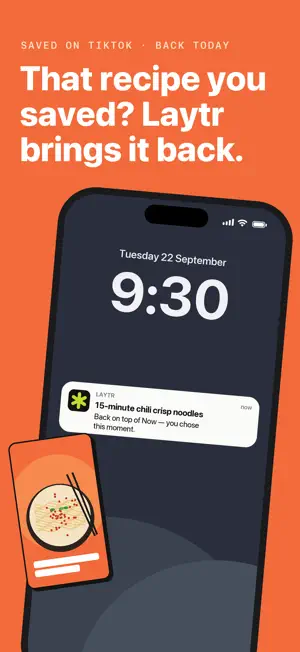
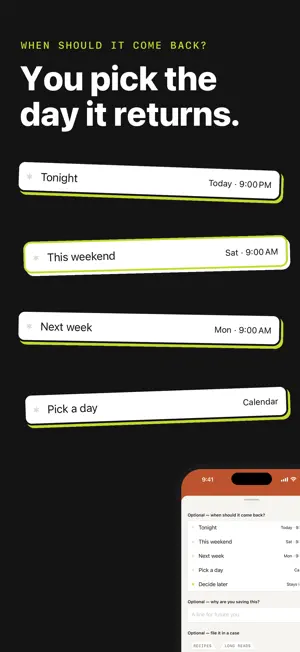
Save anything from any app, pick when you want it back, and Laytr puts it at the top of the app that day. Links, recipes, videos, screenshots and PDFs, all in one place, on your iPhone, iPad and Mac. You save things all day, and most of it disappears into whatever app it was saved in. Laytr keeps it in one place and hands each thing back on the day you picked. NO ACCOUNT, NO SERVER OF OURS There is no Laytr account and no Laytr server. Your saves live on your phone, and if you leave backup or sync on, in your own iCloud, where we cannot read them. Nothing you save passes through us, so it can't be scanned, profiled or sold. SAVE FROM ANYWHERE Laytr sits in the share sheet, so it works from Safari, Photos, Files, Maps, YouTube, TikTok, Instagram, and anywhere else you can share from. Links, articles, videos, places, PDFs, images and screenshots each get a card that fits what they are. Saving takes two taps. You can file things properly later, or never. IT COMES BACK WHEN YOU SAID Tonight, this weekend, next week, a date you pick, or Someday. Each choice shows the actual time it means, like "Sat 9:00 AM". When that time arrives, the save appears at the top of the Now tab. If it's a bad moment, "Not now" sits right next to "Done", and nothing nags you afterwards. There are no streaks and no overdue badges. READ IT LATER, KEPT FOR GOOD Saving an article stores the full text and images on your phone, not just the link, so it still opens years later, when the original site is gone. The reader has three page themes, serif or sans-serif type, adjustable text size, and it remembers where you stopped. SEARCH INSIDE EVERYTHING Search covers titles, sources, notes, tags, the full text of saved articles, and the text inside your screenshots. Screenshot text is read on the phone using Apple's Vision framework; the images are never sent to us. Filter by kind, browse by tag, change the sort. ONE LIBRARY ON EVERY DEVICE Sign in to the same Apple Account on your iPhone, iPad and Mac and you have one archive across all of them: the same saves, cases and tags, the same things you put away or deleted. It goes through your own iCloud, so there is still nothing of yours on a server of ours. It is on when you install Laytr, free on every plan, and Settings has a switch that turns it off there. EXPORT AND IMPORT Your whole archive exports as one ZIP: Markdown and HTML you can read anywhere, plus your original files, unchanged. Export is available on every plan, including free, always. There are importers for Pocket, Instapaper and Omnivore, and Laytr re-imports its own exports. FREE, THEN PREMIUM The free version holds 30 saves. Premium removes the limit, and that is the only difference. $1.99 a month, $14.99 a year, or $39.99 once. Since there's no server of ours, a fair question is what a subscription pays for. It pays for the app itself: Laytr is built by one person, and Premium funds that work. There is no infrastructure you're renting, which is why a one-time lifetime price can exist, and why cancelling costs you nothing. If you stop paying, every save stays, and reading, search, export and the copy between your devices keep working. The one thing that pauses is adding new saves while you're over 30. Nothing you saved is ever deleted, hidden or locked, on any device. Save now. Come back Laytr. SUBSCRIPTION DETAILS Laytr Premium is available as a monthly subscription at $1.99 per month, or an annual subscription at $14.99 per year. Lifetime is a one-time purchase at $39.99 and never renews. Payment is charged to your Apple Account at confirmation of purchase. Subscriptions renew automatically for the same period and price unless auto-renew is turned off at least 24 hours before the end of the current period; manage or cancel any time in your App Store account settings. Terms of Use (EULA): https://laytr.app/terms Privacy Policy: https://laytr.app/privacy
Ratings & reviews
4.7
6 ratings
What’s new
Version 1.0.16 · Updated October 20, 2026
This update is about the Privacy switches, plus a few fixes. Settings > Privacy now says how the two switches start: both on, and turning either one off stops it. With “Share anonymous usage” off, Laytr no longer contacts our analytics service at all, and switching it off deletes any usage events still waiting to be sent. It used to fetch one small settings file from that service when the app opened, and could still send usage events recorded before the switch went off. Laytr is also more careful with files that arrive through sync or in an imported archive. One with a bad name is refused instead of being saved in the wrong place. Import and export errors now appear in your language. In Arabic, the count beside each case in the Library uses the same digits as the rest of the app.
App privacy
The developer, Waitery Inc, reported these privacy practices to Apple.
Data Linked to You
The following data, which may be collected and linked to your identity, may be used for the following purposes:
- Purchases: Purchase History
- Identifiers: Device ID
Used for: Analytics, App Functionality
Data Not Linked to You
The following data, which may be collected but is not linked to your identity, may be used for the following purposes:
- Usage Data: Product Interaction, Advertising Data
- Diagnostics: Crash Data
Used for: Analytics, App Functionality
Alternatives to Laytr: Save & Read Later
Looking for apps like Laytr: Save & Read Later? Here are 6 similar apps on the App Store. The highest rated is KeyAlarm: Calendar Event Alarm (5.0/5), and 5 of the 6 are free to download.
-
 KeyAlarm: Calendar Event Alarm
5.0
KeyAlarm: Calendar Event Alarm
5.0
-
 Grit Method: Show Up Daily
4.8
Grit Method: Show Up Daily
4.8
-
 Stash: Fast Add to Clipboard
4.2
Stash: Fast Add to Clipboard
4.2
-
 Kan Do: Project Management
4.5
Kan Do: Project Management
4.5
-
 Scrappy — Digitial Scrapbook
5.0
Scrappy — Digitial Scrapbook
5.0
-
 Loops: Think through anything
| App | Rating | Price | Last updated | Compare |
|---|---|---|---|---|
| Laytr: Save & Read Later | 4.7 / 5 (6 ratings) | Free | October 20, 2026 | |
| KeyAlarm: Calendar Event Alarm | 5.0 / 5 (4) | Free | Oct 14, 2026 | Compare |
| Grit Method: Show Up Daily | 4.8 / 5 (20) | Free | Jun 6, 2026 | Compare |
| Stash: Fast Add to Clipboard | 4.2 / 5 (9) | Free | Oct 16, 2026 | Compare |
| Kan Do: Project Management | 4.5 / 5 (20) | 2.99 USD | Oct 19, 2026 | Compare |
| Scrappy — Digitial Scrapbook | 5.0 / 5 (4) | Free | Oct 20, 2026 | Compare |
| Loops: Think through anything | – | Free | Sep 22, 2026 | Compare |