

PastPerfect - Photo tools
Marco Wilka Photo & Video iPhoneiPadiPod touch
PastPerfect - Photo tools is a free Photo & Video app for iPhone and iPad by Marco Wilka. Requires iOS 17.0. Updated October 2, 2026.
- Price
- Free
- on the App Store
- Size
- 776 MB
- Age 4+
- Updated
- Oct 2
- 2026 · v1.2.6
Screenshots



About PastPerfect - Photo tools
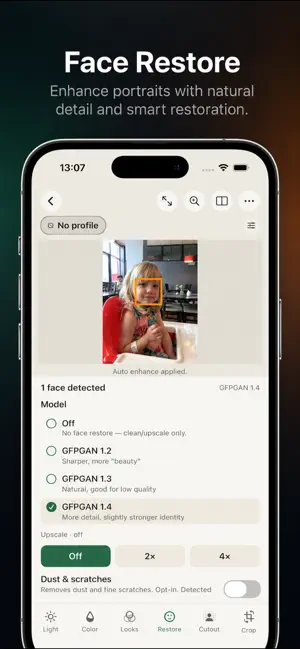
Past Perfect helps you restore and edit old scans, family photos and everyday images. Restore faces with AI, remove backgrounds, improve light and color, and create your own visual styles — all directly on your device. RESTORE FACES Bring detail back to old, small, damaged or slightly out-of-focus portraits with AI-powered face restoration. Choose between three GFPGAN models with different restoration characteristics and compare the results to find the version that works best for each photo. Face restoration can be combined with denoising, cleanup and optional 2× or 4× upscaling. REMOVE BACKGROUNDS Remove backgrounds quickly and directly on your device. No uploads, no account and no online service required. Export as PNG to preserve transparency. EDIT LIGHT AND COLOR Adjust exposure, contrast, highlights, shadows, black and white points, temperature, tint, saturation, vibrance, clarity, sharpness and noise. Automatic Improve analyzes your photo and provides a useful starting point while keeping every adjustment editable. The Color Mixer lets you control hue, saturation and brightness across eight individual color ranges. LOOKS AND LUTS Create your own visual styles with color, black-and-white and dithering effects. Control the strength of each effect, import your own LUT files and add finishing touches with vignettes and frames. CLEAN UP OLD AND SCANNED PHOTOS Reduce noise, dust and scratches before restoring a photo. Each processing step can be enabled independently, so you can decide exactly how much restoration to apply. PRIVATE BY DESIGN Your photos stay on your device. Face restoration, background removal and photo editing run locally. No cloud upload. No account required. Whether you're restoring an old family photo, removing a background or creating a custom color style, Past Perfect gives you powerful photo tools while keeping your images private.
What’s new
Version 1.2.6 · Updated October 2, 2026
Choose Dark Mode or Light Mode in the app preferences. The Looks panel now includes a film grain option for an authentic analog look.
App privacy
The developer, Marco Wilka, reported these privacy practices to Apple.
Data Not Linked to You
The following data, which may be collected but is not linked to your identity, may be used for the following purposes:
- Diagnostics: Crash Data, Other Diagnostic Data
Used for: App Functionality
Alternatives to PastPerfect - Photo tools
Looking for apps like PastPerfect - Photo tools? Here are 6 similar apps on the App Store. The highest rated is Cartoon Photo Editor: Picora (4.8/5), and all 6 are free to download.
-
 Photo Vault - Vaultaire
4.7
Photo Vault - Vaultaire
4.7
-
 Impressia for Pixelfed
3.7
Impressia for Pixelfed
3.7
-
 Slideshow maker PhotoMeister
4.2
Slideshow maker PhotoMeister
4.2
-
 zerocam
3.9
zerocam
3.9
-
 EXIF Metadata Editor & IPTC
4.4
EXIF Metadata Editor & IPTC
4.4
-
 Cartoon Photo Editor: Picora
4.8
Cartoon Photo Editor: Picora
4.8
| App | Rating | Price | Last updated | Compare |
|---|---|---|---|---|
| PastPerfect - Photo tools | – | Free | October 2, 2026 | |
| Photo Vault - Vaultaire | 4.7 / 5 (47) | Free | Oct 23, 2026 | Compare |
| Impressia for Pixelfed | 3.7 / 5 (43) | Free | May 20, 2026 | Compare |
| Slideshow maker PhotoMeister | 4.2 / 5 (431) | Free | Jan 7, 2025 | Compare |
| zerocam | 3.9 / 5 (148) | Free | Sep 18, 2026 | Compare |
| EXIF Metadata Editor & IPTC | 4.4 / 5 (379) | Free | Oct 22, 2026 | Compare |
| Cartoon Photo Editor: Picora | 4.8 / 5 (1,973) | Free | Aug 9, 2026 | Compare |