

Pear Notes - Private AI & Sync
Amresh Venkatesan Suresh Productivity iPhoneiPadiPod touch
Pear Notes - Private AI & Sync is a free Productivity app for iPhone and iPad by Amresh Venkatesan Suresh. Requires iOS 16.6. Updated October 27, 2026.
- Price
- Free
- on the App Store
- Size
- 161 MB
- Age 4+
- Updated
- Oct 27
- 2026 · v1.1.1
Screenshots
Save to Pinterest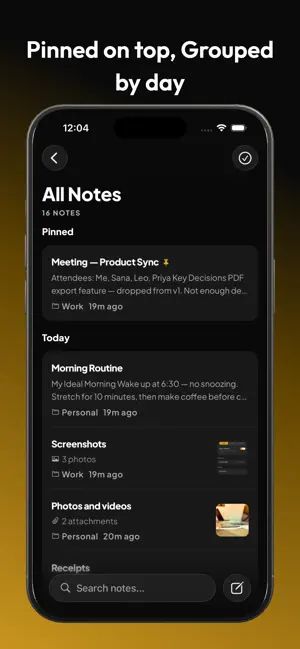


About Pear Notes - Private AI & Sync
Pear Notes is a private, offline-first notebook. Your notes are encrypted on your device and sync directly between your own devices — no cloud account, no server holding your data, nothing to leak. On-device AI handles voice typing, transcripts, translation and summaries without sending a single word off your phone. PRIVATE AI THAT RUNS ON YOUR DEVICE Every AI feature is optional, off until you turn it on, and runs entirely on your hardware. Each one downloads its model once and then works offline, in airplane mode, forever. • Voice typing — speak and your words appear in the note as you talk. • Transcribe recordings — turn a voice memo into text. • Extract text — copy text out of photos, scans and PDFs. • Describe images — get a caption for a photo. • Ask, write and summarize — ask a question about a note, summarize it, pull out key points, suggest a title, or fix, shorten and rewrite selected text. • Translate — 48 languages, to and from English, each downloaded on demand. Nothing is uploaded. No account, no API key, no usage limits. ZERO-SERVER PEER-TO-PEER SYNC Sync your notebook across phone, tablet and computer without your data ever resting on a third-party server. Pear Notes uses a decentralised multi-device sync engine that merges changes locally. There is no central database and no coordinator — the notes remain completely yours. CRYPTOGRAPHIC DEVICE PAIRING Link a new device with a blind pairing handshake that never exposes your identity to onlookers. Scan the pairing QR code, confirm the matching identity keys, and the devices hold a permanent encrypted channel. Invites expire automatically. LOCKED NOTES Lock any note behind Face ID, Touch ID or a password you choose. Locked notes stay locked on every paired device, are hidden from screenshots and the app switcher, and the password is never stored — only a verifier derived from it. WRITE, SCAN AND RECORD • A document scanner that turns pages into a single PDF. • A voice recorder with playback, embedded straight into the note. • Photos, videos, PDFs and files attached inline, with previews. • Share from any other app straight into a note. • Folders, pinned notes, search, and a Recently Deleted that holds notes for 30 days. • Note history showing what each device changed, with the ability to recover a discarded edit. • Elegant typography (Lora, Inter, Outfit, Newsreader, IBM Plex Mono), light and dark themes, and adjustable text size. ENCRYPTED BACKUPS YOU CONTROL Export the whole vault into one secured and encrypted .pnbk file with a password only you know. The password is never stored or transmitted and there is no reset — so you can keep the backup anywhere, and nobody, including us, can open it without you. PERMISSIONS • Microphone — voice notes and voice typing. Audio never leaves the device. • Camera — document scanning, photos, and scanning pairing QR codes. • Photos — attaching images you pick, and saving images you export. • Face ID / Touch ID — unlocking locked notes.
What’s new
Version 1.1.1 · Updated October 27, 2026
Pear Notes 1.1.1 makes locked notes and device linking more secure. • Locked notes are now encrypted with your lock password, including their attachments on top of existing vault encryption. Files you add to a locked note are encrypted right away. • Locked notes now need a lock password. If your password is an older style, you'll be asked once to choose a new one. • Unlock with Face ID or Touch ID, and the app shows which one it will use. • Device linking shows a pairing code to confirm on both devices, and asks you to update devices running an older version. • Pear Notes warns you before restoring a backup or combining vaults when some devices are out of date. • New Locked view: every locked note in one place. • Joining another vault is easier to find: Settings › Devices has a Join another vault section, and the invite field has a paste button. • Each notes list has one options menu with Select notes and Settings, plus Rename and Delete for your own folders. • Report a problem now opens our contact page, including from Ask answers. • Fixes to reminders and Upcoming, the editor keyboard and caret, search, the change password flow, and checkboxes in dark mode.
App privacy
The developer, Amresh Venkatesan Suresh, reported these privacy practices to Apple.
Data Not Collected
The developer does not collect any data from this app.
Alternatives to Pear Notes - Private AI & Sync
Looking for apps like Pear Notes - Private AI & Sync? Here are 4 similar apps on the App Store. The highest rated is Notexy: Private & Secure Notes (5.0/5), and all 4 are free to download.
-
 Notexy: Private & Secure Notes
5.0
-
 Notesnook: Private notepad
4.7
-
 ePost App
3.2
-
 minimalist phone ® Block Apps
4.6
| App | Rating | Price | Last updated | Compare |
|---|---|---|---|---|
| Pear Notes - Private AI & Sync | – | Free | October 27, 2026 | |
| Notexy: Private & Secure Notes | 5.0 / 5 (1) | Free | Nov 24, 2026 | Compare |
| Notesnook: Private notepad | 4.7 / 5 (700) | Free | Nov 24, 2026 | Compare |
| ePost App | 3.2 / 5 (29) | Free | Oct 24, 2026 | Compare |
| minimalist phone ® Block Apps | 4.6 / 5 (893) | Free | Sep 24, 2026 | Compare |