

Notexy: Private & Secure Notes
Eren KORKMAZ Productivity iPhoneiPadiPod touch
Notexy: Private & Secure Notes is a free Productivity app for iPhone and iPad by Eren KORKMAZ. Rated 5.0/5 from 1 ratings. Requires iOS 16.4.
- Rating
- 5.0
- 1 ratings
- Price
- Free
- on the App Store
- Size
- 316 MB
- Age 4+
- Updated
- Nov 24
- 2026 · v1.2.2
Screenshots
Save to Pinterest


About Notexy: Private & Secure Notes
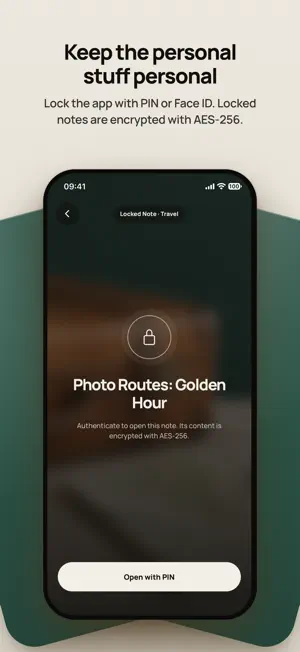
Notexy is a private notes app that works fully offline: no account, no cloud, no tracking. Your notes stay on your device unless you decide otherwise. PRIVACY AND SECURITY • Note lock: AES-256 encryption with Face ID or PIN • App lock with an auto-lock timer • Locked notes stay hidden in search, previews, widgets and on the lock screen ALWAYS AT HAND • Home Screen and Lock Screen widgets: quick note, text scan, a chosen note, recent and pinned notes, upcoming reminders • Control Center and Action button controls • Shortcuts and Siri: add, search and open notes • Save text, links, images, videos, PDFs and files from the Share menu • Sticky note on your lock screen FROM PAPER TO NOTE • Document scanning, live capture and text selection from an image • Recognition runs entirely on your device; no image ever leaves it • Search the text inside images and documents ORGANIZE AND FIND • Colorful categories, folders and subfolders • Tags, pinning and favorites • Grid, list, compact, mosaic, gallery and timeline views • Search as you type • Turns: flip through your notes as full-screen cards POWERFUL EDITOR • Headings, lists, checklists and quotes • Photo, video, audio, PDF and file attachments, all free • Images and videos between the lines of your text • Transcribe audio recordings on your device • Paper textures and colors, covers, 12 ready-made templates • Links between notes, note history, table of contents REMIND AND BACK UP • One-time and repeating reminders • Automatic backup to a folder you choose; full backup in a single file • Export as PDF, Word, Markdown, text, web page and JSON; printing A clean dark interface, card finishes, a wide range of fonts, alternative app icons. Available in 40 languages. Some features are unlocked with a Notexy Premium subscription: unlimited categories, audio transcription, search inside images and documents, unlimited scanning and all personalization options. Prices are shown in the app. The subscription renews automatically unless it is canceled at least 24 hours before the end of the period; you can manage it in your App Store account settings. Privacy Policy: https://notexyapp.com/privacy/ Terms of Use: https://www.apple.com/legal/internet-services/itunes/dev/stdeula/ Support: https://notexyapp.com/support/
What’s new
Version 1.2.2 · Updated November 24, 2026
A new look Notexy has been redesigned from the ground up: dark and clean. Turns Browse your notes one after another as full-screen cards. Notexy in 40 languages 10 new languages, including Bulgarian, Slovenian and Kazakh. Automatic backup Your notes are backed up regularly to a folder you choose. Updated transcription (Premium) Choose the spoken language; it all happens on your device, offline. Recently edited on the home screen The notes you worked on last are at the top. Photos and videos inside your text Adjust the size; two or three sit side by side. Updated PDF export Two designs, with a preview before you share. New export formats Print a note or share it as Word, text, a web page or JSON. 12 ready-made templates Meetings, projects, trips and more; all free. Four new papers (Premium) Margin, Graph, Banded and Cross. Card finishes Colored cards now have a satin finish; Premium adds four more. Visible part of a photo (Premium) Choose which part of the photo shows on cards and covers. Toolbar buttons Buttons that looked cut off in some languages are fixed. Korean line breaks Words are no longer split in the middle. Note links Tapping the note's name now opens the linked note too. Paper lines Lines no longer touch the text.
App privacy
The developer, Eren KORKMAZ, reported these privacy practices to Apple.
Data Not Linked to You
The following data, which may be collected but is not linked to your identity, may be used for the following purposes:
- Purchases: Purchase History
Used for: App Functionality
Alternatives to Notexy: Private & Secure Notes
Looking for apps like Notexy: Private & Secure Notes? Here are 6 similar apps on the App Store. The highest rated is FyleStyle (4.6/5), and 5 of the 6 are free to download.
-
 Sealkeep: Private Vault
-
 Pear Notes - Private AI & Sync
-
 NotingDown – Smart Notes
-
 BlankAway: Remove Blank Pages
-
 LockContacts: Private Vault
-
 FyleStyle
4.6
| App | Rating | Price | Last updated | Compare |
|---|---|---|---|---|
| Notexy: Private & Secure Notes | 5.0 / 5 (1 rating) | Free | November 24, 2026 | |
| Sealkeep: Private Vault | – | Free | Nov 25, 2026 | Compare |
| Pear Notes - Private AI & Sync | – | Free | Oct 27, 2026 | Compare |
| NotingDown – Smart Notes | – | Free | Sep 24, 2026 | Compare |
| BlankAway: Remove Blank Pages | – | Free | Sep 16, 2026 | Compare |
| LockContacts: Private Vault | – | Free | Nov 14, 2026 | Compare |
| FyleStyle | 4.6 / 5 (11) | 5.99 USD | Aug 6, 2024 | Compare |