

Doc Fill
DGL Factor Productivity iPhoneiPadiPod touch
Doc Fill is a free Productivity app for iPhone and iPad by DGL Factor. Requires iOS 15.0. Updated October 14, 2026.
- Price
- Free
- on the App Store
- Size
- 51 MB
- Age 4+
- Updated
- Oct 14
- 2026 · v1.2.0
Screenshots



About Doc Fill
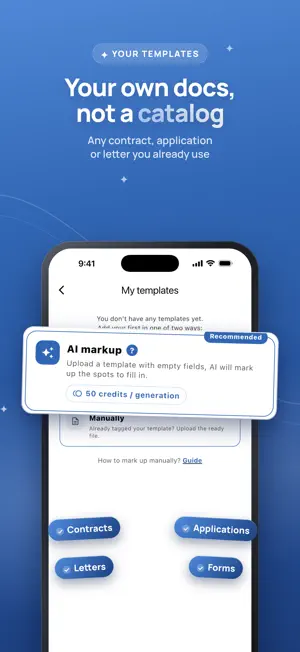
Doc Fill turns Word documents into simple forms you can fill in on your phone. Pick a template, answer the fields on a clean form, and get a finished document you can send to anyone as Word or PDF. No desktop, no fiddling with formatting on a small screen, no accidentally breaking the layout of a document you need to get right. USE YOUR OWN DOCUMENTS The app is not limited to a fixed catalog. Upload your own .docx and it becomes a reusable template: - AI auto-markup finds the places that need filling in and turns them into fields for you, including places for photos and every row of a checklist table. No tags to write by hand. - Manual markup is there when you want full control. Mark the fields with simple tags and the app builds the form. Once a template exists, every new document takes a minute. BUILT FOR REPEAT PAPERWORK - Fill a familiar form again without retyping the parts that never change. - Keep every document you created in one list, open it, edit it, send it again. - Add photos to documents: the picture goes into the frame you set, cropped to fit. - Send the result as a Word file or a PDF to mail, messengers or your files app. YOUR DOCUMENTS FOLLOW YOU Create an account and your templates and documents are stored under it, so a lost or replaced phone does not mean lost paperwork. Sign in on another device and everything is there. FREE AND PREMIUM Doc Fill is free to use with one template and up to 5 documents on it. Premium removes the limits: - Unlimited templates and documents - Export to PDF - 100 credits a month for AI auto-markup - Sync across your devices Credits are used only for AI auto-markup, and the app always shows the exact cost and your balance before anything is charged. You can also buy credit packs separately, without a subscription. GOOD TO KNOW Doc Fill produces .docx files, and Premium can also export them to PDF. Templates are documents, not legal advice: you are responsible for what goes into a document you create and send. Check anything that matters before you sign it. Questions, a missing document type, an idea? Write to us from the app or on WhatsApp: we read every message and reply. SUBSCRIPTION AND LEGAL Premium is an auto-renewable subscription, offered monthly and yearly, and it can start with a 3-day free trial. The price for your region is shown in the app before you confirm the purchase. Payment is charged to your Apple ID at confirmation, and the subscription renews automatically unless auto-renew is turned off at least 24 hours before the current period ends. You can manage or cancel it in your Apple ID settings; deleting the app does not cancel it. Terms of Use (EULA): https://dglfactor.tech/docfill/terms.html Privacy Policy: https://dglfactor.tech/docfill/privacy.html
What’s new
Version 1.2.0 · Updated October 14, 2026
Photos in documents: add a photo field and the picture goes right into your document, cropped to the frame you set. Smarter AI markup: it now finds places for photos and turns every row of a checklist or table into its own field. Export to PDF: preview the PDF and send it straight from the app (Premium). Help when you need it: a new Help screen and notifications put you in touch with us directly. The feedback form now asks how to reach you, so we can always reply.
App privacy
The developer, DGL Factor, reported these privacy practices to Apple.
Data Linked to You
The following data, which may be collected and linked to your identity, may be used for the following purposes:
- Purchases: Purchase History
- Contact Info: Email Address, Name
- User Content: Customer Support, Other User Content
- Identifiers: User ID
Used for: App Functionality
Data Not Linked to You
The following data, which may be collected but is not linked to your identity, may be used for the following purposes:
- Identifiers: Device ID
- Usage Data: Product Interaction
- Diagnostics: Crash Data
Used for: Analytics, App Functionality
Alternatives to Doc Fill
Looking for apps like Doc Fill? Here are 6 similar apps on the App Store. The highest rated is Washidoc: PDF Editor & Scanner (5.0/5), and all 6 are free to download.
-
 Washidoc: PDF Editor & Scanner
5.0
Washidoc: PDF Editor & Scanner
5.0
-
 PDF Fill & Sign Editor
-
 Easy PDF Signer: Scan & Fill
-
 Sign documents: SwiftSign
5.0
Sign documents: SwiftSign
5.0
-
 Джетпринт – печать документов
-
 Letter Printer: PDF Writer
5.0
Letter Printer: PDF Writer
5.0
| App | Rating | Price | Last updated | Compare |
|---|---|---|---|---|
| Doc Fill | – | Free | October 14, 2026 | |
| Washidoc: PDF Editor & Scanner | 5.0 / 5 (2) | Free | Oct 29, 2026 | Compare |
| PDF Fill & Sign Editor | – | Free | Sep 30, 2026 | Compare |
| Easy PDF Signer: Scan & Fill | – | Free | Aug 19, 2026 | Compare |
| Sign documents: SwiftSign | 5.0 / 5 (1) | Free | Mar 17, 2026 | Compare |
| Джетпринт – печать документов | – | Free | Sep 23, 2026 | Compare |
| Letter Printer: PDF Writer | 5.0 / 5 (1) | Free | Aug 19, 2026 | Compare |
Compare Doc Fill with the top alternatives: ratings, updates, ASO score and keyword gaps →